Purpose and entry points
The native Assistant shows an intro icon and keeps the shared conversation header continuous with the top safe area, without a dividing line. The composer explains disabled workplace policy, missing provider configuration or offline status while preserving editable drafts. It does not enable Assistant or bypass send checks; configured and admitted workplaces keep the existing send flow. The reviewed screenshot's disabled workplace still needs authorized setup before it can send. Native feedback evidence.
Assistant is a core business work area at /app/<orgSlug>/assistant.
It answers questions using records the signed-in person can currently read.
Availability is governed by the platform's disabled, pilot or active policy;
a visible business module does not automatically make every record readable.
Assistant is also available in the native workforce app where admitted.
The opening screen presents a question field, work-area suggestions and recent conversations. A conversation is created when the first question is submitted. The conversation rail can collapse; on narrow screens it overlays the reading area. The composer remains alongside the current run's status, Stop and Retry controls. A later successful answer clears an earlier retry prompt.
Timeouts say that the response timed out; they do not imply lost permissions. Access failures keep separate access-change wording. Retry disables immediately in both compact and full views, and repeated retries of the same failed response reuse its active run. After successful Event-batch preparation, a fixed review prompt accompanies the complete review card without another model request. Preparation still saves no Events; confirmation, current-source checks and the configured execution limit remain required. Failed or cancelled partial replies never enter follow-up context. Native receives the same safe failure descriptions; this change does not add native batch confirmation.
Long-question repair: the web and native app preserve the full question and its line breaks up to 32,000 characters, trimming outer blank space only. Longer text stays editable with an inline explanation and Send disabled; the server rejects it without saving a shortened question or starting a run. Retry uses the original saved question. Follow-ups retain a bounded newest suffix of whole historical messages, rather than clipping message contents. The configured execution deadline covers history preparation, provider setup, streaming and completion. Expiry cancels provider work without waiting for stream cleanup, and late output cannot become a successful answer. This does not change the selected model, organization time budget or explicit review before saving.
Common how-to questions about ticket purchase terms, recurring Events, Booking pre-orders and voucher drafts can receive a direct answer from approved public handbook guidance. The answer gives general steps and cites its Help section. It reads no business record and makes no change to settings. Questions about actual records, combined requests and requested changes use the existing Assistant workflow. Workspace admission, conversation ownership, retention and usage limits still apply. Web and native display current reply text before fetching older expanded history. Current access and stream checks still govern every read. Local reply-order validation.
Use Assistant to discover available work areas, search or page through supported collections, read a record, follow supported relationships, inspect visible work and permitted audit evidence, and ask source-supported Ticketing sales questions. The available collection list is the useful boundary: an inaccessible collection or unsupported operation is not permission to infer an answer.
Retained Series panels renew private content only while selected. Closed Assistant chat keeps the same conversation and unsent draft; its content reads pause, while a known queued/running response is followed to a terminal status. Returning refreshes current source access. Hidden browser pages pause shared paginated, streamed and holder-token reads, private image/source previews and migrated operational query clocks (including Phone, Talent, checkout diagnostics, Supply and Wallet rewards). Existing short permission receipts still expire; returning requires a fresh receipt before protected continuations. This scheduling change grants no additional access and does not stop installed Display player synchronization or payment reconciliation.
House companions
The signed-in web Assistant launcher can show a small frameless character above a compact toolbar. It starts at the lower right and can be dragged elsewhere within the window. Position is saved on this device and adapts to resizing. With the character focused, arrow keys move it, Shift moves further and Home restores the corner. The header restores a collapsed or hidden character. The companion follows the admitted work area. General workspace pages use Possibly; the Supply overview uses Just In Case.
Select the character or Ask Assistant to open a compact chat beneath it. Opening chat shrinks the mascot to 48 pixels at the chat's top-right, beside the close button. Closing chat restores its normal size; the same avatar retains drag and keyboard movement. Reduced motion skips the size transition. The full drawer continues to hide the mascot. Deployed web drawer; full signed-in acceptance deferred: Open full Assistant opens the same conversation in a full-height right drawer. On wide desktop screens the workspace reflows alongside it and remains usable; narrow screens use the available viewport. Minimise Assistant restores compact chat. The mascot appears only in the compact/minimised view, never above the drawer. Close and Escape return to the companion; reduced motion disables the entrance animation. The draft and conversation survive view switches, closing/reopening chat and navigation within the same workspace. Changing identity or workplace clears that local conversation view. The same route context, source permissions and availability policy apply. Reviewed actions open in the full view before any confirmation. The character grants no business authority. If Assistant is unconfigured or disabled, the composer explains why and cannot send.
The options control contains animation, available signature actions and Hide character; the downward chevron collapses it. Collapse, hide and animation preferences are saved on this device. Narrow screens start collapsed. Navigation drawers and pending route admission suspend the companion. Reduced motion, hidden or collapsed playback, and unavailable media retain a still image. Sound stays off. Existing progress and notification text remains authoritative: local queued/running/completed/failed Assistant states and confirmed success/error notifications can select approved motion. Listening and silent speaking are audition states until an app interaction exists.
Only immutable approved releases can animate in the app. The 26 October release candidate selects one checked idle for each of the 23 profiles, following the explicit production release instruction. Local releases bind the artwork and both transparent video formats by content hash; delivery checks the admitted route and resource before returning the selected idle. These clips need no provider request or credentials at playback. Safari uses the checked HEVC alpha export; other browsers prefer WebM. A decoding or delivery failure preserves the still image. This release has idle motion only: other semantic states and reactions retain the current idle and their existing textual messages until an approved performance exists. The separate Character Studio retains all 23 profiles and 24 voice recordings, with explicit partial animation coverage, clip inspection, canvas playback and artwork/take/release-bound review files. The clip inspector retains the selected speed when Replay reloads a clip. Twenty additional guarded idles preserve their approved body/prop outlines and transparent gaps. The production selections also include a guarded Possibly idle and repaired Safari exports for Stubbs and Gab & Grunt. Rejected earlier takes remain labelled as needing another take. The release instruction selects the checked idles for the app; it does not fabricate browser review selections or approve other actions. Generation prompts, job receipts and provider credentials stay outside that shared studio. Native apps and public website placements are outside this change. The studio can audition a Local matte correction · preview as a separate content-bound take. It uses the clip inspector, keeps the original for comparison and holds its final frame rather than returning to an uncorrected idle. Its provider canvas remains unchanged; app playback uses only the exact local media selected in its separate approved registry. See the production release evidence and earlier House animation validation for actual coverage and remaining acceptance, and the companion source.
Asking and following evidence
- Select the correct workplace and open Assistant.
- Ask a concrete question, including dates, location or record identity where useful.
- Resolve any ambiguity, such as Events with the same title on different dates.
- Read the completed answer and its source evidence.
- Use an offered source button to continue in the owning work area.
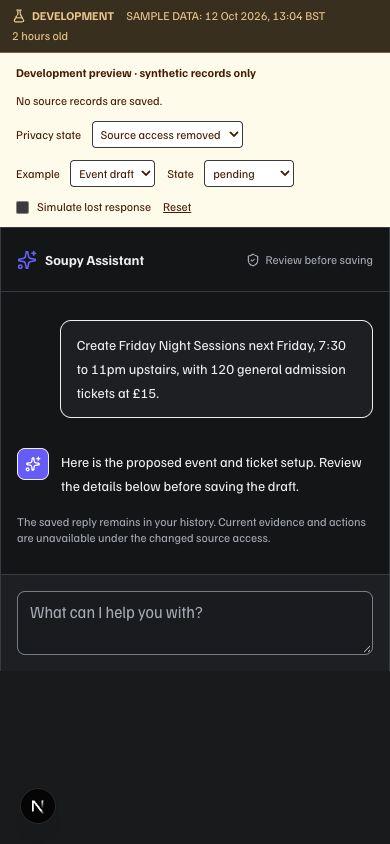
Plain answer text streams from the currently authorized run. Tool payloads, reasoning and provider metadata stay private; Stop removes the active stream. The completed reply is saved only after its normal final source checks. Evidence links and up to three source actions belong to the answer that produced them. Opening a source is navigation; it does not perform the business action. Buttons use server-resolved destinations rather than URLs invented by the model.
A source search can be paginated or incomplete. A count of loaded records is not a total. Sales, committed capacity and attendance have different meanings. Ticketing comparisons require permission for every included Event, and forecasts are conditional scenarios with stated evidence limits. Relative dates use the workspace timezone and the run's server observation time.
Already completed replies belong to the conversation’s owner and remain useful as historical follow-up context, including older replies without the added source receipts. They may describe facts that have since changed. Assistant reads current sources before presenting current facts or preparing proposals; old tool payloads never replay automatically. Evidence links and actions retain their current source permission checks.
Reviewing a creation proposal
Embedded Assistant supports reviewed creation commands. CRM audience and metric drafting are web-first:
| Proposal | What confirmation does | What remains separate |
|---|---|---|
| Event feedback form (web) | Saves a new draft version after review of every question | Publishing, invitation delivery, privacy/recovery settings and native confirmation |
| Draft Event | Saves an unpublished Event and any explicitly specified finite ticket product | Publishing the Event, later communication and collection |
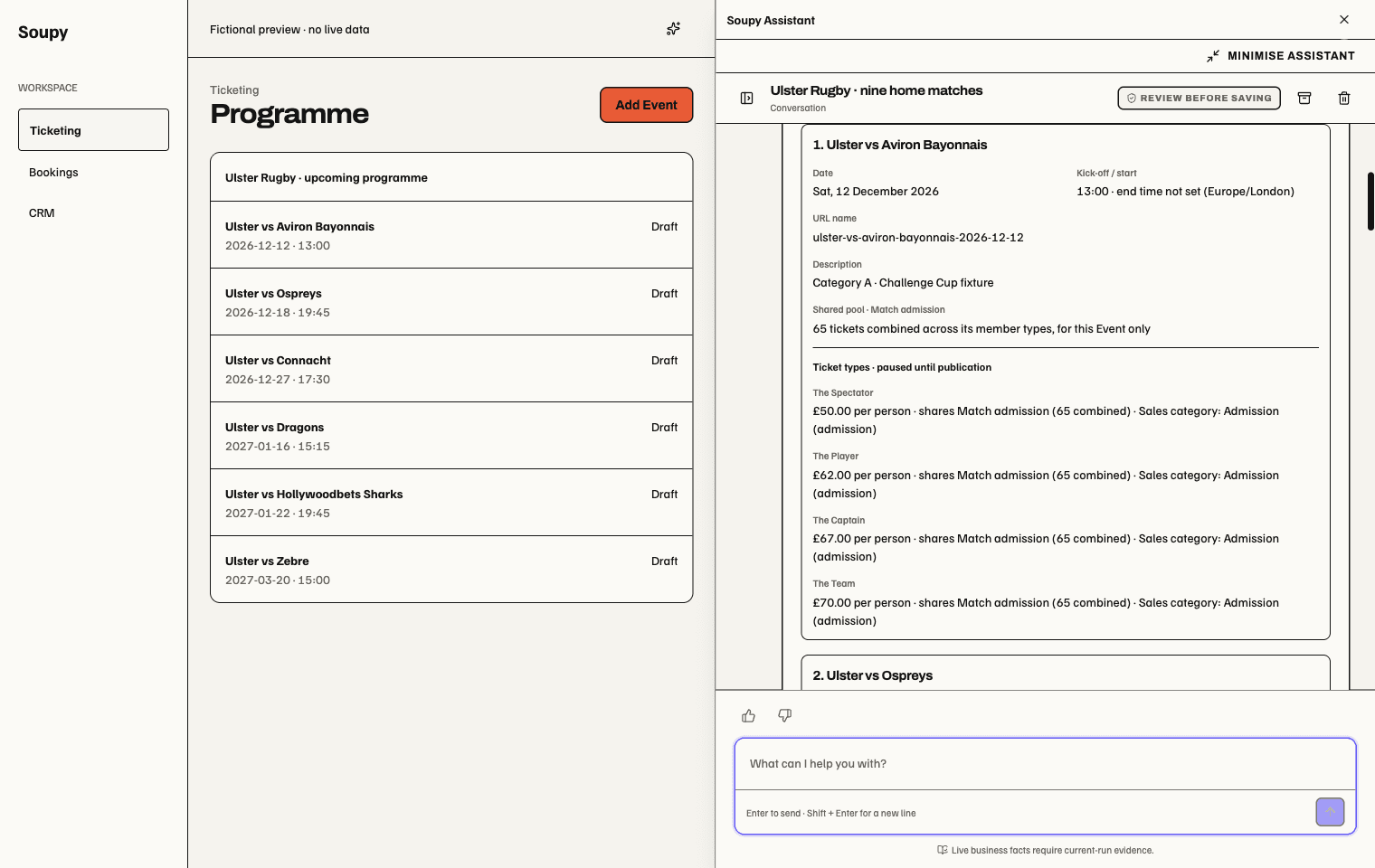
| Event batch (web) | One confirmation saves 1–20 unpublished Events at one Site/Space/Series, with multiple ticket types and Event-local shared capacity pools | Publication, opening sales, messaging and native batch confirmation |
| Standard Booking | Creates an eligible same-day, single-resource free or pay-on-arrival Booking through Bookings | Complex itineraries, unsupported payment collection and other specialist changes |
| CRM audience draft (web) | Saves the reviewed rule tree as an unpublished CRM segment through the canonical draft command | Previewing membership/contactability, publication, campaign review and sending |
| CRM metric definition (web) | Saves a reviewed supported formula, source, window and limitations | Running the canonical report and inspecting dated results |
The batch flow accepts up to ten ticket types per Event and 100 across the review. Each Event shows its exact title, date, local start/end time, description, pricing band, competition, independent pools, combined capacity, product prices/descriptions/inclusions, minimum/default/maximum quantities and calculated schedule before confirmation. Customer copy is rendered once: an inclusion already contained in its description is not repeated in a second list. Accounting category labels come from the frozen source selection, independently of Category A/B or competition labels.
The shared setup service can explicitly update one exact same-title/date Event in its original Site/Space/Series. It preserves its URL and publication state; new Events remain draft and new tickets paused. Ambiguous or incomplete matching, unreconciled existing products, cancelled Events, committed tickets or holds return to protected source workflows. It never resets sold stock or rewrites issued promises. Confirmation rechecks source configuration, categories, Brand placement, permissions and all matching Events in the same atomic transaction. A failed item rolls back the batch; repeated confirmed requests recover their original results. Publication, opening sales, messaging and physical resource bookings remain separate.
The complete owner review stays in Soupy. The model receives a compact proposal reference/outcome rather than repeated copies of the full descriptions. Native batch confirmation remains a web handoff until separately implemented and accepted. See the complete package validation for source tests, fictional previews and acceptance boundaries.
Event permission checks follow canonical Event authoring in both legacy and capability workspaces. A permitted Series supplies its exact parent Site/Space context without demanding a separate venue-wide grant. Explicit restrictions, enabled Ticketing, current identity and final source-command checks still apply. No access grants or workspace migration are performed. Booking and CRM creation retain their existing admission boundaries. Live provider and signed-in acceptance remain separate.
The review card shows the exact proposed values, timezone, financial consequence, version and expiry. Missing price or capacity never means free or unlimited. Paid ticket proposals require an explicitly selected active sales category from the same business. Assistant asks when classification is missing or ambiguous, even when only one category is available, and preserves the full request while waiting. It does not choose a category automatically. The web and native review's Reviewed outcome shows the frozen category name and code. Confirmation revalidates the selection and category revision; renaming, archiving or restoring a category requires a fresh review. Free tickets and Events without tickets do not require a category. Category administration remains in Payments settings. This web release does not publish native binaries. Until separate native publication and device acceptance, review category-bearing proposals on web when an installed mobile build cannot display them. A proposed Booking does not reserve capacity; confirmation rechecks availability. CRM proposals show translated rules and their JSON, current referenced Sites/fields and source descriptions. No audience count is invented. Configuration or scope changes require fresh review; ordinary contact changes are evaluated later in CRM. Metric proposals support email contactability, observed returning guests, monthly visit retention and known attributed payments/refunds. The review contains no invented results or arbitrary database query. Confirmation saves a definition; Overview's Run canonical CRM report explicitly starts the report and exposes its current source coverage. Unsupported questions require a different review. Native CRM and Event-batch proposals show a web handoff and cannot confirm there. Older installed mobile builds fail closed on unknown batch proposals; use the same conversation on web. Native publication/device acceptance is separate.
Use Edit to ask for a revised version, Cancel to abandon the proposal, or Confirm to approve the displayed version. Editing or another conversation turn supersedes the pending version. Typing agreement in conversation is not an approval. A failed, cancelled or unfinished response cannot expose confirmation.
Proposals expire after fifteen minutes. Confirmation rechecks identity, current workplace access, source permissions, rollout policy and source facts. Changed facts require fresh review. Retrying a confirmed proposal retrieves its original outcome rather than creating another business record. Deleting its conversation does not delete the resulting business record.
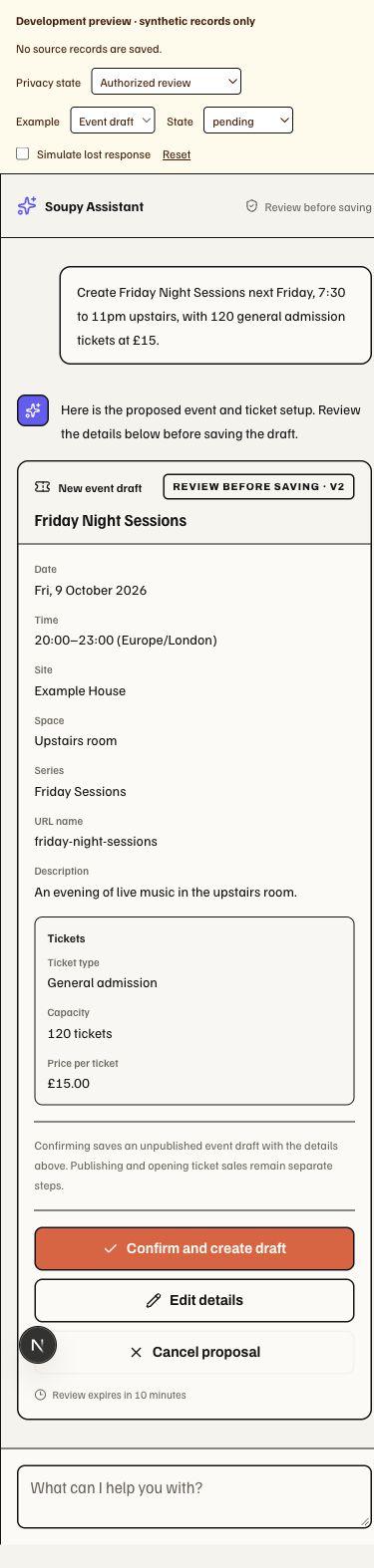
- Proposal version: the revised card is the version the person reviews.
- Unpublished consequence: Event creation saves a draft; publication remains a separate action.
- Confirm, Edit and Cancel: each choice acts on this specific proposed outcome.
- Expiry: an expired proposal requires a fresh review before execution.
Privacy, history and failure
Saved conversation text remains readable by its signed-in owner while they have current workplace access and the conversation is within retention. A source record edit or loss of source permission does not remove an already completed answer from their history. Older replies recorded as a run's successful final answer can also be read without the new source tracking. This is historical text; asking again reads current facts. Running, failed, blocked and cancelled responses are not restored as answers. Unmatched output remains unavailable when it lacks a recorded successful final answer binding or falls outside the bounded history lookup.
Evidence, source buttons and proposals still require current source access and matching source facts. An old answer can remain readable after its source card or action becomes unavailable. Owner-bound successful final plain text can enter follow-up requests as historical context; current facts and proposals require fresh tools. Prior tool payloads never replay automatically. The same server history reader serves web and native clients. Same-scope connection stalls retain already-read display and drafts; identity/scope changes or received refusals clear them. Guarded continuations still require a fresh current-connection receipt. Fresh current-run sources are rechecked after prompt preparation immediately before each model invocation and before provisional stream reads. Final saved answers require their normal final check. Text already observed or sent to a provider cannot be recalled by a later Stop or refusal.
Organization and principal identity are supplied by Soupy, not by prompt text. There is no unrestricted database tool or automatic cross-conversation memory.
One run can be active per conversation. Quotas, tool limits and deadlines can stop a run. A run without a complete saved answer is a retryable failure, not a success. The current policy defaults to ninety-day conversation/evidence retention; conversation deletion removes first-party conversation state and its Agent thread.