Communication-library images have a conditional direct-upload adapter that preserves shared or personal ownership and the selected mailbox destination. Reply selections and approved send jobs retain exact image identities. Background delivery can fetch a private image only for its currently claimed send job and current mailbox authority. Archive and retention keep images still held by frozen jobs. PDF and inbound provider attachment handling retain their existing paths.
Scope, screens and permissions
Inbox is a separately entitled work area at /app/<orgSlug>/inbox.
Its web sidebar and narrow-screen drawer show Inbox and authorized Settings
only, including while Settings is open. Source and status choices stay inside
the inbox; existing filtered links remain valid.
It combines email conversations and structured form submissions and works
independently of CRM or Bookings. Those products contribute capabilities only
when both their entitlement and the person's source permissions allow them.
| Surface or action | Authority/boundary |
|---|---|
| Read conversations and view/download their files | inbox.view and current mailbox access; private mailbox ownership still applies |
| Manage conversations or personal mailbox connection | inbox.manage, with personal ownership retained |
| Approve and send a reply | inbox.reply.send plus exact conversation, sender and current provider readiness |
| Publish an Inbox Booking draft | inbox.booking.publish plus the owning Bookings capabilities and live validation |
| Read/change module settings | inbox.settings.view / inbox.settings.manage at the supported scope |
| Independent historical classifier review | Inbox source access; platform access alone cannot read mail |
The default Unified queue interleaves open email and active forms by latest activity. Email and Form submissions retain their source-specific controls. The queue and reader scroll independently. On narrow screens, Conversations and filters opens the queue; Back to conversation returns to the open reader. Switching between them retains the reply draft and gives reading and writing the available viewport. URL filters preserve Back/Forward navigation. Switching between focused source views preserves the selected item and its draft while authority remains. A workplace or signed-in account change clears private view state.
Email queue and mailbox identity
The mailbox menu offers All my inboxes and individual authorized accounts. Shared and Personal labels and full addresses remain visible alongside mailbox colours. Each mailbox uses the same colour for its address dot and a very subtle email-row background, in light and dark themes. The orange dot beside the time still means unread; opening mail removes that dot without changing its mailbox colour. The selected row keeps its selection edge and a slightly stronger tint. In the Unified inbox, form submissions have their own subtle soft-green tint and retain the Form icon and form name. Their orange unread dot and selection edge follow the same rules; the tint identifies the source, not its status. All my inboxes includes shared mail plus only the signed-in person's own personal mail. Selecting an inaccessible mailbox never broadens to another queue.
Personal mailbox ownership differs from conversation assignment. Administrators do not automatically gain personal email access. Personal conversations cannot be assigned to teammates, converted into shared enquiries or saved as shared responses. Private uploads remain outside the shared communication-file library.
Email filters include open/closed, unread, ownership and category, with paginated chronological results. Loaded counts are not full mailbox totals. Web queue rows use a one-line preview and retain sender, subject, mailbox identity, owner and time. Assessed Reply and Internal states and follow-ups remain visible; each unassessed indicator stays hidden independently. The selected conversation keeps the explicit work-state editor and existing filters. Opening an email conversation with Inbox management access marks it read and clears its unread dot. Mark unread restores an unread reminder without closing or reopening the conversation; it stays unread until you reopen it or choose Mark read. A failed update restores the prior indicator and shows an error. Read-only users retain the existing read state. Reading does not declare reply or internal work complete, and these controls do not change Gmail's own labels.
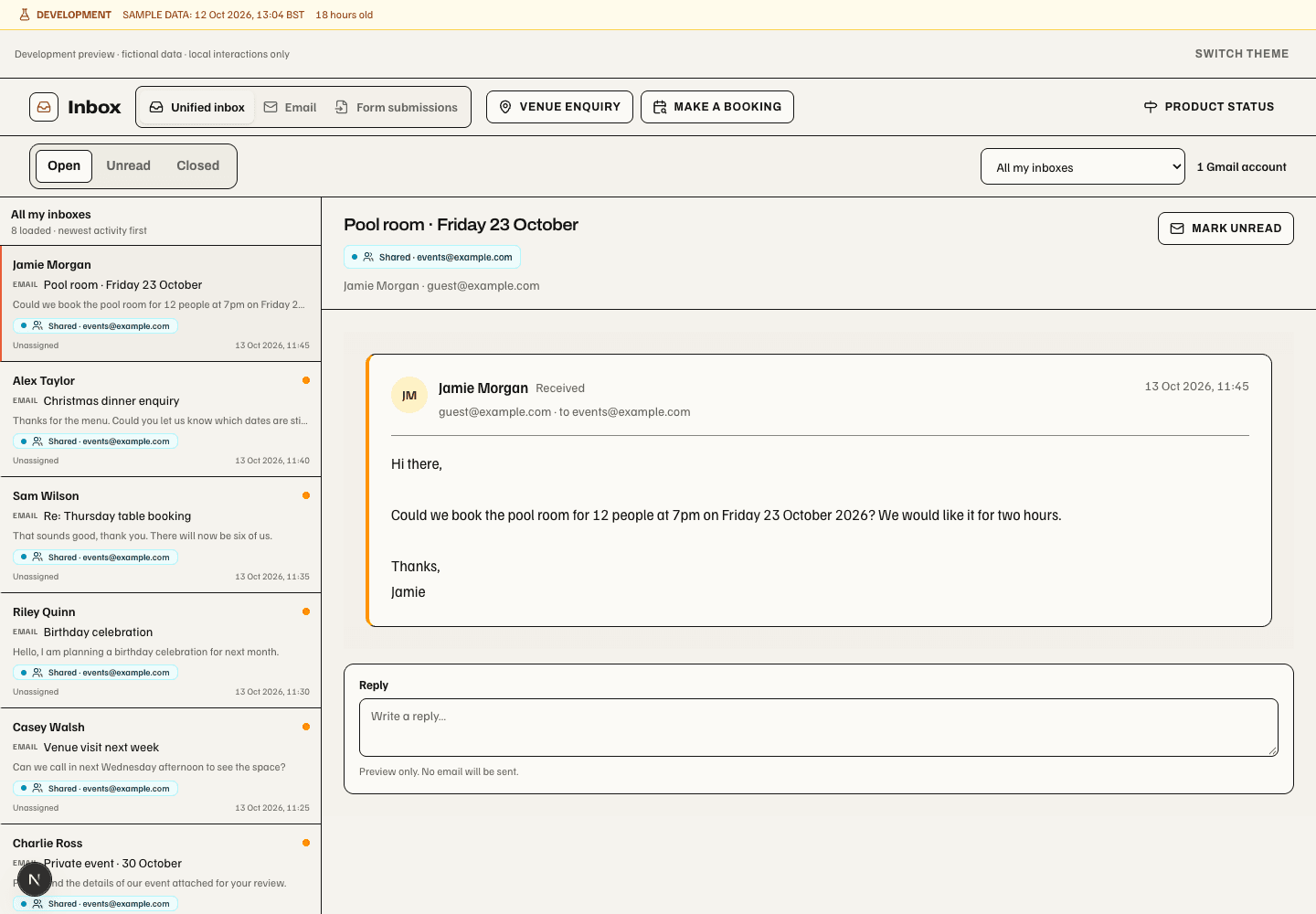
Historical development preview, 13 October 2026, fictional records. The selected email has no unread dot and offers Mark unread. Booking actions now sit beside the conversation read/close controls and open the right-hand panel described below. Queue rows retain mailbox identity. This fixture has unassessed work states; assessed states and follow-ups remain visible in the compact queue. Changing category does not assign, close or move the email.
On web, compact email previews pair the sender with the latest activity time, then show one subject line and one message-preview line. Mailbox identity keeps the Shared or Personal label and address; category text retains whether it is suggested, reviewed or automatic. An assigned teammate remains visible. Long text is shortened within the row; opening the conversation shows its detail. This presentation changes how many previews fit in the queue, without changing message content, ordering, unread state or assignment. Native mobile does not show mailbox chips.
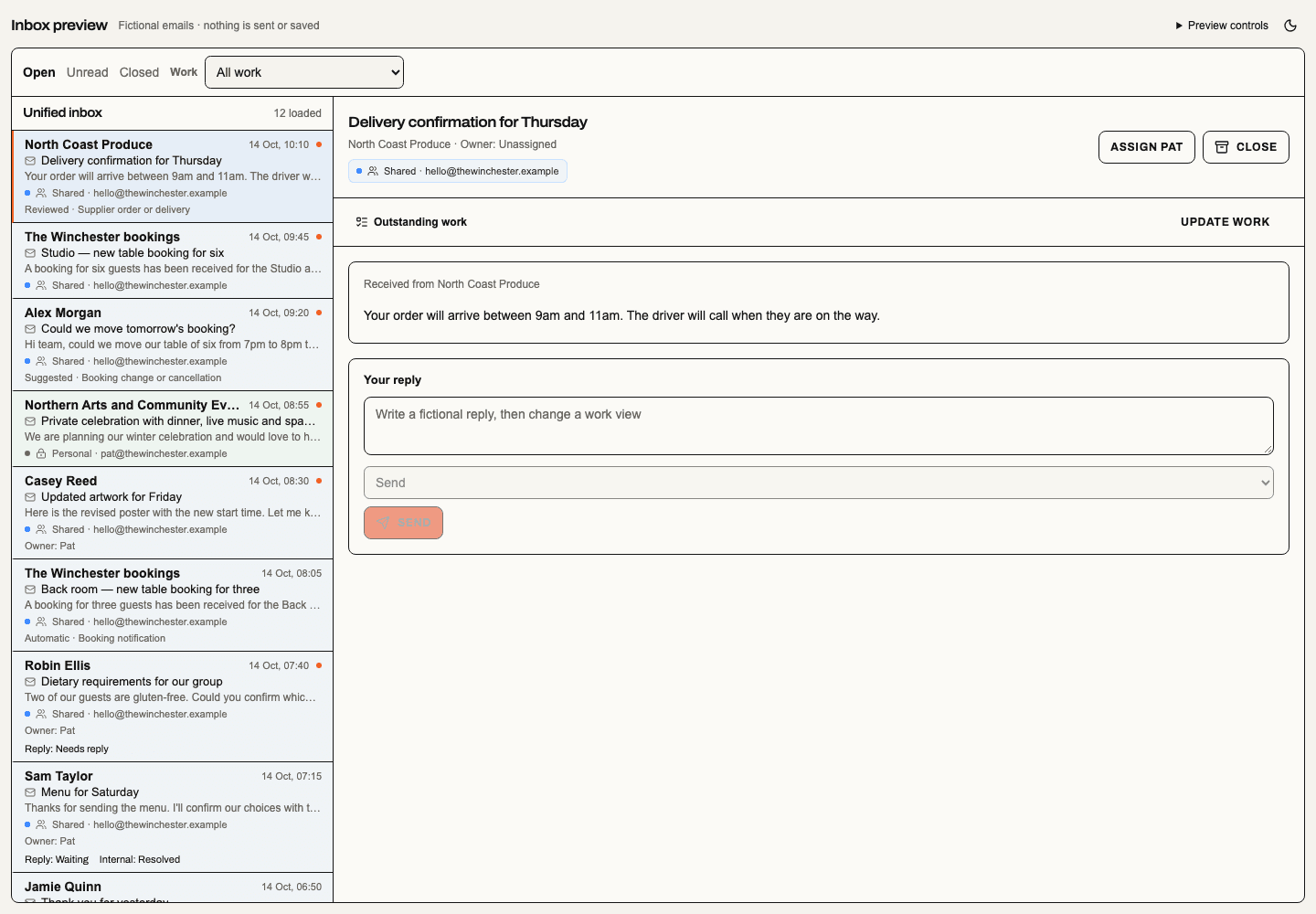
Captured 15 October 2026 at 1440 × 1000 from a local fictional Inbox preview. Email rows from three mailboxes are mixed with two form submissions. Match the address dot and faint background to identify an email account; soft-green rows with a Form icon identify submissions. The orange dot beside the time is unread status. Mailbox addresses, Shared/Personal labels, form names and stages remain readable without relying on colour. This fixture does not establish authenticated production acceptance.
Mailbox controls expose sync status, manual refresh and management. Routine account details stay in that control; failures show a recovery notice. Gmail history sync is bounded and preserves the last successful cursor on ordinary failure. Reconnect must use the same verified Google identity and mailbox; a different Google account requires a separate connection.
Reading and replying
The email reader has one thread scroll region containing the Inbox title, source tabs, conversation controls and messages. The title and tabs scroll with the email rather than taking permanent space above it. The three most recent messages appear newest first, with older history in an expandable control below them.
A single-line Reply to… bar stays at the bottom of the reader while collapsed. Click it or use Enter/Space to expand the editor smoothly and focus the writing area without moving the thread. The entire expanded reply stays anchored at the reader's bottom while the conversation scrolls behind it. Its height follows the reply content up to the available reader height, leaving a strip of conversation visible. On short screens or with long reply details, only those details scroll; the Reply bar and Send controls remain reachable. The reachability check excludes Inbox headers still above the conversation, including after returning to an unsent draft from another source. Scrolling the thread does not resize the expanded reply. Minimize reply returns to the single line without discarding the draft. Reduced-motion preferences remove the animation. Draft wording survives new messages and filter changes under the same source authority. This supersedes the earlier expanded reply that scrolled with the reading document. When the latest ready received email has scrolled fully above the reader, an expanded reply can show Original email, a read-only plain-text reference. It sits beside the editor when the reader is wide and below it on narrow screens. Dismiss original reference hides its text; Show original reference restores it. View original returns to the full message and its formatted content/files. The reference retires when the source or reply is no longer eligible. It never sends, saves, changes message order or replaces the draft.
Booking actions beside the conversation read/close controls open a right-hand availability panel. Received/sent direction, sender, recipient, timestamp and attachments remain identifiable. Recovered quoted history is labelled; unknown provider quote text remains a safe plain-text expansion rather than a claimed standalone email.
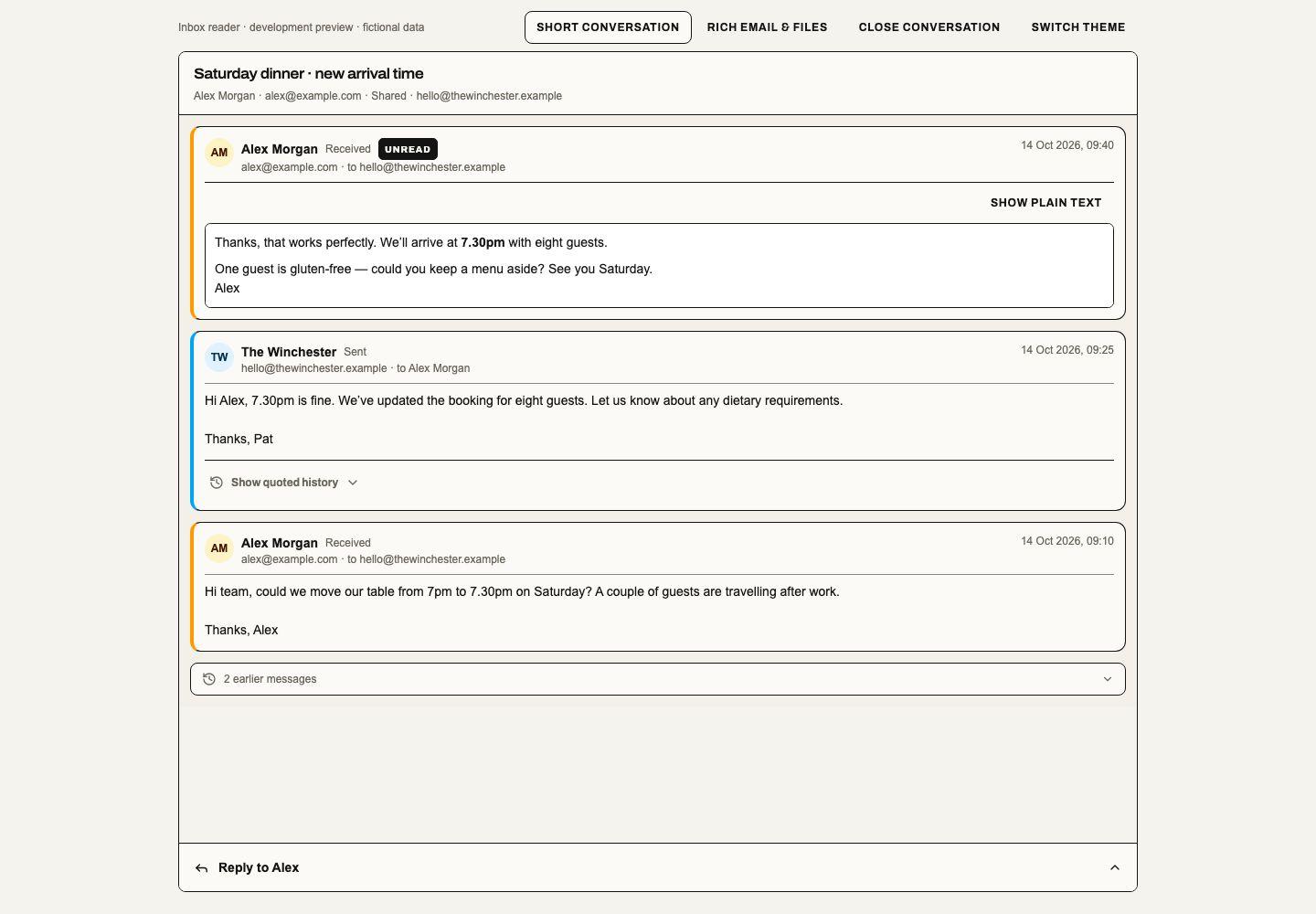
22 October 2026 local fixture with fictional messages and providers. The single-line Reply bar stays at the bottom while the title and thread scroll. Expand Your signature to inspect its formatting and links; collapsing it changes only the preview, and the same approved signature is included when sending. This local example does not establish production or provider acceptance.
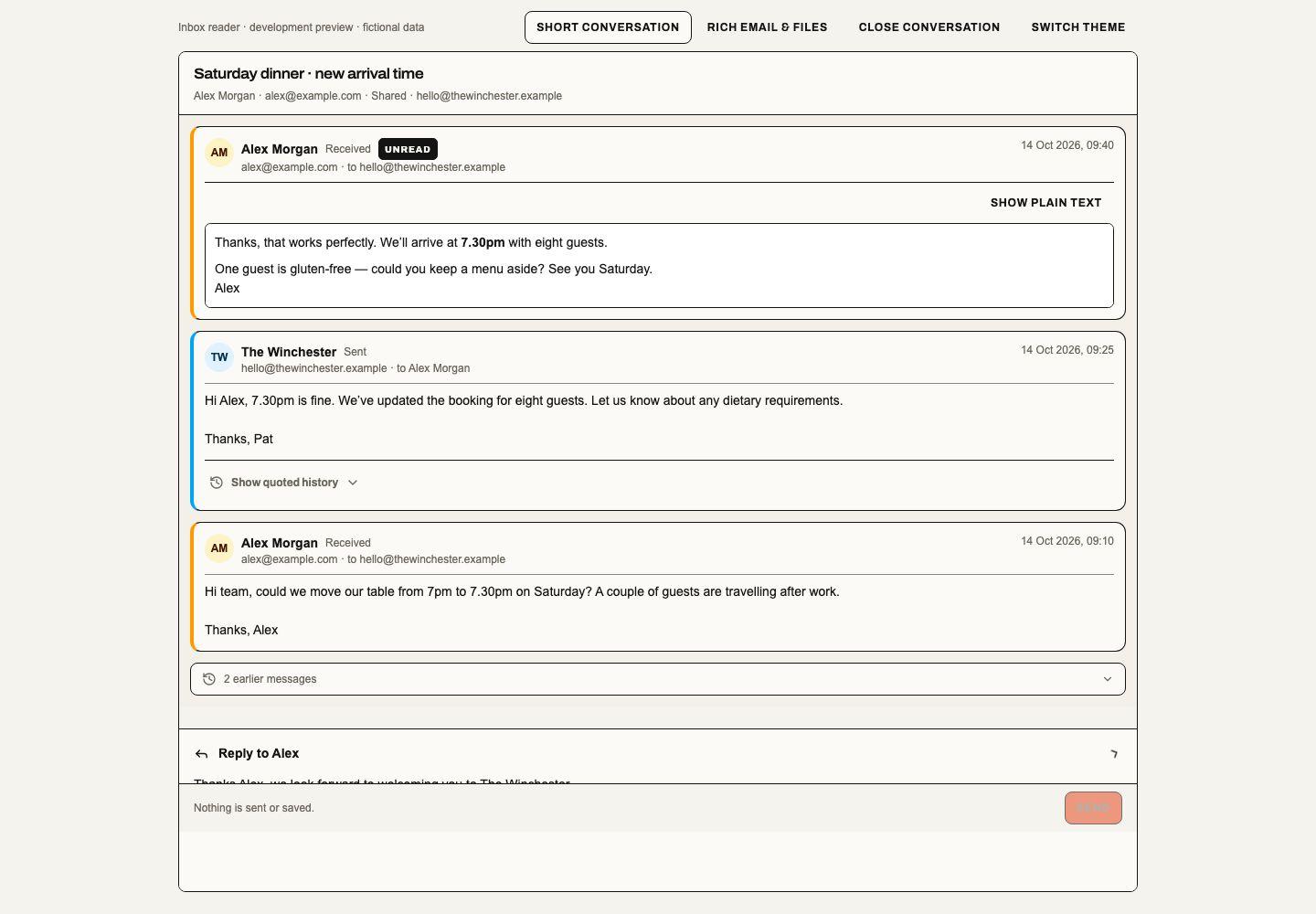
22 October 2026 local fixture with the reply expanded after the title has scrolled away. Minimize reply retains the wording. The entire expanded reply remains anchored while the thread scrolls; Send remains an explicit approval.
The web reader uses compact message cards, small sender and timestamp rows, and 14px default body text. Message bodies remain complete. Linked Booking conversations reuse these cards in chronological order with all loaded messages in their bounded scroll pane; their signature preview also starts collapsed. Formatted mail retains the sender's own styles; the smaller default applies where the sender has not supplied them. These are web presentation changes. Native mobile retains its existing reader.
Web email cards load the original formatted message on demand, including hosted and embedded images, tables and links. Show plain text retains the stored text view. Fixed-height logos and wallet badges keep their authored height limit; larger images still shrink to fit the reading pane. Email markup is sanitized and isolated; scripts, forms and active embedded documents cannot run. Hosted images load from the sender’s image hosts without the app’s referrer. Sender formatting keeps its own colours in either app theme. Earlier synced mail uses the same retrieval path, without a mailbox reimport. A disconnected provider, deleted message or retrieval failure leaves the available plain text visible with Retry.
Each available attachment has View file and Download controls. Images, PDFs, text and supported spreadsheets open in a private browser preview; image and PDF previews also offer Open in new tab. Spreadsheet previews display bounded read-only values; formulas, macros and external links are not executed. Download original preserves the complete source file. Files above the 10 MB transfer limit are labelled unavailable; unsupported or oversized previews explain how to download the original when it is within that transfer limit. Every retrieval rechecks the message, workplace and source mailbox. Closing or switching the private source retires pending downloads and in-app previews. Gmail files are recovered from the selected original message; previously imported mail does not need a resync before its files can open. A missing original file or lost mailbox access leaves the attachment unavailable rather than selecting a different file. Linked Booking conversations reuse these controls under the same Inbox access. This is web reader behaviour; native mobile retains its existing text reader. Live provider availability and authenticated acceptance remain separate from the fictional development preview.
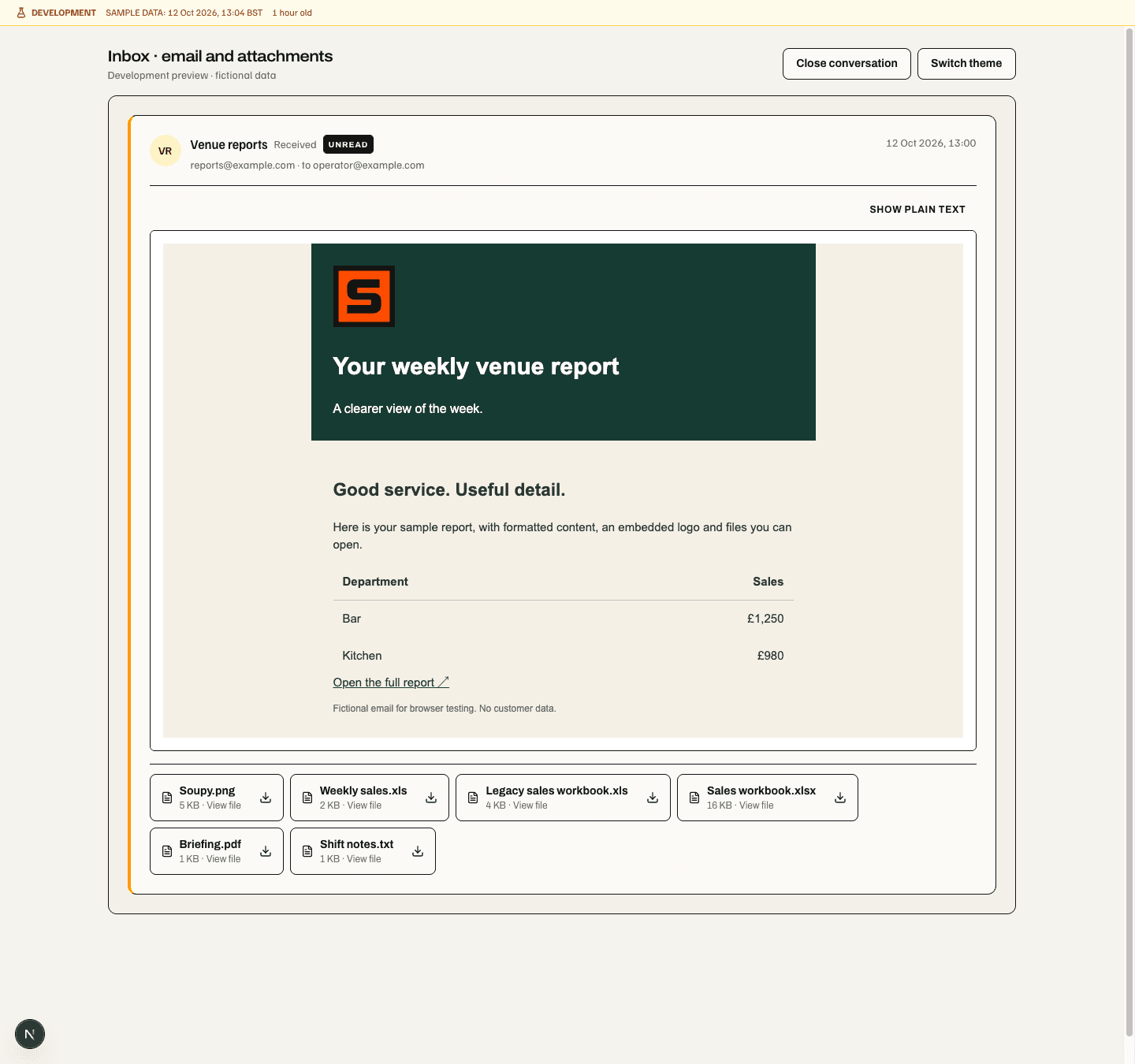
The fictional preview shows the plain-text switch above the message and file actions below it. It demonstrates the web controls, not a live provider mailbox.
- Read the exchange and check the exact source mailbox.
- Write a reply, choose an approved saved response, or request optional AI wording.
- Edit the wording and inspect any proposed supporting facts.
- Select eligible files from the private communication library or permitted source.
- Review the From/Reply-To identity, personal signature and attachments.
- Explicitly approve send and inspect its resulting state.
All three writing paths use one editable composer. AI never sends automatically. Manual and saved-response replies remain usable without an AI key. Refreshing availability or receiving a newer email does not intentionally discard an edited reply; stale or failed sends remain available for recovery.
Replies use their originating Gmail account and Sent mailbox. Verified Gmail aliases can change the guest-facing From/Reply-To identity while retaining that account and privacy boundary. Each Soupy person has their own workplace signature, including on a shared mailbox. HTML signatures can contain links and hosted logos; the sender stays visible and the compact signature row expands to show its full preview. Saved responses remain unsigned. Queued delivery freezes the approved sender, signature and attachment revisions. Provider acceptance is separate from confirmed delivery.
Inbox settings
Open Inbox > Settings for Your signature and Mailboxes. Your signature opens first. Edit plain text or paste HTML, inspect the preview, then choose Save your signature. Saving an empty signature turns it off. The signature belongs to your Soupy login in this workplace, including when replying through a shared mailbox. Changing settings sections keeps an unfinished signature; changing the signed-in account or workplace clears that private draft. Failed saves retain edits, and a conflicting saved revision requires reloading or cancelling before trying again.
Mailboxes reuses the existing Gmail connection manager. It lists only authorized shared and personal connections, their sync status and the connection actions allowed for each account. Expand Sending identity to review the sender name, verified From address and Reply-To address. Alias refresh and Gmail connection require the provider to be available. Signature editing does not require a connected Gmail account.
The settings route still requires Inbox settings access. Reading a personal signature additionally requires Inbox view or management access; saving requires Inbox management access. Mailbox access and configuration retain their separate Inbox, provider and personal-ownership checks. Settings access alone does not grant access to mail or another person's signature. Read-only controls remain visible when permitted. Inbox's Manage mailboxes keeps its entry point, and organisation Email connections links here for people with Inbox in their workspace. These are web settings; native mobile has no separate signature editor.
Booking and other source contributions
The selected web conversation's action bank includes Venue enquiry for eligible shared conversations and Make a booking when the operator has Inbox publishing and Bookings access. They sit beside the owner, read/unread and close controls. Both slide the shared Bookings form in from the right. Desktop keeps the email visible and interactive: the queue temporarily hides and the reader reflows beside the panel. Closing restores the queue. Narrow screens use the full width. This is web-only. Native retains its existing Booking proposal screen.
The panel includes guest count, venue, Space, date, duration, live times and allocation choices, guest contact details, Accessibility needs and booking notes. A booking can contain multiple parts using the same journey controls as Bookings. Contact name and email carry over automatically. Current extracted email facts prefill the requested date, time, guests and Space; when configured, AI reads missing facts on first opening. Extraction failure leaves contact details and manual entry available. Enter details now skips waiting. Suggested values remain editable and require review; opening or checking availability reserves nothing.
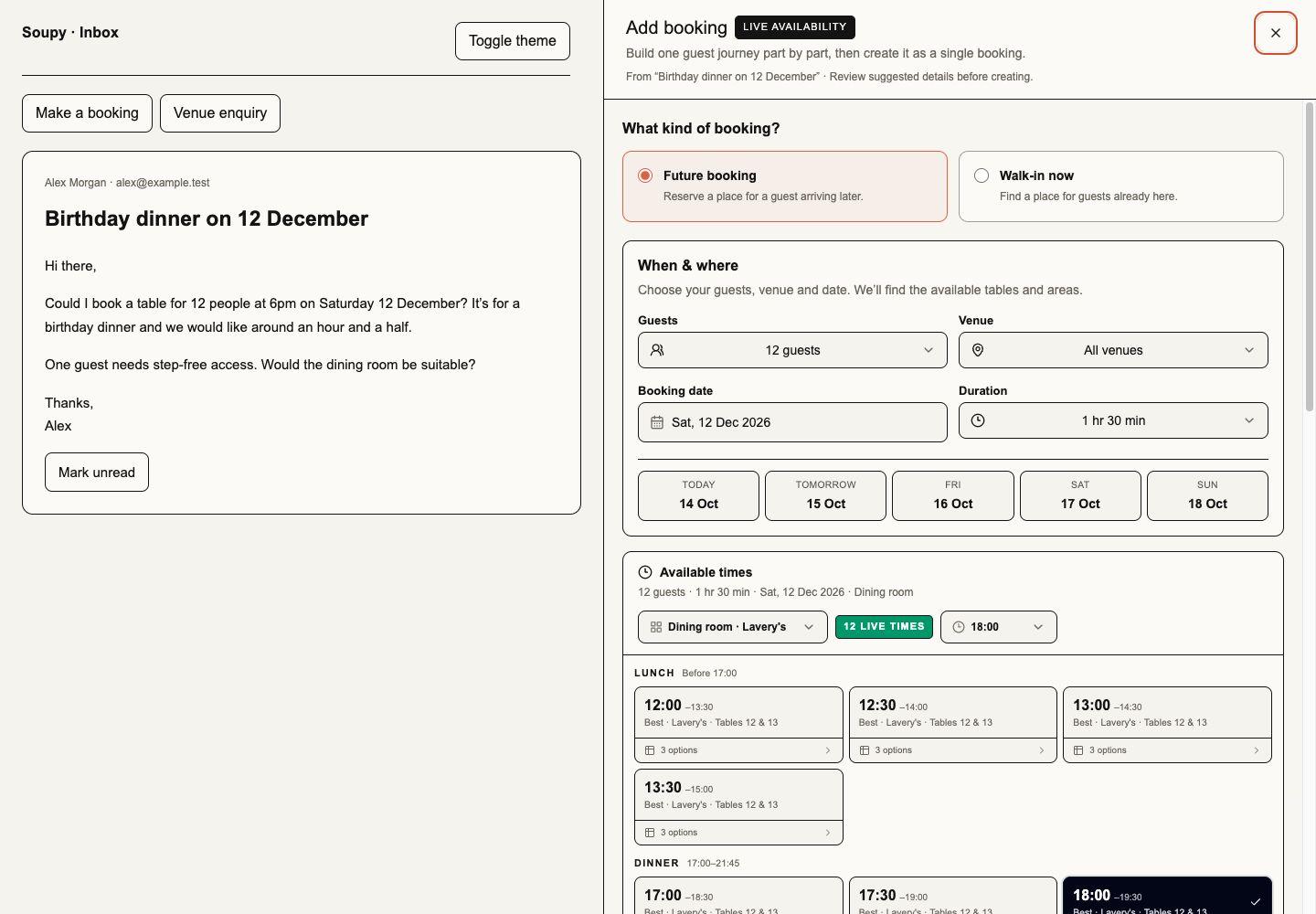
Local component fixture, 14 October 2026, 1440 × 1000. Left: the email stays readable. Right: the actual shared booking form with fictional availability. This verifies presentation; it does not establish provider execution or authenticated production acceptance.
Closing and reopening the same conversation's panel preserves edits. A new source email leaves the current draft visible but blocks saving until the operator chooses Start again with latest email. Changing conversation, workplace or signed-in identity retires that local panel. Missing permissions or source content leaves creation unavailable. Live availability or creation errors keep the fields available to revise and retry.
Make a booking rechecks every part through Bookings' canonical creation command and atomically links the result to the selected email. Personal email can create a booking business record visible to authorised booking staff, while the source email remains private. It cannot become a shared Venue enquiry.
Venue enquiry uses the same search and guest controls for one requested window. Its Bookable event spaces selector and available-time cards show Space, Area and nested sub-area options explicitly enabled for event/private bookings. Parent paths distinguish similarly named Areas. Each Area checks its entire Resource subtree; overlapping parent/child options conflict, while free sibling Areas can remain available. Searches use the chosen date, venue and Space; changing the date replaces the search rather than loading a calendar history. Nearby overnight bookings and setup/cleanup buffers still block an overlapping time. Private-event availability and current permissions are checked again on creation. The requested Space, date, time and guests become an unreserved event plan; no capacity hold, Order or Inbox reply is created. Existing private-event, guest and exact Space permissions still apply. Link existing enquiry in the panel retains the authorised venue and enquiry selector. Form-submission intake uses the same date/time/Space picker for new enquiries and retains the event title, type and contact review. Closing and reopening the same source retains its draft. Missing eligible Spaces or no available times are explicit empty states, never a fallback to ordinary tables. Native has no event-space settings or day-picker screen.
The annotated local preview and validation show date, guests and duration above the available times, with guest details retained alongside. Its screenshots use fictional inventory and record the local checks and production acceptance boundary.
After placement, the panel closes and the action bank offers View booking or Open enquiry. A blank reply may receive editable wording based on actual Booking/Order state; existing wording is preserved with Add booking details. A reservation awaiting payment must not be worded as confirmed. Booking state is checked again before reply sending and provider delivery. Creating the booking or preparing reply wording never approves the Inbox email for sending.
Ticketing and Sport can contribute current event facts when authorized. CRM can contribute relationship/consent context when authorized. A service reply creates no marketing consent. Unsupported calendar or external effects are unavailable; a suggested next step does not execute another product's command.
Reply work, internal work and follow-ups
When the business's optional outstanding-work control is enabled, each email has two separate obligations: reply work and internal work. Each can be unassessed, needed, waiting or resolved.
Choose Update work to record whether a customer reply or an internal action is needed, waiting or finished, and optionally set a follow-up. These are staff decisions, separate from reading the email or reviewing its category. On web, the queue and collapsed reader summary show Reply and Internal only when that individual state is assessed: needed, waiting or resolved. Not assessed stays available in the editor and hides that indicator again when saved. Hidden indicators do not resolve work or remove unassessed mail from Needs attention. The editor still requires Save work state; opening it does not change a state.
| View or send choice | Meaning |
|---|---|
| Needs attention | Outstanding work, including unassessed mail |
| Needs reply | Reply work explicitly needed |
| Needs action | Internal work explicitly needed |
| Waiting | Work depends on the customer or team |
| Updates | Both obligations resolved |
| Send | Preserve the recorded work state |
| Send and wait | Set reply work waiting after successful provider acceptance |
| Send and resolve | Resolve reply work only after successful provider acceptance |
Internal work survives reply sending. New inbound mail requires reassessment and preserves unresolved internal work and ownership. Closing outstanding work needs an explicit resolution choice. The conversation's eligible assignee owns a manual follow-up date/time in Europe/London; ambiguous clock changes need a choice.
Follow-ups appear in Inbox and My Work. They do not create reminder notifications, customer follow-up messages or an independently completable generic Task. Disabling the control hides those views/projections while retaining decisions and ordinary Inbox use. The control is separate from AI classifier rollout.
Forms and submission review
Use Manage forms from Form submissions to create or edit an intake form. Configure its internal name, public title, description, confirmation message and privacy notice. Fields can be reordered, required and given help text/placeholders. Supported types are short/long text, email, phone, number, date, single/multiple choice, checkbox and consent. Optional contact mappings identify name/email/phone.
Save the draft, preview it and explicitly publish a version before embedding. The builder provides public preview plus copyable inline or button embed code. Enable/disable controls govern availability. Draft changes do not alter the live schema until publication; old submissions retain their exact published version.
Submission stages are New, Reviewing, Qualified, Closed and Spam. Read every answer against that version, contact the mapped address/phone where appropriate and choose the stage. A mapped contact does not automatically create a CRM customer or marketing permission. Supported private-event intake can hand a reviewed request to Bookings without turning the form into a Booking itself.
Enquiry learning and suggested next steps
Enquiry learning is off by default. It is a web workflow for shared email and authorised Forms, enabled independently of the optional email classifier. Native has no new learning controls in this change.
In Inbox → Settings → Enquiry learning, an operator with Inbox management,
inbox.settings.manage and the selected Bookings guest scope chooses venues and
one mode: Off, Capture reviewed handling, Evaluate suggestions privately
or Prepare staff-reviewed suggestions. Capture records normal staff decisions;
Shadow keeps proposed handling hidden; Suggestions prepares reviewable advice.
The setting grants no new Booking, sending, consent or work-completion authority.
The reviewed global policy template binds the current catalogue but retains its explicit capability list. Adding Vouchers does not add Voucher authority to that list or activate any stored policy; a catalogue change still requires a new independently approved policy version.
Approved global administrators use the same exact capabilities and Site/Space checks. Scheduled preparation rechecks the enabling person's current authority, including expiry and revocation, without creating a local role for them.
Clear private-dining, private-hire and exclusive-use requests receive private-event guidance; requested booking changes or cancellations keep their existing-booking workflow, including a short request such as “Change my table time”. Advisory routing ignores quoted message history. Private-event guidance asks for event date and guest count when absent; missing arrangements still require clarification.
The enquiry's Suggested next steps panel remains available in the reading area while the reply composer is minimised. It describes the proposed handling, missing questions and optional reply wording. Why this suggestion? identifies currently authorised venue examples and manager-approved practices. Examples suggest workflows and questions; they cannot supply another guest's details, prices, dates, availability or booking status. Existing Booking/enquiry actions and the reply composer retain their separate review and approval controls. A form without a mapped email recipient receives internal questions rather than reply wording. A new message retires the old proposal without overwriting staff notes; saving old learning choices requires an explicit restart with the latest request. Provider/model availability does not gate these rules-based proposals or manual Inbox work.
Under Linked outcomes and learning choices, choose a venue and booking date, find an authorised existing Booking and explicitly Link existing booking. Several outcomes can be linked to the same enquiry. Existing Inbox Booking and private-event creation also capture their source link when learning is enabled. Unlink removes a mistaken relationship. Current destination status remains visible independently of the staff-reviewed outcome. A pending Booking, a closed conversation or an approved reply does not establish fulfilment.
Normal booking-field review, creation, reply edits/approval and form-stage changes record attributable decisions. Optional handling guidance and explanations can record a correction or negotiated arrangement. One-off exception and Don't learn from this prevent reusable examples. Successful reusable examples need a current linked confirmed outcome and explicit staff review. Source changes, unlinking, withdrawn permissions and cancellation invalidate affected examples and suggestions. Requested details are retained separately from agreed schedule changes. Personal mail and other businesses' examples are excluded.
Historical examples are selected by opening and reviewing existing enquiries; there is no automatic mailbox backfill or email-address-based outcome match. Managers can approve short Handling practices for one venue or explicitly across their business, and retire them. Repeated staff choices never silently publish a rule.
In Shadow mode an authorised manager can record an Independent handling review for a selected enquiry before seeing its proposal. The entire source is then reserved from example reuse. Settings reports observed workflow matches, the rules baseline and literal required-question wording coverage over at most the latest 100 cases. These counts are diagnostic; small samples and wording-based matching do not establish general accuracy. Existing classifier review cases are also excluded, including later messages in their conversations.
Learning stores source references and bounded derived handling text rather than another mailbox archive. Derived case/suggestion text, optional explanations and schedule-change snapshots expire after 90 days; bounded daily cleanup also scrubs text for deleted sources. Current access checks withhold unavailable sources immediately. Disabling learning hides its suggestions and stops new capture; ordinary reading, booking and replying remain available.
Optional classifier and historical review
Rules-based current-message triage always remains available. Optional Jev classification is governed per business as off, shadow, suggestions or automatic labels. Suggestions disclose provenance and can be accepted or corrected. Corrections remain attributable and survive another classification of the same message. Labels do not send mail, create Bookings, move/close mail or confer consent.
Platform operators choose a daily allowance or No daily cap for the approved business. Enabled classification processes each supported ready incoming shared email; a newer arrival does not discard an earlier message's classification. Only the latest incoming message supplies the conversation category. No daily cap removes the daily volume limit, while per-message limits, provider failures and source permissions still apply. It does not import or automatically retry older mail.
Saving an updated policy adopts the fourteen-category contract with corrected change/cancellation and urgency questions and restarts its evaluation period. Warnings distinguish a requested booking amendment from an automated notice or arrangements question. Time-sensitive warnings use the combined probability of urgent levels, preserving the raw model score. Earlier policies and historical results retain their version. Staff confirm Suggestions; automatic labels keep their separate evidence requirements.
The current questions distinguish ordinary group food-and-drinks reservations from private or exclusive hire. Continuing availability enquiries remain new enquiries until the message establishes an agreed booking. A booking-system notice keeps its notification category even when it includes a guest comment; a customer's own reply is judged by that reply. Routine payout announcements are automated reports, while lost-property forms carry the customer's request.
Current policy and source authority are checked immediately before each provider attempt, including retries. Withdrawal prevents a later send; it cannot recall data already transmitted under valid authority. Historical classification keeps its original platform approval and selected-message scope.
/app/<orgSlug>/inbox/review is an independent historical-review surface, not the
ordinary category picker. Reviewers label selected evidence before seeing model
answers; held-out answers remain sealed until formal evaluation. Eligible label
correction preserves an audit trail. Formal evaluation locks the cohort.
AI-assisted or previously exposed labels remain diagnostic and cannot qualify
automatic labels, including after a fresh provider replay.
Historical batches, model policy and activation are governed platform operations;
a batch's existence or confidence score does not establish measured accuracy.
Platform operators can prepare a Fresh blind review from stored shared Gmail mail or collect new incoming conversations while Suggestions stays enabled. Stored selection scans existing ready mail. Incoming collection runs for up to seven days, stops at the requested maximum, and can be finished early. Its progress shows the collected count and deadline; a collecting set is not yet ready for human review. Finishing with no eligible conversations creates no review set. The selection takes at most one latest incoming message per conversation and excludes conversations with retained classifier jobs, historical batch items or reviews, or a current category correction. Mailbox-authored copies are excluded. The requested size is a maximum: scan limits and exclusions can leave a smaller set, which the app reports. It imports no additional mail.
Incoming collection reserves newly received and hydrated conversations before their categories or warnings appear. Closing collection freezes its membership and calibration/held-out split, then allows up to six hours to collect the normal live results. It makes no extra classifier calls. Delayed or failed live results remain visible exceptions after a bounded wait. Cancellation or loss of the initiating operator's authority stops collection and retains collected cases as reviewable exceptions. No incoming result or human answer is used to choose which conversations enter the set.
Selected conversations withhold model categories and warning flags before any new prediction can appear. Ordinary reading and replying remain available, and classification continues for incoming mail. Setting or clearing a manual category is paused while that fresh conversation is sealed, so another reviewer's label cannot bias the review. Reviewers see the same bounded current-message input supplied to Jev, with its pinned definitions; they must record ambiguity when that text lacks context. Human labels start blank. The review-set selector retains access to older diagnostic cohorts and confirms before discarding unsaved work. Calibration answers can reveal after a saved review; held-out conversations remain sealed until formal evaluation. Fresh selection alone does not establish independent accuracy or permit automatic labels.
An operator with platform and Inbox management can explicitly end a closed, settled incoming blind review if it cannot be completed. The confirmation records a reason and reveals its answers, restoring normal category controls. The set keeps its original split, labels and results, but becomes diagnostic evidence and cannot proceed to formal evaluation. This also provides recovery for a single collected conversation or unavailable source; cancellation alone does not reveal answers.
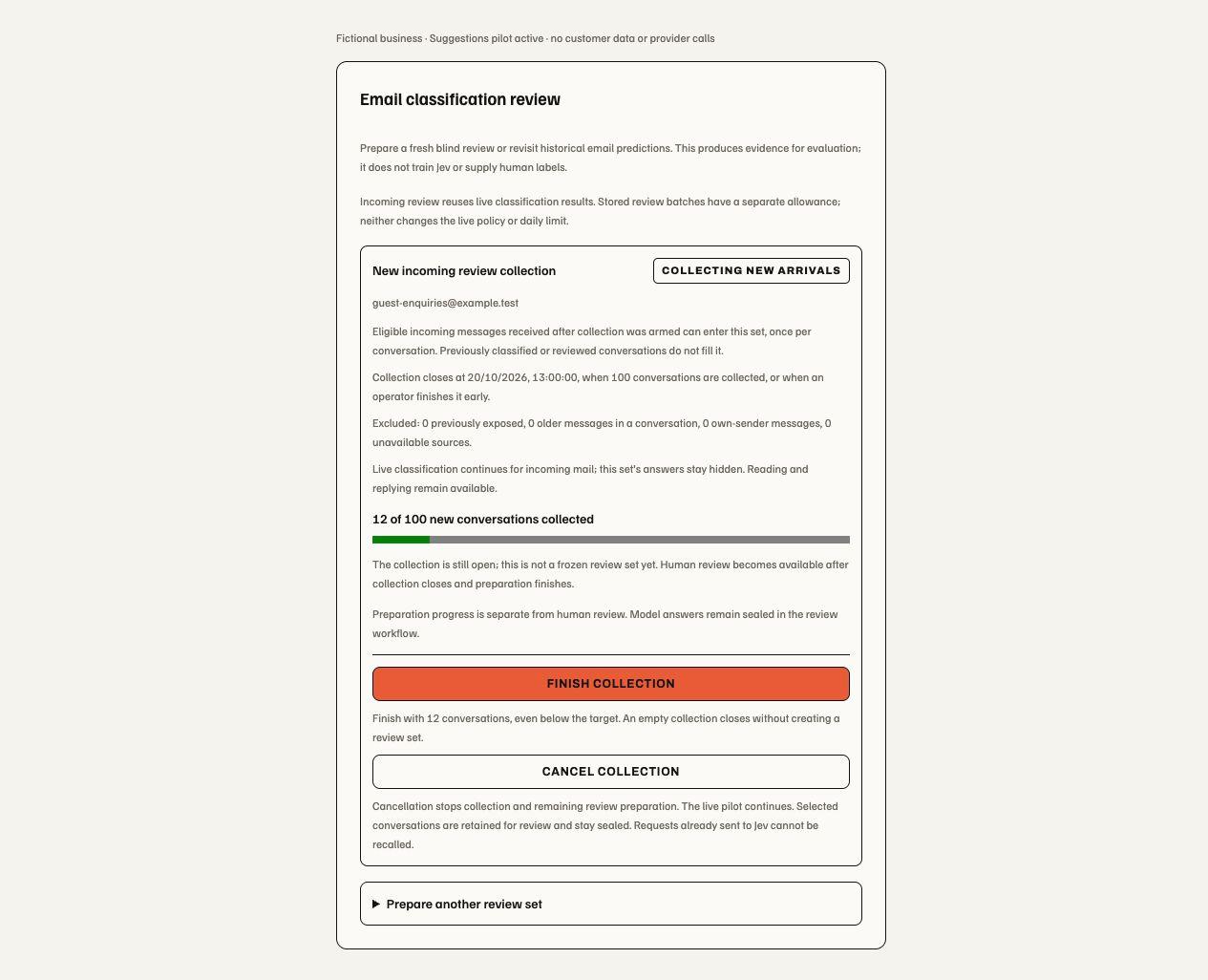
Local component preview, 13 October 2026; fictional business and counts. Count and deadline: collection is still open and human review has not started. Finish collection: freeze the cases collected so far. Cancel collection: stop preparation while retaining evidence; the live pilot continues.
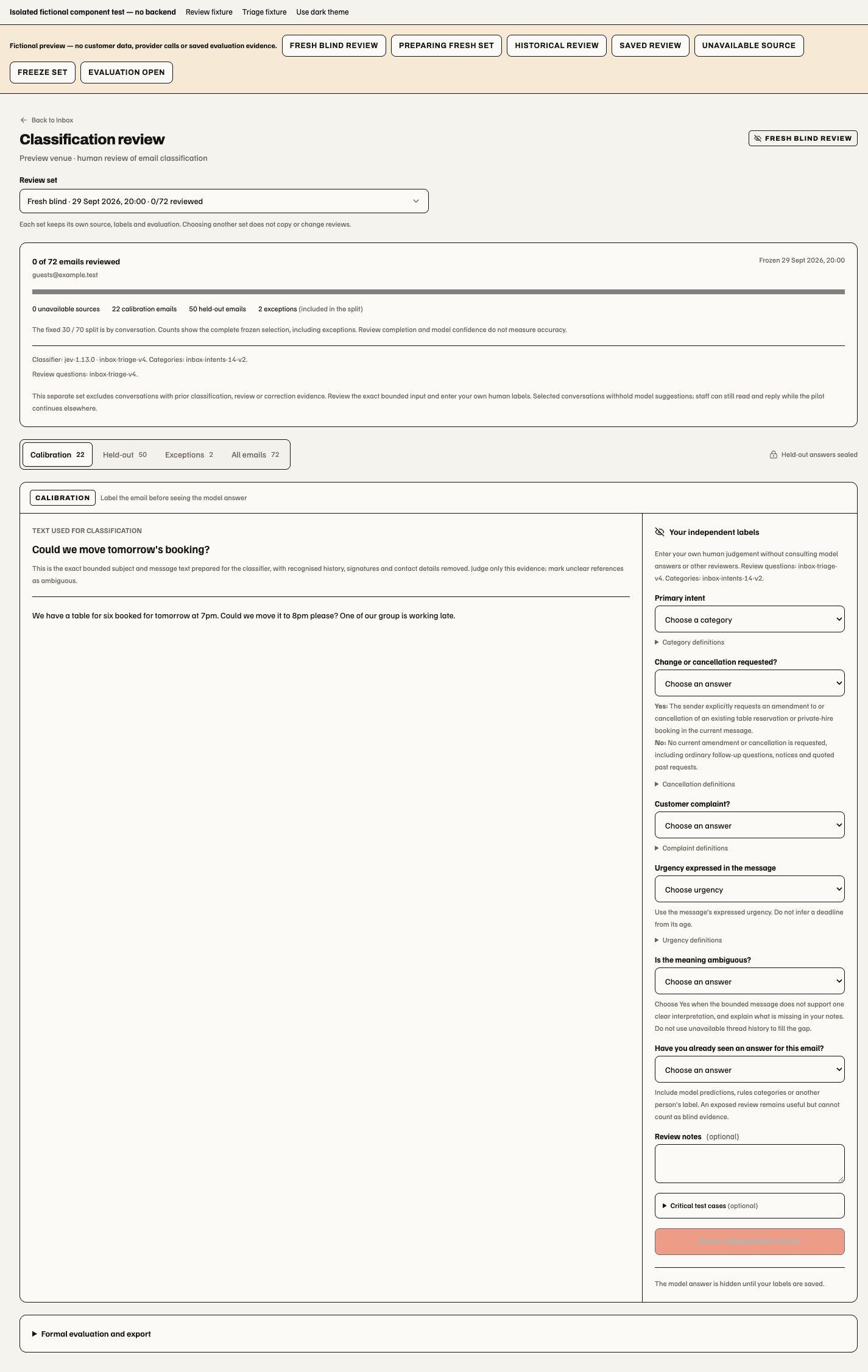
This component preview illustrates the review controls, not live cohort counts. The set selector preserves older reviews; the split summary includes exceptions; answers remain blank until a person labels the message. This is a web workflow; no native review screen is added.