Structured email studio
Communications editors share one structured design format, responsive compiler and version store. The owning product supplies audience, available variables, sending purpose and permissions. Saving a template is separate from sending it. Modules without an authorized audience/send workflow can remain template-only.
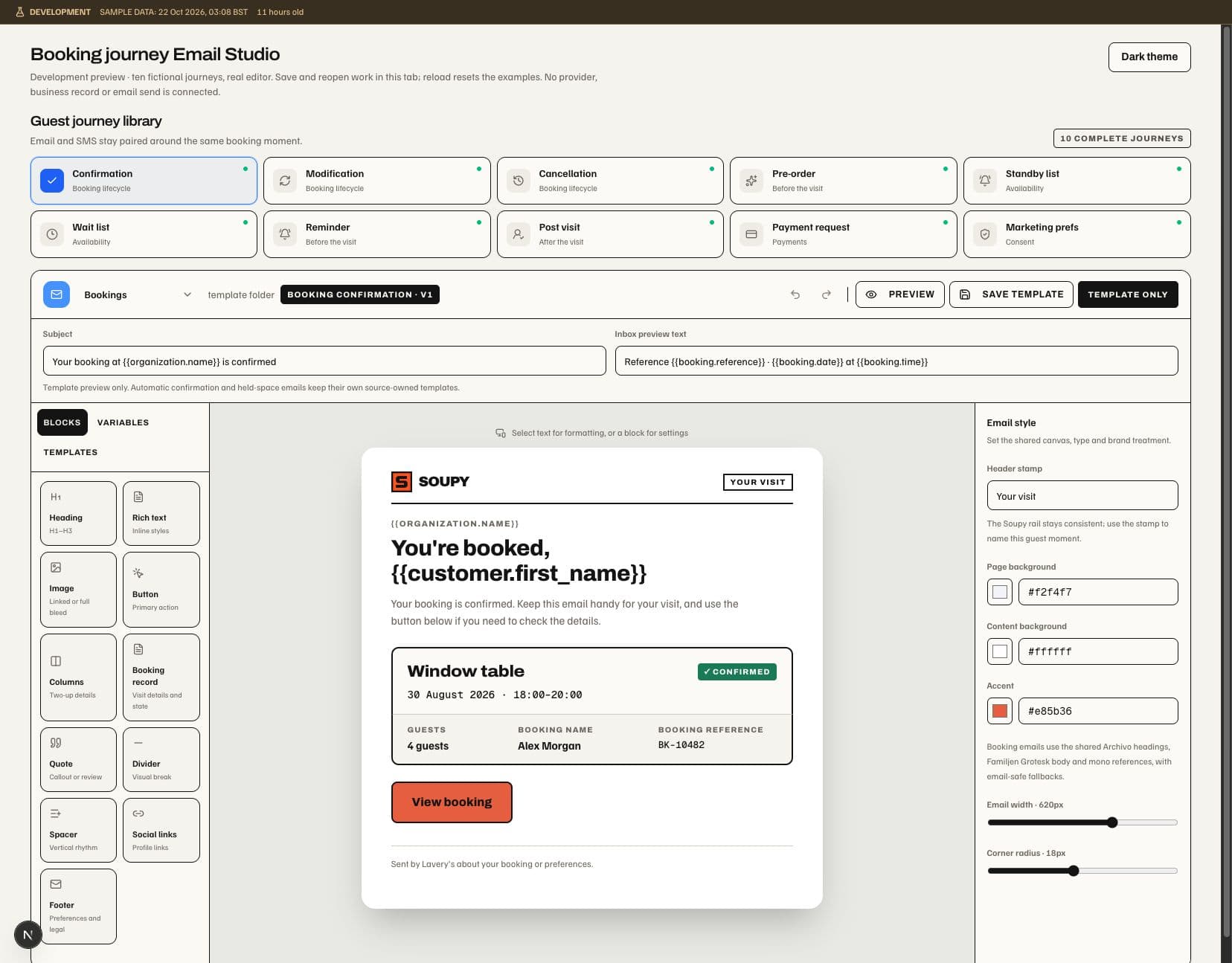
The studio includes subject, preview text, saved templates/version history, desktop/mobile preview and a block canvas. Blocks include headings, rich text, images, buttons, columns, quotes, dividers, spacers, social links and a footer. CRM and Ticketing designs can add an Event card: small heading, Event name, date, time, venue, status label and booking link, in the Ticketing paper style. A card without a safe link shows no button. Designs using the ticket presentation (Series promotion emails) keep the Ticketing typography and colours, so Email style hides the font choice. Allowed smart variables are product-specific; unsupported values cannot be used to access another product's data. Preview recipients and ticket examples are illustrative rather than real delivery evidence.
Saving uses the expected template version, preventing an old editor from silently overwriting new work. Archive hides a template without rewriting its previous versions. Sending freezes design and recipient variables into the owning delivery workflow.
Ticketing separates Series journey templates from one-off communications. Its confirmation design has a protected ticket/receipt delivery block; surrounding copy can be edited, but the block cannot be removed or duplicated. Booking journey content and SMS readiness remain in Bookings Communications. Its fourteen email Guest journey library entries open the shared Email Studio with the appropriate record state, editable subject, preview, copy and action: confirmation, modification, cancellation, pre-order, standby, wait list, reminder, post-visit, payment request and marketing preferences, plus held-space offers, verification, guest replies and invoice copies. Compact journey cards keep the icon on the left, title to its right, folder subtitle beneath the title and a separate Email/SMS readiness dot. Booking records use solid, dashed, muted or compact presentation according to the message; preferences and post-visit omit the record.
New Booking templates use a 620px white email card with 18px rounded corners, a soft shadow and inset content; the editing surround stays pale grey in both themes. Email style retains the width and corner-radius controls. The old product illustrations are absent from new defaults; the Soupy mark and text-based facts/actions remain. The responsive HTML preview uses the same card treatment, subject to email-client support for shadows and rounded corners.
New Booking templates use the current Soupy design. On library initialization, an exact untouched original starter receives a new saved version once; its old version stays available. Customised designs retain their content. Use updated Booking design replaces only the open draft, which takes effect on Save. It does not send a message or change an automatic message’s source facts. The 2 November connection uses saved designs for the existing sending workflows described in Booking guest communications. Protected source content stays inside the design; saving does not create a schedule. Current fictional Studio checks include both themes, narrow screens, save/reopen and transport regression evidence.
Resend connection and sender settings
Email settings exist at Portfolio, organization and Series scope; Event
Communications previews its resolved connection and sender rather than holding
an Event-level API key. Organization entry is
/app/<orgSlug>/settings/communications/email, with a Series selector/subpage.
Portfolio entry is /portfolio/<groupSlug>/settings/email.
Connections resolve from Series to organization to Portfolio and then an allowed platform fallback. Sender identities resolve separately: a Series may inherit a connection while using its own verified sender. A configured but invalid child connection/sender blocks its route; failure does not silently change the brand. Only explicitly configured essential-transactional fallback can use a parent. Marketing has no implicit failure fallback.
When the whole inheritance chain has no configured connection or operational sender, Ticketing reminders and Event change/cancellation notices default to Soupy's Resend sender. This includes permitted manual Order/Ticket reminders. A usable Series, organization or Portfolio connection takes precedence. Explicit broken connections or sender profiles remain blocked. Generic broadcasts, completion/follow-up messages, feedback and marketing still need their own eligible connection. Recipient eligibility, suppression, per-organization pacing and delivery evidence still apply. Retrying a blocked reminder rechecks the current Order, Tickets and Event; a reminder whose Event has started is skipped. Provider acceptance does not prove inbox receipt. The business service terms cover reasonable shared usage and a requirement to fund a separate Resend account where justified; existing contracts retain their agreed change procedure.
New Ticketing email jobs that use
Soupy's shared sender—including confirmations, purchase receipts, financial
Order documents, reminders and Event changes/cancellations—use
[Organiser name] via Soupy noreply@soupy.ai, with Reply-To also set to
noreply@soupy.ai. The organiser is the selling business. The footer says Soupy
provides the ticketing software and directs event enquiries to that business's
saved contact email, or its website when there is no valid email. These are
business-supplied contact details, not proof of inbox ownership. When neither
contact is usable, the footer asks the recipient to contact the organiser directly.
Replies to the automated address are not presented as an event-support channel.
Valid customer Resend connections keep their configured sender and Reply-To. Other product email flows retain their own sender policies. Already frozen or sent jobs keep their original identity/content; retry does not rebrand or resend them. The organiser footer is saved separately from receipt/document content and added after template rendering; retained Order email previews show the actual provider copy. Event Communications previews the sender resolved for new event mail. No new permission, operator control or native-specific workflow is introduced. Browser preview is not email-client, installed-device or live provider acceptance.

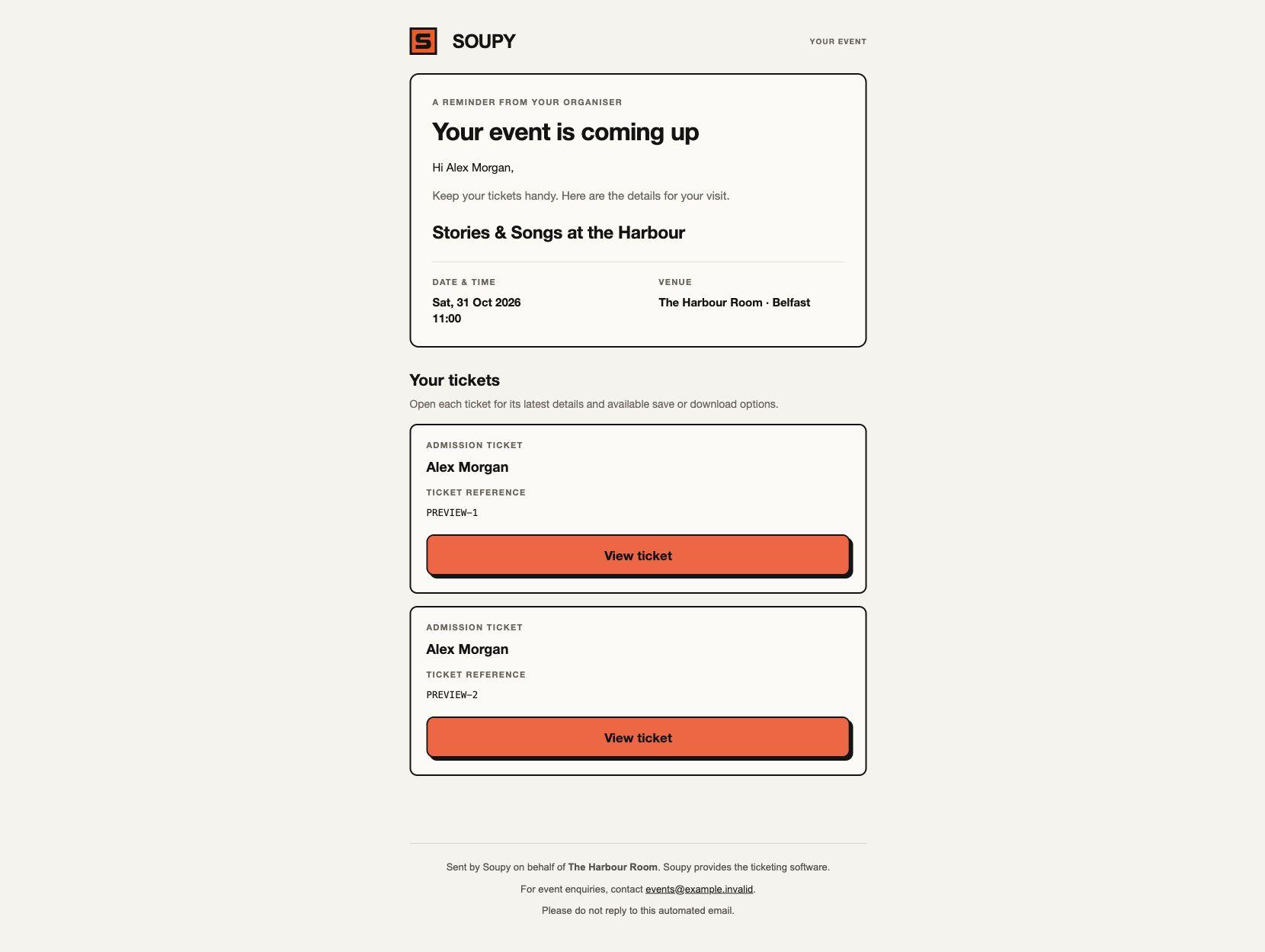
Default shared-sender confirmations, purchase receipts and individual Ticket deliveries carry Soupy's logo and paper, ink and orange styling. Default reminders and Event updates show readable Event details and a View ticket button for each Ticket currently held by that recipient. The Ticket page offers the save/download options enabled for that Ticket; existing confirmation/delivery emails still attach PDF copies when PDF delivery is enabled. Reminders do not attach new PDF copies. Purchase receipts remain purchase records without private Ticket links. Cancellation notices explain the cancellation and omit admission actions.
Authored Series templates and customer Resend designs keep their presentation. New default presentation is frozen alongside the original receipt content so source validation and historical records remain exact. No already queued or sent email is redesigned or resent. The recipient, permissions, suppression and current-Ticket checks are unchanged.
Sender profiles distinguish transactional, operational, feedback and marketing purposes. The exact From domain must be verified with the resolved provider; Customer-configured Reply-To should be monitored; the shared Ticketing no-reply policy above is the deliberate exception. Provider delivery and marketing eligibility are independent controls.
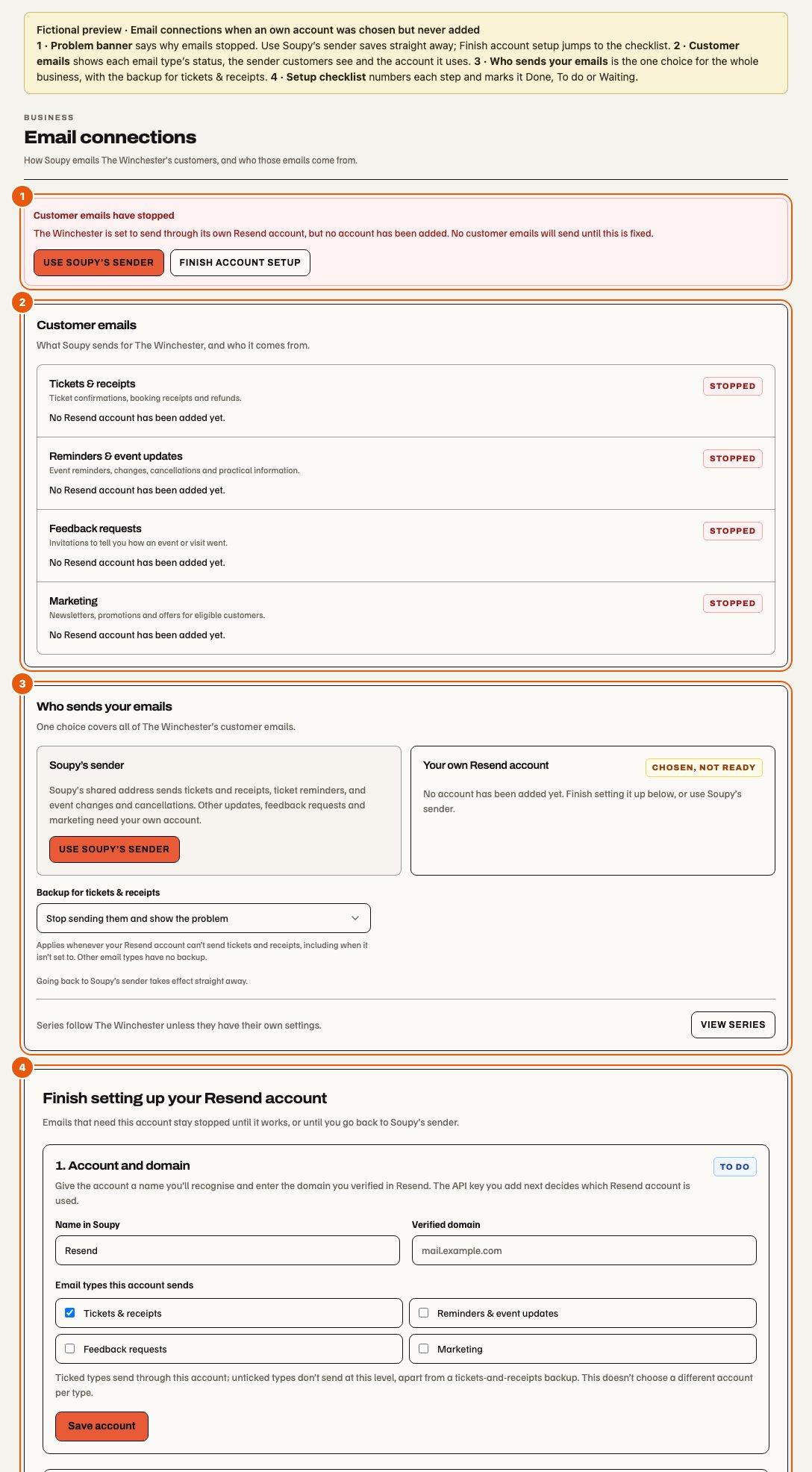
The Email connections page. The organisation page is Email connections and a Series page has the same layout; Portfolio opens Portfolio email defaults. From top to bottom:
- Customer emails have stopped appears only when an email type that should send has stopped. It names one cause and the fix. When a level chose its own Resend account but never added it, every email type stops. The banner then offers Use Soupy’s sender (Use ’s settings where a level is above), which saves straight away, and Finish account setup, which opens the checklist. A sender problem offers Fix the sender where a sender saved at that level would be used; a problem at a level above names that level. Tickets & receipts that the level's own account isn't set to send, with no backup, also count as stopped; the banner then offers Choose a backup and Edit the account. A sender saved where no account can send it is explained without a button. Read-only viewers see the cause without buttons.
- Customer emails has a row each for Tickets & receipts, Reminders & event updates, Feedback requests and Marketing: an example, a status, the From and Reply-To customers see, and the account and level they come from. Sending and Using backup mean it sends; Using backup appears only when the chosen account can't send tickets & receipts, or isn't set to, and the backup sends them; the row says which. Off means the account doesn't send that type, Not set up that it needs the business's own account, and Stopped that it should send but can't. Rows sent by Soupy say ticket emails show “ via Soupy”; for updates, Soupy covers ticket reminders, event changes and cancellations only. Customise sender appears only where a sender saved at that level would be used, so not on a backup route, which reads the senders of the level whose account it borrows. Saving a sender pauses that email type until a test email with it succeeds.
- Who sends your emails is one choice for every email type at that level: ’s settings, or Soupy’s sender when no level is above, or Your own Resend account. The chosen card says In use, or Chosen, not ready while the level's own account can't send. Following the level above saves immediately and says so; Set up your own account opens the checklist without saving. While the level's own account is chosen, Backup for tickets & receipts applies whenever that account can't send them, including when it isn't set to: stop and show the problem, send with the level above (not for a Portfolio), or send from Soupy's shared address. Other email types have no backup. An organisation links its Series with View series; a Series notes that its Stripe payment account doesn't choose who sends.
- The setup checklist, while a level sets up or uses its own account.
- Staff inboxes and your signature links to Inbox settings for people with Inbox in their workspace. Gmail mailboxes and personal signatures are managed there, not on this page.
- Recent changes, collapsed, lists account and setting changes at that level.
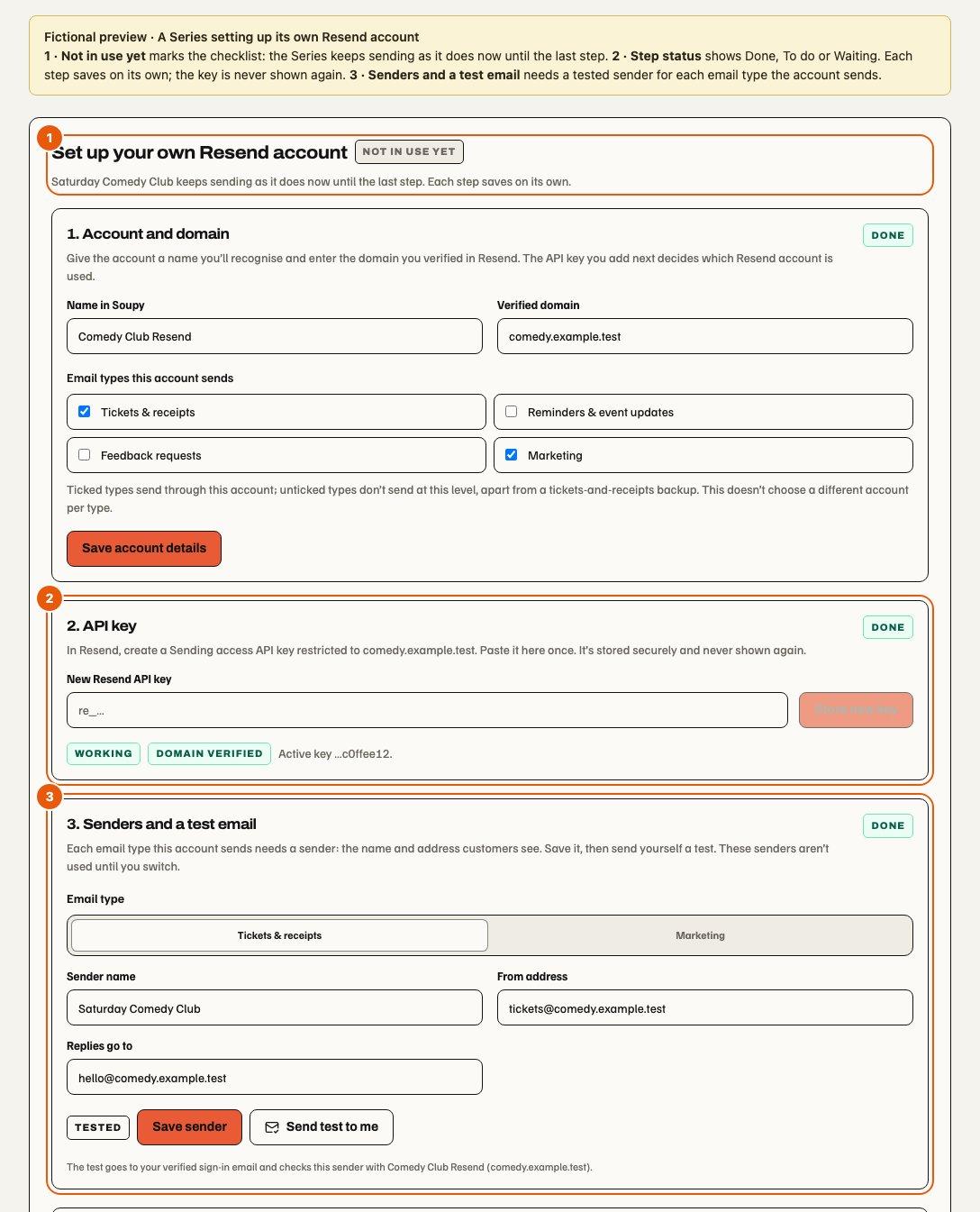
Setting up your own Resend account. Set up your own account opens Set up your own Resend account, marked Not in use yet, without saving anything. The level keeps its current route meanwhile; Cancel setup closes it while nothing is saved. Each numbered step saves on its own and shows Done, To do or Waiting, with what must happen first:
- Account and domain: a name, the domain verified in Resend and the email types the account sends. Ticked types send through it; unticked types don't send at that level, apart from the tickets & receipts backup. It doesn't choose a different account per type.
- API key: saved through a write-only field and never shown again.
- Senders and a test email: a sender for each email type the account sends, then a test to the administrator's verified sign-in email. These senders are not used yet; a prepared Reminders & event updates sender does not displace Soupy's default.
- Activate the key: activates the exact tested key.
- Delivery events: the Soupy webhook address and its signing secret.
- Switch to your account: the review below.
The switch step shows what each email type will do: send from its tested sender, keep sending tickets & receipts through the backup, stop, or not send. A parent backup is shown only when the parent route would send tickets & receipts; otherwise they count as stopping. For a business without a Portfolio, the parent backup is Soupy's. Soupy's backup covers eligible tickets and receipts only. Switch to this account needs an active key and a tested sender for every email type the account sends. Email types that send today but that the account does not send stop at that level and at every level that follows it. For an organisation or Portfolio, the review also lists inheriting Series and businesses whose own senders send today but stop until each is tested with the new account after the switch; a sender cannot be tested with an account its level does not use yet. Large portfolios are checked up to a limit, and the review says when it could not check them all. It names only the Series and businesses the administrator may open; any others fall under the same note. A Portfolio review shows each Series with its business. When anything stops, the administrator must tick an acknowledgement. Soupy refuses a switch whose review is out of date, including a sender edited or retested since. Switching takes effect immediately and needs the same configure permission as the account choice. For each email type the account sends, the tested sender replaces the level's previous one; a previous sender tested with the inherited account is kept unused for going back. Marketing, journeys and checkout reminders already queued on the current route are skipped, not resent. Desktop applies the pending-work guard first.
A level whose own account is chosen but can't send shows Finish setting up your Resend account, or Your Resend account needs attention once it has had an active key, without a switch step. While a stored key waits on a successful test email, the senders step is marked To do. A revoked account shows Your Resend account was revoked: its retired key is not shown as active and the steps restart at Account and domain, because saving the account details again starts it over. Email types that need the account stay stopped until it works or the level goes back to the level above. A working account shows Your Resend account, with sender customisation, key rotation, delivery events and Revoke account. Settings show the masked key fingerprint, test and health state, domain status, fallback, recent changes and delivery-event setup. Secrets are not returned after save.
Portfolio opens Portfolio email defaults: businesses and Series in the Portfolio use it unless they choose their own. Its choices are Soupy’s sender for eligible messages or a Portfolio Resend account. There is no level above a Portfolio and no parent backup; business and Series exceptions are set in their own Email settings. The same overview and configure permissions apply at every level.
Account names are chosen by the administrator; the stored API key decides the Resend account. A level's own Resend account is a domain/key override, not necessarily another Resend account. For a different sender on the same domain, follow the business's settings and customise the Series sender. For a different domain in the same Resend account, set up a Series account with that verified domain and a key restricted to it. A separate Resend account uses the same setup with its own key and domain. Each account accepts one exact sending domain. Series Stripe payment selection is independent and does not choose the email account or grant email administration access. View series opens the only Series, or the searchable list when there are several. Routing retains each currently authorised detail route. An unrelated Series, another business or revoked access remains unavailable; saving still requires the exact Series or Portfolio communications capability.
Going back to the level above saves immediately and keeps the own account's senders unused for a later switch. A sender the switch replaced comes back if the inherited route still uses the account it was tested with; otherwise, or when a sender was saved for that email type since the switch, it is removed. An own account's senders are those tested with it, or untested ones on its domain for an email type it sends; senders tested with another account stay live. Returning an organisation or Portfolio to the level above does not review the senders below it: those tested with its account stop until tested with the parent's. Account and sender edits use explicit Save buttons; testing and activation remain separate actions. Changing the domain or email types of an account that is already sending pauses it until a sender test succeeds.
These controls are on web and desktop. Read-only viewers see the same page without edit commands and are told changes need an administrator with email setup access. Desktop account and purpose changes keep the pending-work guard; changing the purpose starts that purpose's local sender draft. Native mobile settings are not changed. Fictional previews cover the stopped, default and setup states in light and dark at desktop and phone widths; they are not live provider acceptance.
Rotation stages and test-validates a new key. Revocation previews affected levels, frozen jobs and replacement routes. Revoked jobs stop instead of silently routing through another account. A bounded or incomplete impact sample is labelled.
Customer-owned Twilio connection
The business Settings → Communications → Twilio connection screen is
browser-based and requires direct business organization.settings.manage.
Availability depends on approved published terms, matching server configuration
and verified provider callbacks. Until those are present it explains that setup
is unavailable. Desktop hands off to the website; no native account-authorisation
flow or live-service acceptance is claimed.
The administrator supplies the parent Account SID and confirms account control and direct Twilio billing, then authorises access on Twilio. Soupy asks for usage permission on the delegated account, not read access to all parent account data. Twilio accounts must be upgraded and use US1. Existing numbers do not move into the connection; UK regulatory requirements need separate reviewed provisioning.
The return verifies the current administrator, business, short-lived browser request, delegated account and expected parent. It records pending review; that state is not independent account-ownership proof and never activates Phone, SMS, number purchases or charges. Cancelled, expired, mismatched or failed returns leave services inactive and require a fresh request. Saved connection rows, not a return URL message, determine the displayed state.
A separately reviewed Phone binding shows Phone account reviewed. This is account-review evidence only; the Phone Overview still reports gateway, number, billing and receptionist readiness separately. A CRM SMS sender reviewed against the current connection revision shows SMS sender reviewed; sending readiness stays in CRM SMS campaigns. A stale or revoked connection returns to needing review. Ordinary business settings authority cannot approve either operational binding.
Disconnect disables the local candidate using its current revision. Queued CRM SMS from that account are skipped and do not resume after reconnecting. It does not release numbers or stop Twilio rentals; provider access and resources must be managed on Twilio. Verified provider revocation disables the exact candidate revision; a stale notification cannot disable a reconnected account. Disputed unreviewed claims require an audited platform correction. Phone provisioning, spend limits, source permissions and billing-model review remain separate.
Delivery outcomes and SMS
Queued, provider-accepted, delivered, failed and uncertain are distinct outcomes. Retries use frozen content/source context and idempotency rather than sending a fresh lookalike message. A send attempt holds each email or SMS for one minute from when it starts preparing it. After that, Soupy returns the message to the queue, and the late attempt can no longer retry, fail or skip it, or start an SMS; a provider acceptance it reports still counts. An SMS whose provider request had already started is marked uncertain instead and never resent. If the attempt had started sending an email, the next waits the same growing delay as a retry after a failed send, as does an SMS that never started sending. An email that a busy batch did not reach within the minute, or that a stopped batch had not reached, keeps its place in the queue instead. An email gets five attempts. An attempt counts once it starts sending, or when it fails before then; a pickup that only waited for the hourly sending limit, or that never started sending, does not. When the fifth outlives its hold or stops without reporting, Soupy stops retrying and marks the message failed, although that attempt may still reach the provider. Its recipient and offer limits stay used, a funded reward that may have been sent stays reserved until it expires, and an Inbox reply shows as failed. Bounces, complaints and suppression can prevent delivery. A test send or saved template does not prove a complete customer journey.
Twilio provider readiness supports Bookings SMS content and signed status/incoming callbacks. CRM SMS campaigns and journeys instead send from each business's own connected Twilio account and report to separate Connect callback routes; the shared routes cannot record CRM receipts or STOP replies. The UI can save SMS templates while sending is unconfigured. Segment counts distinguish GSM-7/UCS-2 costs. Provider wiring alone is not a complete send workflow or a permitted audience; the owning product must freeze recipient, version, purpose, consent and suppression before sending.