Report photos and later report evidence have a conditional direct-image adapter for admitted businesses. Staff and guest upload grants retain their source limits and expiry; uploading never submits a report. Current report authority is checked again before completion and download. Cancelled or expired unattached photos follow source retention, while submitted evidence stays attached to the report. Web and native retain selected photos on failure. Provider rollout and installed-device acceptance are separate.
Maintenance carries a fault from report through triage, assignment, approval, repair verification and closure. Reporting a fault, approving spend, dispatching a contractor and verifying a repair are separate authorities.
Control desk and job sheets
The /maintenance workspace presents operational attention, pending spend, contractor visits and verified
hand-backs. Its work functions cover Control desk, Job sheets, Approvals, Contractor visits and
Reporting access. Job sheets can be searched by job, venue or asset and filtered by operational state. A
selected sheet shows fault details, risk/immediate control, location, responsible work, evidence and currently
permitted next actions.
Use Report a maintenance fault to record title, what happened, priority, likely trade, observed risk, risk summary, whether the area is secured, venue and area/space within the building. The optional asset selector appears when Assets contributes permitted records. Add up to five photos and inspect/remove them in the draft before submission.
Report-only staff can submit without gaining the work queue. Triage reviews safety and whether work can wait. Critical work bypasses routine consolidation. Internal assignment selects an eligible Person. Quote requests, approval requests, contractor details, amounts and decision notes become attributed workflow evidence on the same ticket.
Contractor visits and governed spending
- Select compatible job sheets and Plan a shared contractor call-out with contractor and access start/end. Each ticket retains its own evidence and approval; a shared visit does not pool away those controls.
- Record contractor contact evidence, such as a phone note, email-thread or portal reference. This records contact; it is not a claim that Soupy sent it.
- Record acceptance and obtain current approved spend for every visit item. Dispatch requires those facts and the appropriate capability.
- Use the time-bounded contractor link to expose only assigned visit work and required access/evidence. Contractors submit their work evidence there.
- An authorised operator verifies the repair. Close verified maintenance work then records final hand-back notes; verification and closure differ.
Independent approvals do not allow requesters to approve their own requests. Changed or expired approval evidence can invalidate a next action. Emergency users can record an immediate safety action and why normal approval could not wait; a separate retrospective review remains required.
Competitive contractor quotes and invoice reconciliation
Maintenance includes Quotes & tenders, and the authenticated supplier portal
at /supplier includes Contractor quotes. Known contractors
reuse supplier businesses, active private trading relationships and their own
supplier memberships; they receive no buyer staff access. The initial scope is
web, portal delivery, text discussion and one contractor awarded the whole batch.
Email notifications, quote-file uploads, split awards and post-award variations
are not part of this addition. New work requires a separate quote request.
- Select 1–20 compatible, triaged jobs at one Site and one or several contractors. Enter a request title and closing time. Critical work keeps its emergency path. Publishing the request makes it available to every addressed contractor in their portal; it does not claim an email was delivered.
- Each contractor submits one priced line per job, terms and a validity time. Revisions preserve previous quotes. Private discussions belong to that contractor's invitation; competitors cannot read other bids or conversations. Multiple authorised buyer operators can review the same request.
- Select an exact current quote and request the existing per-job spend approvals. The requester and members of the winning contractor cannot approve their own award. Decline a bid with a reason, or withdraw a selection for revised terms. After independent approvals, award the entire batch once and create its accepted contractor call-out. Existing dispatch and repair verification remain separate; a visit link cannot start work before dispatch.
- The awarded contractor's administrator/accounts role can create an invoice from the accepted lines or submit corrected amounts under the same claim. Each job is billed once; retries and stale revisions cannot create another payable. An invoice already in approval or accounting cannot be rewritten.
- A buyer with current Maintenance viewing and Purchasing invoice-review access checks the contractor submission against every accepted net/tax line and independently verified repair. Any difference holds the full invoice. Discuss it in the same private thread; the contractor submits the correction, then an independent buyer rematches that exact version. Buyer extraction edits, goods matching and non-PO review cannot waive the accepted quote.
- A matched invoice can request ordinary independent Purchasing approval. Export and payment recording repeat the quote/completion checks, including source changes after approval. One existing Purchasing ledger owns settlement. A local hold cannot recall a payment already made outside Soupy.
Quote creation/selection uses existing maintenance.quote.request,
maintenance.contractor.contact and maintenance.approval.request authority at
every job; spend decisions and dispatch retain their existing capabilities.
Invoice review additionally requires Purchasing to be enabled with an active
supplier account in the quote currency. Financial authority never grants
Maintenance source access. Disabled relationships remove supplier access and
block new decisions; authorized buyers retain historical invoice evidence.
Revoked memberships, changed Site ownership and retired entitlement incarnations
remove affected source access. Lists cover the latest 50 requests/invitations;
job selection considers the latest 200 current-incarnation reports and contractor
selection considers up to 100 active relationships. Older work may not appear.
Request lists offer Refresh requests. While a request is open, new private
messages and quote changes refresh its content automatically. Access is checked
separately; a changed audience hides the previous content until a fresh read
succeeds. Failed reads offer a retry and preserve unfinished drafts.
Source tests, fictional previews and authenticated development checks do not
establish authenticated production acceptance.
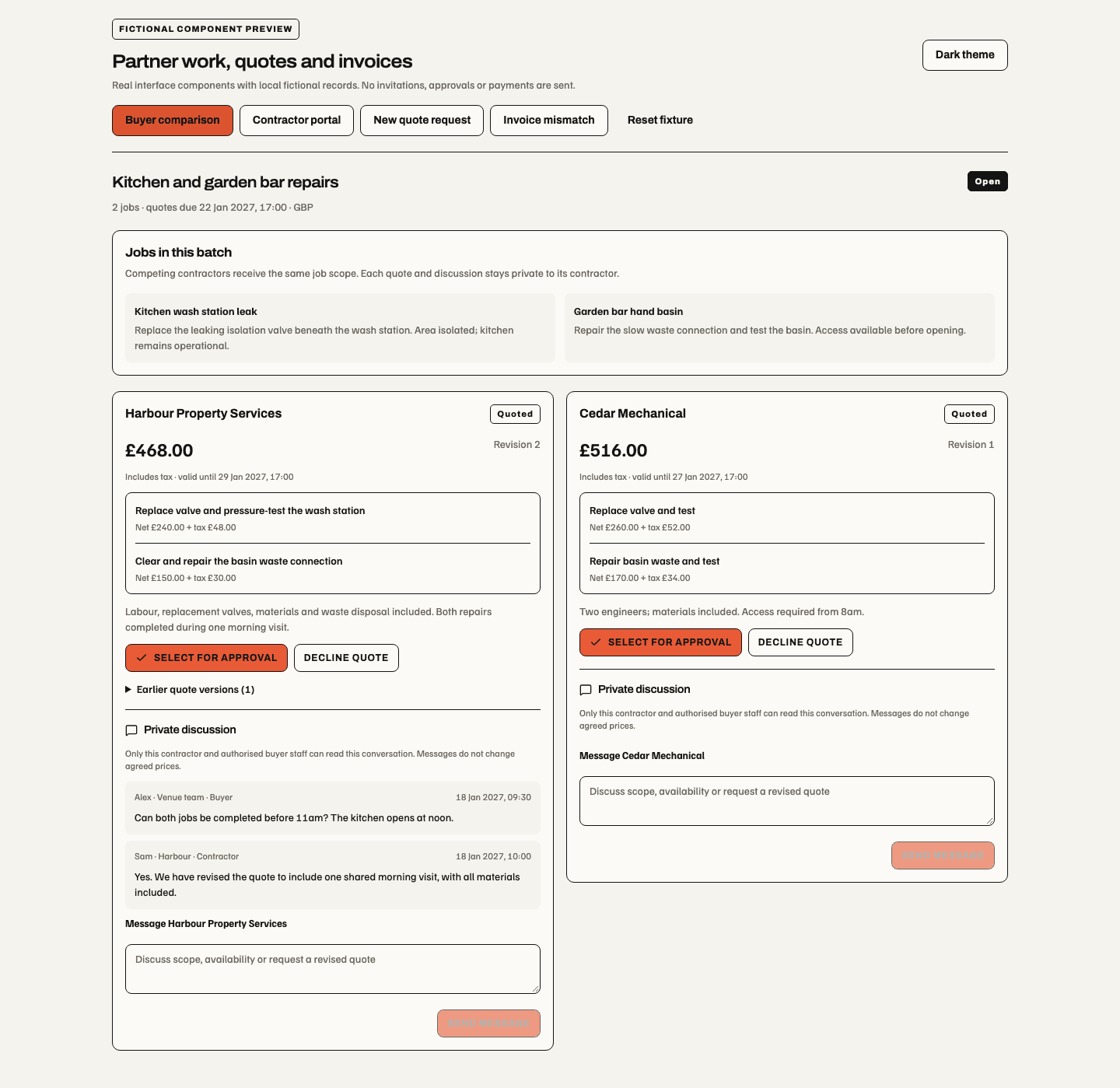
17 October 2026, isolated component harness with fictional records. Each contractor has a separate quote and private thread. The narrow invoice example shows agreed versus invoiced lines and a full payment hold. These images do not establish authenticated runtime, provider delivery or production acceptance.
The 18 October signed-in development checks cover the actual buyer/contractor forms, private comparison, payment hold and corrected settled invoice. Their screenshots and API evidence remain development acceptance; production/provider outcomes are separate.
Restricted public reporting
Reporting access → Create a restricted reporting tag generates a create-only NFC/QR link at
/maintenance/report/{token}. Its reporting-point name identifies the source. The same bounded form can be
reached for one asset at /maintenance/report/asset/{token}. A bearer may submit a fault but cannot browse
Maintenance or read private photos. Links can expire or be revoked.
Photo uploads bind to the reporting source and draft for 30 minutes. Submission consumes the report and its selected evidence together. Failed uploads keep the draft open; an uncertain submission retains its operation and checks for the existing report before retrying. Anonymous evidence records its link/tag source without inventing a staff identity. The reporting point is not an authenticated workplace or general public read account. The upload guard requires currently enabled Maintenance and the original reporting authority for uploads and status checks. A duplicate upload rechecks that authority and its intact private file after reading the request. Cancelled, expired or missing draft files cannot produce a success receipt; an unchanged submitted file can still confirm its original receipt after draft expiry. Submitted evidence stays private. Downloading a reporter's own file requires current reporting permission for that work, or another current permission that admits the work item. File ownership alone does not survive revoked access, disabled Maintenance or a retired workspace incarnation. Uploaded report drafts remain private before submission, including when another record refers to the same file as public artwork.
Permission and settings reference
| Capability | Responsibility |
|---|---|
maintenance.report | Create a bounded fault report. |
maintenance.view | Read permitted work and history. |
maintenance.triage | Triage and reporting-access administration. |
maintenance.assign_internal | Assign internal repair responsibility. |
maintenance.approval.request | Request approval. |
maintenance.quote.request | Request/record quotation workflow. |
maintenance.contractor.contact | Plan/contact contractor visits. |
maintenance.contractor.dispatch | Dispatch approved contractor work. |
maintenance.spend.approve | Decide permitted spend independently. |
maintenance.verify | Verify submitted repairs. |
maintenance.close | Close verified work with hand-back evidence. |
maintenance.emergency.act | Record exceptional immediate safety action. |
maintenance.settings.view, maintenance.settings.manage | Settings reach. |
General, Triage, Contractors and Approvals settings sections currently display configuration shells rather than general-purpose policy editors. The work queue and its exact record permissions determine the available operational actions. Missing escalation/approval readiness can block dispatch; a hidden button is not the only enforcement because the backend rechecks the stored ticket.