Purchasing owns buyer orders, receiving, invoice review, the supplier ledger and accounting handoff. Products are shared buyer identities used by Purchasing, Stock and Production. A supplier business has global identity but each buyer's trading relationship, prices, account code, terms and documents remain private.
Workspace map and supplier setup
| Surface | Purpose |
|---|---|
/purchasing, Orders & receipts | Draft/approve/send orders, inspect delivery state and record actual receipt. |
| Invoices & receipts | Capture private documents, inspect connected-source activity, review extraction, matching and discrepancies. |
| Ledger & export | Approved supplier ledger, payment evidence and frozen accounting exports. |
/purchasing/catalogue | Staged catalogue revisions, product matching and price-book review. |
/purchasing/buying | Compare approved terms and build an agreed-price order. |
/purchasing/discovery | Supplier-authored public discovery and requests for a trading introduction. |
/purchasing/reports | Supplier performance, control totals and permitted Stock/Production/EPOS contributions. |
/purchasing/migration | Source-hashed migration batches, open-work adoption, archive search and cutover waves. |
Onboard supplier establishes the buyer relationship; supplier users operate through the supplier portal with their own membership. They do not need buyer staff access. A disabled or conflicting existing Soupy identity cannot keep using supplier membership to read private relationships or invite people.
Supplier invitations require a verified recipient email and current authority from the original inviter when accepted. A supplier administrator must still hold that role with the same valid identity. For a buyer's first supplier administrator invitation, the original buyer must still manage Purchasing in the same organisation and originally authorised Purchasing workspace. The recipient's own access cannot substitute for that authority. Older pending invitations without a recorded authority check must be reissued; existing accepted memberships keep their independent access.
Discovery publishes only approved public catalogue/service/credential summaries. A discovery request is an introduction, not an approved trading account.
Catalogue, prices and comparison
Supplier manual input, file imports and signed API submissions create immutable staged revisions. Buyers review row validation/diffs and approve catalogue identity, then separately accept an exact equivalent or acceptable substitute for a canonical product variant. An identifier match alone does not authorise substitution. Variants carry explicit units, identifiers and lot/expiry policy; allergen candidates remain separate from reviewed declarations.
Price revisions belong to a confidential relationship and target Group, Legal Entity or Site. More specific approved terms take precedence. Overlapping live terms require explicit supersession; locks, effective dates and historical terms remain respected. The reviewed row binds description, pack and unit.
Compare & buy shows effective ex-VAT cost, free quantity, tax/deposit, delivery, minimum order, freshness, availability and conditions. Supported offer rules include quantity tiers, free goods, fixed/percentage discounts, promotional prices, bundles, mix-and-match and delivery/spend incentives. The shared calculator enforces stackability and exclusions. A displayed cheap price is not orderable until its conditions and approved mapping are satisfied.
Order and receiving workflow
- Build a draft from current approved terms, selecting supplier relationship, destination and valid quantities. Review goods, discounts, deposits, VAT and delivery. The draft freezes its approved term revision and calculation.
- Obtain independent order approval. Mark the approved immutable revision sent through its configured portal/email/API route. API suppliers require an outbound endpoint; queued delivery, acceptance and receipt are separate states.
- Review supplier acknowledgement, rejection, back-order or change proposal. Accepting a material revision returns the PO to draft for fresh approval.
- Record actual goods received at the Site. Supplier ASNs/dockets may prefill but remain claims. Confirm quantity, rejected/damaged/substituted goods and required lot/expiry/private-photo evidence.
- Correct an erroneous receipt by attributable reversal/replacement. Original receipt evidence remains available. Confirmed receipt intake into Stock is a separate mapped physical-stock operation.
Configured API dispatch signs an exact order revision and retries a bounded five times. Exhaustion is visible and needs review. A supplier's status cannot silently rewrite the buyer's approval, delivery destination or received quantity.
Invoice review, discrepancies and settlement
Capture an invoice or credit note from private PDF/image evidence. OCR produces an editable draft with confidence. Human review creates the version used for explained two- or three-way matching; raw extracted text expires after 30 days. One document may allocate across multiple orders/receipts, and vice versa.
Reconciliation requires current access to every contributing order, receipt and prior invoice or credit, including their original Sites. Invoice review or approval alone does not grant purchase-order access; a reviewer can use separate scoped PO-read authority. Saved matching results, buyer discrepancies, invoice approval, manual payment recording, accounting exports and Purchasing work shown to the Assistant retain that source boundary. Reports apply their distinct reporting permission to each contributor. A later supplier-linked replacement or credit adds its own source requirement. Unavailable contributors remove the derived record before totals or counts are returned. Non-PO invoices retain their separate evidence and independent approval.
Results created without complete source records are retained but unavailable. A fresh authorized reconciliation can replace missing source evidence only in a supported review/matching state with known source details. Invoices awaiting approval, approved, exported or settled do not have that ordinary recovery path. Reconstructing historical authority from current access or current record placement is not supported.
Missing receipts/dockets, duplicate documents, unresolved shortages, substitutions, stale terms, low confidence and price/quantity/tax discrepancies hold the full payable. A supplier response needs an independent buyer decision. Factual gaps require corrected evidence and rematching. Non-PO documents have separate coding, evidence and approval; they do not create retrospective POs.
Contractor invoices created from Maintenance awards use the same payable and payment holds. Their dedicated matcher compares the exact accepted quote with verified repair work; a generic goods or non-PO review cannot replace it. The contractor submits a correction and an independent buyer reconciles that version. See contractor quotes and invoice reconciliation for web availability, permissions and the first-slice limits.
Monthly Talent invoices offering Stripe must first close that online request through Talent Money → Use venue payment before Purchasing records venue payment. Existing settlement prevents a later online request for the same claim.
Independent invoice approval creates supplier ledger evidence. Accounting handoff freezes approved CSV/XLSX mappings and export content. A configured SFTP profile is configuration, not proof a file was transferred. Importing settlement records or recording payment evidence describes an external payment; Soupy does not initiate the bank transfer from Purchasing.
Gmail invoice and receipt capture
This web/desktop feature requires an active Purchasing product, an authorised Gmail connection and explicitly enabled capture. It can operate without the Inbox product. Actual provider operation requires acceptance; the fictional preview below does not establish it. Native mobile retains its existing Purchasing screens.
Open Invoices & receipts → Connected sources to connect or reuse Gmail, choose the destination business and optional Site, and save a capture draft. Connection management requires organisation-level Purchasing access; shared connection administration also retains Communications connection permissions. Saving a draft does not enable capture. Gmail read access is sufficient for Purchasing alone; adding Inbox may require separate read/send consent. Reconnect keeps the same verified Google identity and each consumer's separate checkpoint.
Shared sources examine likely incoming financial documents, including archived messages. Spam, Trash, drafts and sent-only messages are excluded. Optional exact sender and Gmail-label rules narrow selection. Personal sources require the owner's rules and private preview before Enable automatic capture. Sender and label conditions within a rule both apply; any approved rule may qualify. The owner approves sharing matching financial evidence with the displayed business. Connecting Gmail alone never grants that sharing. Other messages, quoted history and unrelated attachments remain private. Mixed or ambiguous personal/business originals require an explicit whole-document business check before publication; otherwise provide separate business evidence.
The destination stays fixed so rule edits cannot move historical documents or their access to another Site. Changing rules pauses capture and requires fresh owner approval where applicable. Pause capture stops that consumer's pending processing; global disconnect stops capture and any Inbox import. Already published Purchasing evidence retains its financial history and source access. These actions do not delete the original Gmail messages or change their labels.
Historical import defaults to the previous 90 days, with editable received- email dates covering up to two years and ending today or earlier. Preview import reads the selected window without publishing documents or creating old unread conversations. Start this import is a separate action. Progress, failures, cancellation and resumption remain visible; an interrupted or limited scan is not a completed archive. Document discovery has its own checkpoint, including later Gmail label changes, and does not alter Inbox's conversation cursor or unread state.
Capture queue separates processing/review, completed activity, duplicates and failures. Select a document to inspect its retained private original, proposed type and extracted amounts. Supported PDF/image attachments and body-only financial evidence enter the same workflow. Incomplete fields can be completed in financial review. Password-protected or oversized originals, portal links, unsupported files and PDFs containing several invoices need manual resolution. Automatic extraction is bounded to 10 MB and 30 PDF pages. Missing or conflicting supplier, date, currency, lines or totals remain review work; extraction never creates a reviewed financial decision.
Exact repeated originals and source retries must not create another financial posting. Similar dates/amounts alone suggest a match. Link later invoice, receipt or payment-confirmation evidence to the existing permitted financial record; conflicting evidence remains held rather than rewriting approved amounts or frozen exports. When Inbox is enabled, Send to Purchasing beside a selected supported Gmail attachment makes an explicit business copy for manual financial review without enabling an automatic rule or sharing the conversation.
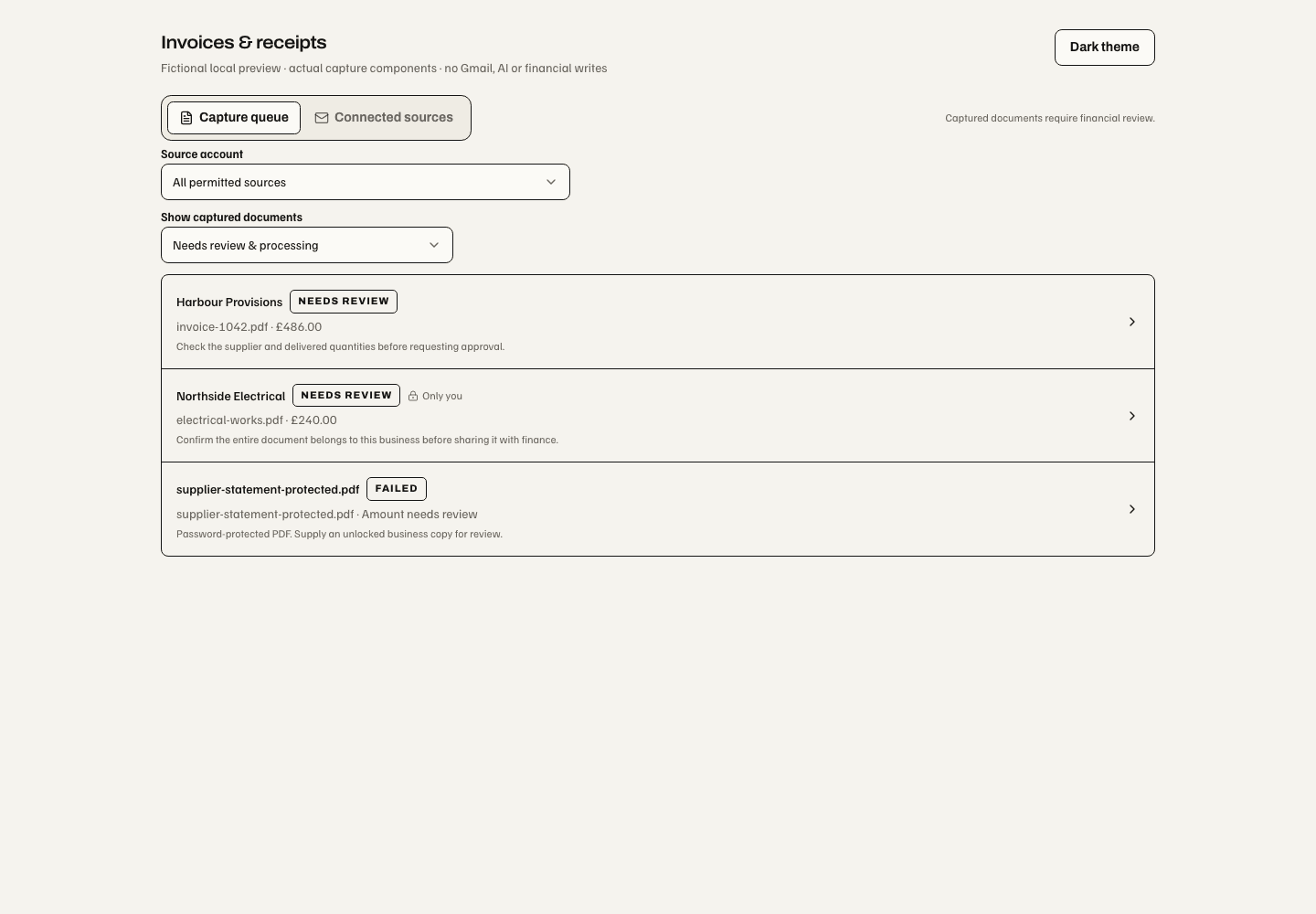
22 October 2026 local component fixture with fictional businesses and files. Capture queue shows ingestion state independently of invoice approval. Connected sources owns source configuration and historical import. Only you identifies unpublished evidence from an owner's personal mailbox.
Businesses with older saved originals must complete the guarded original-index setup before enabling automatic capture. A missing or invalid original leaves setup incomplete; historical preview remains available. See the activation runbook.
Paid business receipts
Choose Paid business receipt for a company purchase already claimed as paid. It has its own optional supplier receipt reference and an internal document reference; Soupy does not invent an invoice number. Review the supplier, amounts/tax, business purpose and order match or non-PO accounting coding. An extracted “paid” label is a claim, not verified bank settlement.
In Ledger & export, an authorised accounting administrator configures business
payment accounts with accounting codes and recognisable company-card/bank/cash
labels. A person with purchasing.payment.record confirms the receipt's exact
full payment, date, reference and business account against the original evidence.
An independent approver checks the frozen record. Approval creates one positive
paid-expense entry and applies that confirmed payment in the same transaction.
The result is labelled Recorded paid externally and does not offer another
payment. Missing payment evidence or account mapping leaves the receipt in review.
Reversing payment evidence retains history and reopens review rather than creating
an ordinary unpaid bill. Partial, mixed-tender or cross-currency receipts need
manual finance resolution; staff reimbursement is outside this workflow.
Receipt-aware accounting exports freeze posting type, payment-account code, paid date/reference, settled amount and zero outstanding. A settled expense can be exported once while retaining its settled state. Historical export versions remain readable; older invoice-only formats reject paid-receipt postings. A downloaded export remains an accounting handoff, not proof of posting in another system. Reports distinguish paid expenses from supplier invoice totals.
Reports, migration and permissions
Reports retain each contributor's enabled module and actual Site permission. Unpermitted price books, stock or recipe cost cannot leak through totals. Migration stages source-hashed master data, review-required open work and a read-only legacy archive. Explicit adoption makes eligible source work native; cutover comparison/certification, activation and rollback retain checkpoints. Historical imports are labelled source evidence, not fabricated Soupy audit.
| Permission | Responsibility |
|---|---|
purchasing.view, purchasing.manage | Read permitted buyer work; manage ordinary transactions/setup. |
purchasing.catalogue.manage, purchasing.catalogue.approve | Prepare catalogue work; approve source revisions/matches. |
purchasing.price.approve, purchasing.order.approve | Approve agreed terms and orders. |
purchasing.receiving.confirm, purchasing.receiving.correct | Confirm actual receipt and attributable corrections. |
purchasing.invoice.review, purchasing.invoice.override, purchasing.invoice.approve | Review, permitted override and independent payable approval. |
purchasing.payment.record | Record external payment evidence. |
purchasing.accounting.export, purchasing.accounting.configure | Frozen accounting output and mapping/profile configuration. |
purchasing.migration.manage, purchasing.reporting.view | Govern migration and cross-suite reports. |
purchasing.settings.view, purchasing.settings.manage | Settings access. |
General, Suppliers, Orders, Invoices and Approvals settings are currently section shells. The concrete controls above live in their operational workspaces. A supplier user never gains buyer capabilities through supplier membership.