Find a guide
Open Knowledge base in the Soupy website navigation or footer, or visit
/help. It is public and does not require a Soupy account. Browse all guides or
choose one of six topics: Getting started, Customers & sales, People & work,
Venue operations, Assistant & connections, and Settings & apps. Each guide has a
summary and estimated reading time.
Ask about Soupy
Ask a question accepts a question about a workflow, setting or capability, such as How do I refund a ticket? or How does Gmail sync work? The page matches the question against the same published guides and displays relevant source passages under From the published guides, with links to their exact sections. These are extracts from the guides, not generated answers. Open the linked section for the complete workflow and its availability conditions.
Questions stay in the current browser tab's memory. They are not added to the page address, saved as conversations or sent to an AI service. This help field has no access to personal information, business records, private staff knowledge or the workspace Assistant, and cannot carry out actions. Requests for live records receive a scope explanation. Unclear or unsupported questions ask for more detail or suggest searching the guides instead of inventing an answer. Clearing the question or reloading discards it. Question matching requires JavaScript; Search guides remains available without it.
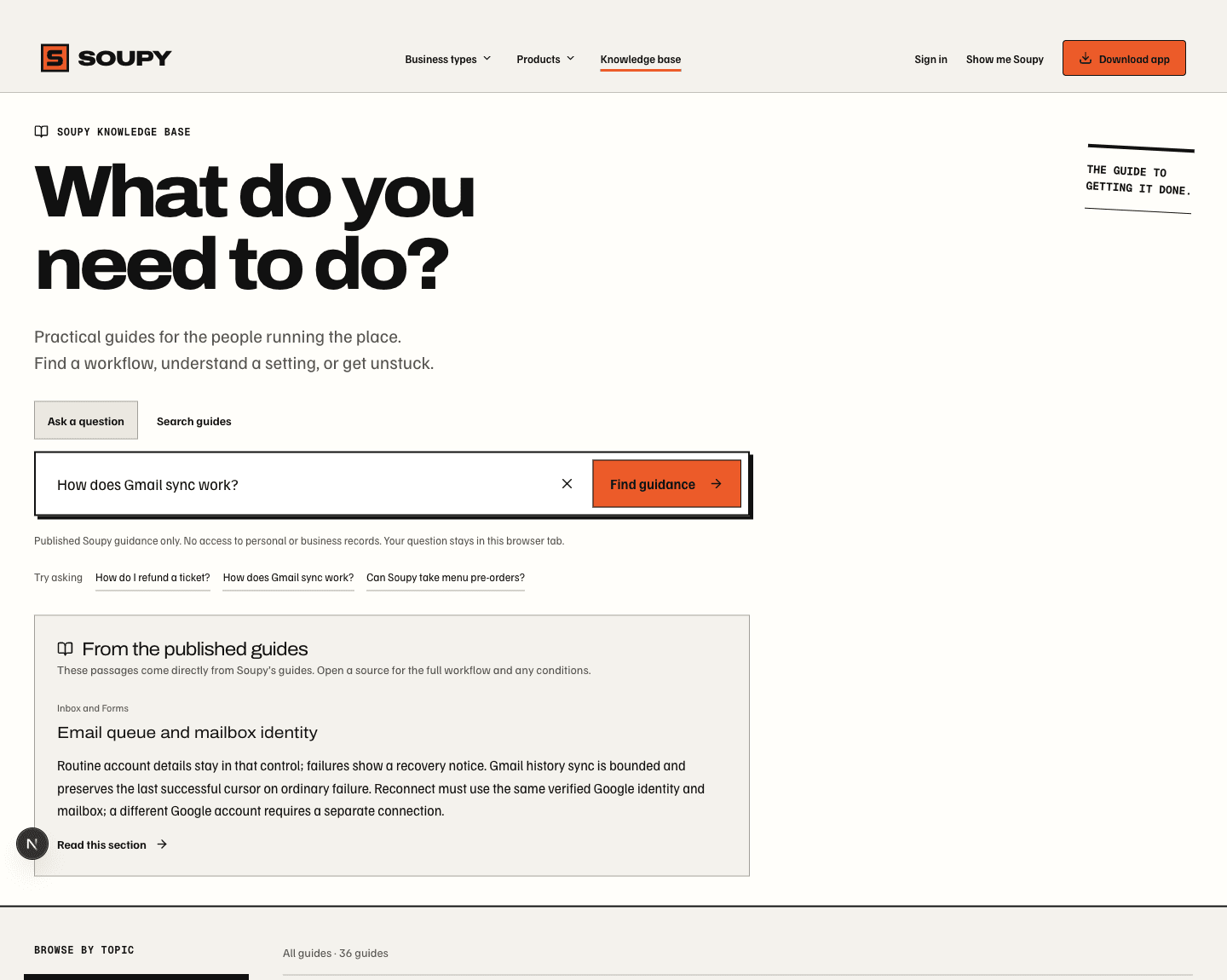
Local development preview, 9 October 2026; published product guidance only. Ask a question / Search guides: switch between local questions and shareable keyword searches. Find guidance: find a source passage without contacting a workspace. Read this section: open the complete published workflow; the short extract is not a substitute for its conditions.
Search and share results
Search by product, workflow or setting, such as refund, Gmail or staff access. Search covers the published guides and their sections. Results identify the guide, matching section and an excerpt; selecting one opens the relevant section. A selected topic limits the results. Clear the search to return to browsing, or use Search all topics when a topic has no matches. No-match results suggest a shorter phrase or product name.
The search phrase and topic are stored in the page address, so the current
search can be bookmarked or shared. The / shortcut or Command/Ctrl+K focuses
the search field; Escape clears it while the field is focused. Search submits
and topic links still work when JavaScript is disabled.
Read and navigate articles
Each guide has its own /help/{article} address, breadcrumb, nearby guides and
related reading. On this page links go to individual sections; the section
headings are also permanent links. On smaller screens the contents list opens
from a disclosure above the article. Wide tables scroll within the article,
and explanatory screenshots retain their example context and annotations.
Article search returns to results across the knowledge base. An unknown article
address shows a missing-guide page with a route back to browsing and search.
The knowledge base explains Soupy's product behaviour. It does not search a business's private records or grant access to a product. Workspace enablement, individual permissions, preview rollout and provider setup still determine which features a person can use. Staff knowledge and training inside Messages remain a separate, permission-controlled workspace feature.