
One show or a whole season. All together.
Your whole programme. Set up to sell.
Create recurring events with multiple show times, ticket types and shared capacity. Bring admission, food, drinks and extras together, sell on your own website, and keep every date connected from checkout to check-in.

In the product today
Recurring setups with multiple show times, ticket types and shared capacity; flexible pricing, included benefits, optional extras, Series promotions, website embeds, mobile tickets and door operations. Multi-seller checkout requires enabled, compatible Payment Profiles and ready payment accounts; native Wallet passes require configured issuers.
See what’s nextThe guest side
A proper ticket.
Right in their pocket.
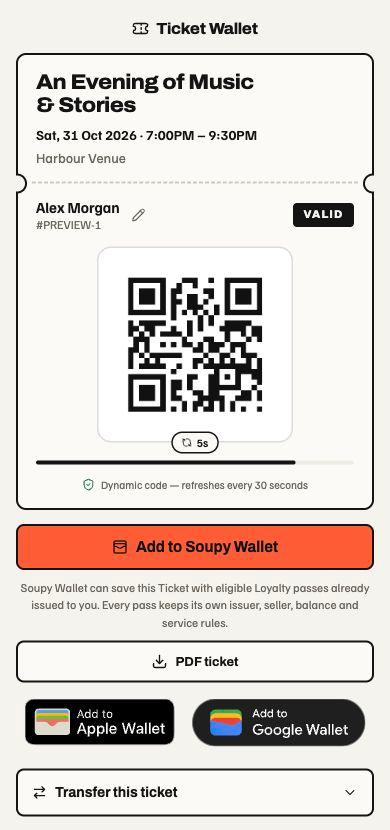
The sale is only the start. Give every guest a clear mobile ticket, with their details, their QR and their next steps in one place.
Everything they need at the door.
Event, date, time, venue and attendee name sit together with the live admission QR. One ticket, ready to show.
Open it. Save it. Print it.
Guests can open their ticket on mobile, download an eligible PDF, or save to Apple Wallet and Google Wallet when enabled.
Plans change. Tickets can follow.
Eligible guests can edit an attendee name or transfer a ticket. Those actions stay separate from saving it, and follow your event’s rules.
Native Wallet saves require a configured issuer. PDF, name changes and transfers depend on the ticket’s policy and current status.
Recurring events. Flexible tickets.
Set up the show.
Repeat the good bits.
A weekly comedy night, a weekend of performances or a season of fixtures. Bring the dates together in one Series, with tickets that fit each event.
- 01
Build one event properly.
Add your ticket types, prices, included benefits and checkout questions. Give them separate stock or one shared capacity pool.
- 02
Choose when it repeats.
Pick weekdays, an end date and one or more show times. Preview the dates and exclude holidays or other nights off.
- 03
Carry the setup forward.
Each performance gets its own inventory and the saved ticket defaults. Review changes to eligible future dates while preserving existing sales and individual event overrides.
Different nights can have separate recurring setups within the same Series. Irregular fixtures can sit together in a Series without a repeating schedule. Publishing and opening sales remain your choice.
See how recurring setups workOne recurring setup
Every Sunday · 8–29 Nov 2026
15:00 and 19:30 Europe/London
- 15:0019:30
- 15:0019:30
- 15:0019:30
- 15:0019:30
Ticket defaults on every performance
- Early birdAdmission · limited sales window£15
- StandardAdmission£20
- Ticket + drinkAdmission and a drink£25
- Ticket + mealAdmission and a meal£35
4 ticket types. 100 places.All four types share one pool per performance.
One event. More than one business.
Every item.
The right seller.
Split a ticket into priced inclusions. Add food, drinks or artist merch on top. Assign each item to its own seller and bring it all together in one checkout.
The promoter sells admission. The venue supplies the drink. The artist pre-sells the T-shirt. Each keeps their own part of the sale.
One gig. Your seller mix.
Change a seller or remove an extra to see the split.
Admission and an included drink. Both are inside the ticket price.
Chosen separately. Each adds to the customer’s total.
Customers see who sells each item before paying.
- PromoterAdmission£20
- VenueWelcome drink£5
- ArtistArtist T-shirt£25
- Food traderPre-show supper£12
The same seller profile groups into one charge. Different profiles receive separate direct charges.
Illustrative prices before any applicable fees. These controls only change this example; they do not configure an event or take payment.
Sell the merch
before the doors open.
Offer T-shirts, records or posters with their own variants, prices and sales limits. Assign the sale to the artist’s seller profile and tell fans where to collect.
At the show, staff scan the web voucher, check the item and confirm the handover.
How add-ons and collection workMulti-seller checkout needs enabled, compatible seller Payment Profiles in the same business group, country and currency, with ready payment accounts and an appropriate seller limit. Each included line goes to one seller; any unassigned ticket balance stays with the event seller.
The Events workspace with sales summaries, series performance and the event schedule. Switch to Orders or Attendees and search the sample records.
Current workspace layouts with sample data. Nothing is saved or sent.
Events
Operate publishing, sales and event delivery from the live series.
Fictional sales history · Preview held at 21 Oct 2026, 12:00 UTC.
Series performance
A separate sales snapshot for every series.

Friday Comedy Club
2 events in total · 1 live · 1 draft
Next 1 live event
- Gross sales
- £1,290.00
- Tickets sold
- 86
Friday Comedy Club
Fri, 23 Oct 2026 · 19:30
86 / 120 sold
Next live event
Friday Comedy Club
Fri, 23 Oct 2026 · 19:30

Sunday Sessions
1 event in total · 1 live
Next 1 live event
- Gross sales
- £420.00
- Tickets sold
- 42
Sunday Sessions
Sun, 25 Oct 2026 · 16:00
42 / 80 sold
Next live event
Sunday Sessions
Sun, 25 Oct 2026 · 16:00
Event schedule
Live, draft and past events · Times at the venue
| Event / Series | Date & time | Status | Sold | Revenue | View event |
|---|---|---|---|---|---|
| Friday Comedy Club | Fri 23 Oct19:30 · Demo venue | Live | 86 / 120 | £1,290.00 | |
| Sunday Sessions | Sun 25 Oct16:00 · Demo venue | Live | 42 / 80 | £420.00 |
Explore the current Ticketing layout with fictional records. Search, switch views and try both themes. Nothing is saved, sent or charged.
On the other side of the shift
Less friction. More getting on with it.
- 01
Set up a recurring programme without rebuilding every date’s tickets.
- 02
Sell different ticket options against the same room capacity.
- 03
Connect the website sale, mobile ticket, guest list and door.
What’s included
Made for the job.
The practical details behind the promise. Built around the people doing the work, and connected to the information they need.
- 01
One setup. A whole run of events.
Choose recurring weekdays, multiple show times and an end date, then preview the performances and exclude dates. Each show inherits the saved ticket defaults with its own inventory. Different nights can have their own setups within one Series.
- 02
Different tickets. One capacity limit.
Offer early bird, standard and premium options with separate prices and sale windows. Share one capacity pool across ticket types, or give them separate stock. Free, fixed-price, donation and quantity-break pricing support different ways to sell. Collect what you need with checkout questions.
- 03
Tickets ready for a phone
Show event details, holder and live QR together. Guests can download an eligible PDF or save to Apple and Google Wallet with configured issuers; name changes, transfers and resale follow the ticket’s rules.
- 04
Included benefits, optional seller amounts
Optionally assign an included amount to a seller: admission to the promoter, a drink to the venue, a meal to the food trader. Allocated amounts stay inside the ticket price; the event seller keeps the remainder. Descriptive benefits need no individual price. Guests see each seller before paying; different eligible profiles receive separate charges.
- 05
Add-ons and artist merch presales
Offer optional food, drinks and merchandise with variants, prices and sales limits. Assign each add-on’s seller, explain collection and let staff confirm handover from its web voucher.
- 06
Your programme, wherever you need it
Put an Event, Series or business programme on your website with customisable Photo, List or Calendar embeds, including WordPress shortcodes. A Series can have its own domain or subdomain; a website section can serve listings and Event pages at /whats-on after separate hosting setup. Capacity, waiting lists, check-in and communications stay connected. Automatic WordPress account connection is pending release.
- 07
Ready for the door and the next event
Manage waiting lists, named guest lists, holds and attendee communications. Check tickets by QR, review Event and Series sales, and handle permitted transfers, resale and refunds. Series promotions can share one usage limit across dates.
More of the working product
What you can do with Ticketing.
Explore the tools behind the overview, then open a workflow for the steps, settings and availability that apply. Product access, rollout and connected providers determine what your workspace can use.
Programme and recurrence
- Plan one-off events or dates in a Series.
- Set recurring schedules and exclude dates.
- Use Series banners or choose artwork for an Event.
Ticket setup
- Set capacity and ticket inventory.
- Ask the questions you need at checkout.
- Reuse Series promotions and set sales windows.
Distribution
- Manage separate embeds for your websites.
- Choose List, Photo or Calendar views and exclude Events.
- Match colours, card spacing, corners and width; preview before saving.
- Install saved code or use the WordPress plugin with a shortcode; automatic account connection is pending release.
- Review embed statistics and save later changes explicitly.
- Give a Series its own domain or subdomain after DNS and hosting setup.
- Serve listings and Event pages under a website path such as /whats-on with a verified host and Cloudflare routing; checkout opens on Soupy.
Door and guest operations
- Manage named guest lists and promoter allocations.
- Check guests in by scanner, with supported offline door work after device setup and acceptance.
- Find attendees and export permitted records.
Aftercare
- Handle date swaps, transfers and resale under each ticket’s rules.
- Resend tickets and manage permitted cancellations and refunds.
- Review waitlist activity and communication outcomes.
Evidence and feedback
- See sales across Events and Series.
- Review audience trends for each permitted embed.
- Collect attendance-based feedback and handle service recovery privately.
Explore every workflow in the guides.
Choose a guide to see all its topics. The detailed guides include setup requirements, preview features and supported limits.
Ticketing, Events and Series23 workflow topics
Create events, sell tickets, manage admission and serve ticket buyers.
Read the complete guide- Screens and navigation
- Ticketing home operations
- Order source coverage
- Series sales window
- Event schedule views
- Create and publish an event
- The Belfast Guide event feed
- Edit an existing event
- Ticket products, inventory and checkout questions
- Series, recurrence and distribution
- Make an Event recurring
- Series banners and Event overrides
- WordPress experiences
- Managed embed studio
- Ticketing settings
- Set ticket purchase terms
- Turn the checkout soft opt-in on or off
- Event team roles
- Buyer journey and ticket aftercare
- Waitlist, promoter allocations and official resale
- Check-in, named lists and offline door operation
- Embed audience
- Reports, communication and feedback
Shared Add-ons3 workflow topics
Offer extras, explain seller charges and fulfil or refund a purchase.
Read the complete guideOrders, Payments, refunds and financial evidence9 workflow topics
Read payment state, configure fees and manage supported refunds.
Read the complete guidePasses and the Soupy Wallet3 workflow topics
Issue passes and understand the customer Wallet and mobile credentials.
Read the complete guidePart of the bigger picture
The context comes with it.
The guest, the venue, the team. Useful information should follow the work. Ticketing connects to shared records, with access controlled for your organisation and your people.
A clear picture
Today. And what’s next.
Recurring setups with multiple show times, ticket types and shared capacity; flexible pricing, included benefits, optional extras, Series promotions, website embeds, mobile tickets and door operations. Multi-seller checkout requires enabled, compatible Payment Profiles and ready payment accounts; native Wallet passes require configured issuers.
Automatic visit upsell recommendations remain product direction. Configured ticket inclusions, optional add-ons and merchandise presales for collection are existing capabilities; add-on shipping and native add-on passes are outside this implementation.
Good questions
Ticketing FAQs.
Can I create recurring events with different ticket options?
Yes. Configure one Event, then make a recurring setup with selected weekdays, one or more show times and an end date. Preview the dates and exclude any you do not need. The saved ticket defaults and shared capacity pools follow each performance, with separate inventory for every show. Named recurring setups are managed on the web.
Can I change future events without changing existing sales?
Yes. Edit the source Event and explicitly update its recurring setup to apply new defaults to eligible future dates. Existing orders, issued tickets, sold stock and individual event overrides are protected. Editing one Event alone does not rewrite all recurring defaults, and publishing remains a separate action.
Can several ticket types share the same capacity?
Yes. For example, early bird, standard, ticket-and-drink and ticket-and-meal options can all draw from one pool of 100 places. That is 100 places combined, not 100 per ticket type. A recurring setup gives each performance its own pool, so one show’s sales do not consume another show’s capacity.
Can I use Soupy on my WordPress website?
Yes. Download and activate Soupy Experiences, then add a Shortcode block using the public ID from your saved Soupy embed. The setup instructions and ZIP are on this page. Account connection and the automatic experience picker are pending service release; shortcodes work independently. The plugin requires WordPress 6.5 or later and PHP 8.0 or later.
Can the embed match my website?
Yes. Choose Photo, List or Calendar, set colours, card spacing, corners and full or capped width, and preview before saving. Advanced styling uses supported, scoped CSS. Your website section can still limit the width. Install the saved snippet once; later saved changes and newly published eligible events follow through. Other websites can use the same snippet wherever scripts are supported.
Can one event sell for several vendors?
Yes. Assign each priced ticket inclusion and each optional add-on to its seller Payment Profile. One included line goes to one seller; the event seller keeps any remaining ticket amount. Matching profiles share a charge and different profiles receive separate direct charges. Multi-seller checkout must be enabled, within its configured seller limit, with ready profiles in the same business group, country and currency.
Can artists pre-sell merchandise with tickets?
Yes. Offer merchandise as optional add-ons with variants, prices, sales limits and collection instructions, assigned to the artist’s eligible seller profile. Fans choose before payment; staff review the web voucher and confirm collection at the show. Shipping and native add-on Wallet passes are not included.
What does the guest receive on their phone?
A private mobile ticket with the event, holder and live admission QR together. PDF download, Apple Wallet and Google Wallet are available when the ticket policy and provider setup allow them. Eligible name changes, transfers and resale remain separate actions; an unavailable native save leaves the live web ticket available.
Does this still cover running the event?
Yes. Series, event dates, ticket types, capacity, waiting lists, orders, attendee communications, scanner check-in and aftercare remain connected. With Bookings enabled, a ticket can include a configured table reservation; completed orders can also contribute to entitled CRM, Loyalty and Automation workflows.
Start with the pressure point