Private image attachments have a conditional direct-upload adapter on web and native. In admitted businesses, the current source authorizes upload before image bytes go to the media service. A draft upload leaves the message unsent; Send freezes its attachment identity. Adding a file to an already-sent message uses its separate upload intent and attaches only after verified completion, while rechecking the uploader, author or manager permission, channel access and ten-file limit. Current channel access governs later downloads even after a temporary draft expires. PDF/text attachments and explicitly admitted older storage paths retain their existing rules. A failed image upload does not switch providers automatically. See the source inventory for rollout and device acceptance.
Messages is the internal organisation conversation layer. Its underlying module and permission keys remain
team; the product name is Messages. Conversations may link operational work, but messages do not replace
the source task, shift, contract or maintenance record.
Channel stories
The native Messaging screen shows a horizontal channel story feed. Each channel with available stories shows its initials as soon as the feed is ready. A ring distinguishes new updates from those already viewed. A small crop of the first available Story photo appears once decoded. The initials remain the fallback while the photo is warming, missing or unavailable. Add story chooses an accessible channel; Message options → Also share to #channel stories shares a channel post to that same channel’s story feed. The destination is shown explicitly. Direct conversations and thread replies do not offer stories. Publishing a direct story leaves channel history/unread state unchanged. Sending a channel post with Sharing the channel post to stories creates both together; an uncertain retry retains the exact text, ordered files, chosen photo, title and duration without a duplicate post.
Stories accept text and a title over an optional JPEG, PNG or WebP photo. Direct stories have one photo; a channel post uses its first supported photo. The default is 24 hours, with 4 hours, 12 hours, 48 hours or 7 days also available, capped by the channel's retention. Selecting a photo or changing the story options only updates the encrypted draft. Publish story or Send is explicit; reconnection never publishes automatically. Direct-story and channel message drafts remain separate. Photo preparation and upload are labelled as draft work; Publishing appears only after the explicit publication command. The direct-story editor labels its text/photo preview as read-only. Edit Story heading first, then the optional Story message below it; the preview uses those same values. A new direct story requires a heading. Existing uncertain submissions retain their exact original operation and title fallback. Add a story photo / Story photo options exposes the existing picker; remove a retained photo explicitly before replacing it. The scrollable form keeps its explanations and attachment state aligned, with an explicit Publish story button. The button stays above the keyboard in portrait and joins the scrolling form when vertical space is short. Saved story drafts reopen their own editor from Messages → Drafts. Text-only stories centre their message; photographs keep the title over the image.
The viewer offers previous/next, pause/play and close, and starts with manual
navigation when reduced motion or a screen reader is enabled. Explicit Play
opts into automatic advance; enabling either accessibility setting pauses it
again. The viewer removes expired or unavailable content. The feed admits up to ten recent
stories per channel from a bounded fifty-row scan, across up to thirty loaded
channels. A + indicates additional or unscanned content; this is not a complete
story archive. The rail loads a private 192 × 192 WebP
for each cover (at most 64 KB each and thirty covers). It does not download
full photos for the rail. Loaded covers stay visible during ordinary access
receipt renewal and when another story disappears. A stalled renewal clears
private covers five seconds after the last receipt expires (ten seconds from
that request starting); this grace never permits a download or action. New downloads wait for fresh
authority; refusal, expiry, source loss or leaving the current foreground account
still removes the affected private image. Older app builds that load original
images for the rail remain compatible.
Opening a channel prepares all of its admitted photos before enabling navigation;
a cold channel can briefly show Preparing stories…. If the photo access
check briefly expires during renewal, the viewer keeps its place and hides
photos until access is confirmed again. If the open channel leaves the feed,
the viewer closes and requires a new tap to reopen. Once prepared, previous/next
reveals already mounted photos without another download or image fade. Only the
opened channel warms full photos, in a queue of three transfers. Its cache remains
bounded at twenty files (up to 200 MB at the existing per-photo limit) and cannot
evict the separately cached rail covers. Healthy rail covers download once per foreground source lifetime. One failed
thumbnail may retry after fresh admission; repeated failures keep initials until
the next foreground lifetime. The first network load can still take time.
Download or image-decoding failure offers Retry photo and does not wait
indefinitely. Files retire on background, leaving Messaging, offline, account or
workplace changes, lost authority, withdrawal or expiry. Returning requires fresh
authority. This temporary cache does not make Stories available offline.
A view is recorded after the story is visible for one second, and only after its photo loads when present. Preloading a viewer photo does not count. Repeat views count once per person, and the author's own views do not count. The author and current channel managers can open the total and paged named-viewer list while the story is active. Other viewers cannot read these statistics. Authors/managers can remove a story; expiration/removal clears its content and purges viewer rows. The channel's own post and photograph retain their normal lifetime. If a linked post expires or is moderated, its story is immediately unavailable too.
Stories retain current Messages access, channel membership, posting policy and entitlement incarnation. A story never broadens its channel audience or exposes a public photo URL. Stories are a native app feature (availability). The isolated development backend has been recovered without resetting its fixtures. Installed native verification is partial: real photo transport and automatic expiry remain outside the shared development runtime’s guards. See acceptance evidence. Web does not yet expose a story composer/viewer. Source and native viewer.
Screens and conversation workflow
Messages, /messages?section=updates, offers channel/direct-conversation navigation, unread state, search
and the current conversation. Within a conversation, Messages, Pinned and Files change the
loaded-history view. Earlier history loads in pages. Search starts at two characters and returns only currently
accessible conversations; a result opens its source message.
Create a channel with a title, audience and retention period. Public channels are available to people with Messages access; private channels need explicit Person membership; a group channel can derive membership from a People group. Direct conversations contain two to eight People and do not become manager-readable because a manager administers ordinary channels.
Compose a message or thread reply, optionally mention a permitted person and attach files. The draft accepts up to ten JPEG, PNG, WebP, PDF or plain-text files of up to 10 MB each, previews them before Send, allows removal and supports files without text. Selecting a file does not publish it. The upload retry guard requires the original private file to remain available and its recorded size/type to match; a lost or changed draft file must be selected again. The conversation overhaul below covers web and the shared iOS/Android app. Fictional local previews and native simulator checks establish interaction evidence. Native publication and installed-device acceptance remain separate from web release.
JPEG, PNG and WebP attachments render directly in web and native conversations, with an original-file action beside the filename. Private images use the same permission-checked source as downloads. Native previews require an online connection and use temporary files removed when the current preview loses its account, workplace, source or mounted-view binding. A failed preview offers Retry; it does not turn the file into a public image. PDF and text attachments remain file actions.
The native app crops conversation thumbnails to fill a 4:3 frame. Tap a thumbnail to view the complete image in place, then pinch to zoom or use the labelled zoom, reset and directional controls. The viewer uses the same authorised temporary bytes, retires on source/account/connection loss and does not open a public URL. The original-file action remains separate. Conversation headers extend their surface into the top safe area, and empty conversation copy stays upright within the reversed message list. Installed-device acceptance is pending.
Reply opens a thread directly beneath its original message. The channel
composer stays available, and each thread has its own retained draft. Earlier
replies load independently from channel history; a reply whose original message
is outside that history opens its earlier thread. Reply counts use + when a bounded scan cannot establish an exact total
(for example, 100+). Closing a thread does not send or discard its draft.
Native thread links and shortcuts open the root within its channel, including
older roots outside the loaded page. Existing replies beneath a moderated root
remain readable; that root no longer accepts new replies.
Add reaction opens a 24-emoji picker. Selecting an existing reaction toggles
your contribution and shows whether you are included in its count. Type @ or
use the mention button to choose a permitted person. Tap a suggestion on native;
on web, arrow keys and Enter select suggestions, and Escape closes them. A message's Mention person action
inserts that person into the relevant composer. Mention text and recipient IDs
stay linked; removing the text removes the recipient. Suggestions are limited
to the currently returned directory and do not imply every Person is listed.
On web, Enter sends and Shift+Enter adds a line; choosing a mention and completing an input-method composition do not send. Files can be pasted, dropped or selected before Send. The conversation follows new messages while you are near the bottom; Jump to latest returns from older history. Narrow screens use Conversations to open channel navigation while retaining space for the discussion.
Native Return adds a line and the explicit Send control sends. Channel and thread composers keep separate encrypted drafts across restart. While typing an inline reply with the keyboard open, the channel composer temporarily collapses without clearing its draft. The inline editor uses the measured space above the keyboard, including in landscape. Saved text and replies retain the existing offline access lease; reconnect never sends a draft automatically.
Reactions, pinning and thread replies keep discussion attached to the original message. Create linked My Work item captures title, assignee and optional due time while retaining the conversation reference.
Channels provides membership and archive controls. Files collects files from permitted loaded content. Moderation removes content with a reason; removal also affects search/delivery while retaining bounded audit evidence. Channel retention is explicit, with a form range of 7–3,650 days.
In the app, a message's ⋯ actions (also opened by a long press) include Report to a manager. A reason is required and nothing is sent until Send report to manager; the message then shows Report sent for manager review, while a failure stays in the open form for retry. Reporting the same message again keeps the first report. Messages managers see a reports to review banner in that channel, open each reported message and mark the report reviewed with a resolution. The web workspace has no report action. On iOS build 17 and later, the report form, content removal, the emoji picker and file or photo pickers open only after the actions sheet has closed. Installed-device acceptance is pending.
A message linked to a record, such as a Soupy-authored post about a booking, shows that record as a chip below its text on web and, on iOS build 17 and Android build 22 or later, in the app. The app opens the link only inside the selected workplace: its native screen when one is enabled, otherwise the web workspace, which checks access as usual. A link outside the workplace stays closed and the message says so. The chip is unavailable offline.
The web download guard stops a file still loading when the account, workplace or conversation changes, or the loaded source removes it. Return to the permitted conversation and open the file again. This guard supplements the server’s file permission check; it does not withdraw a completed download.
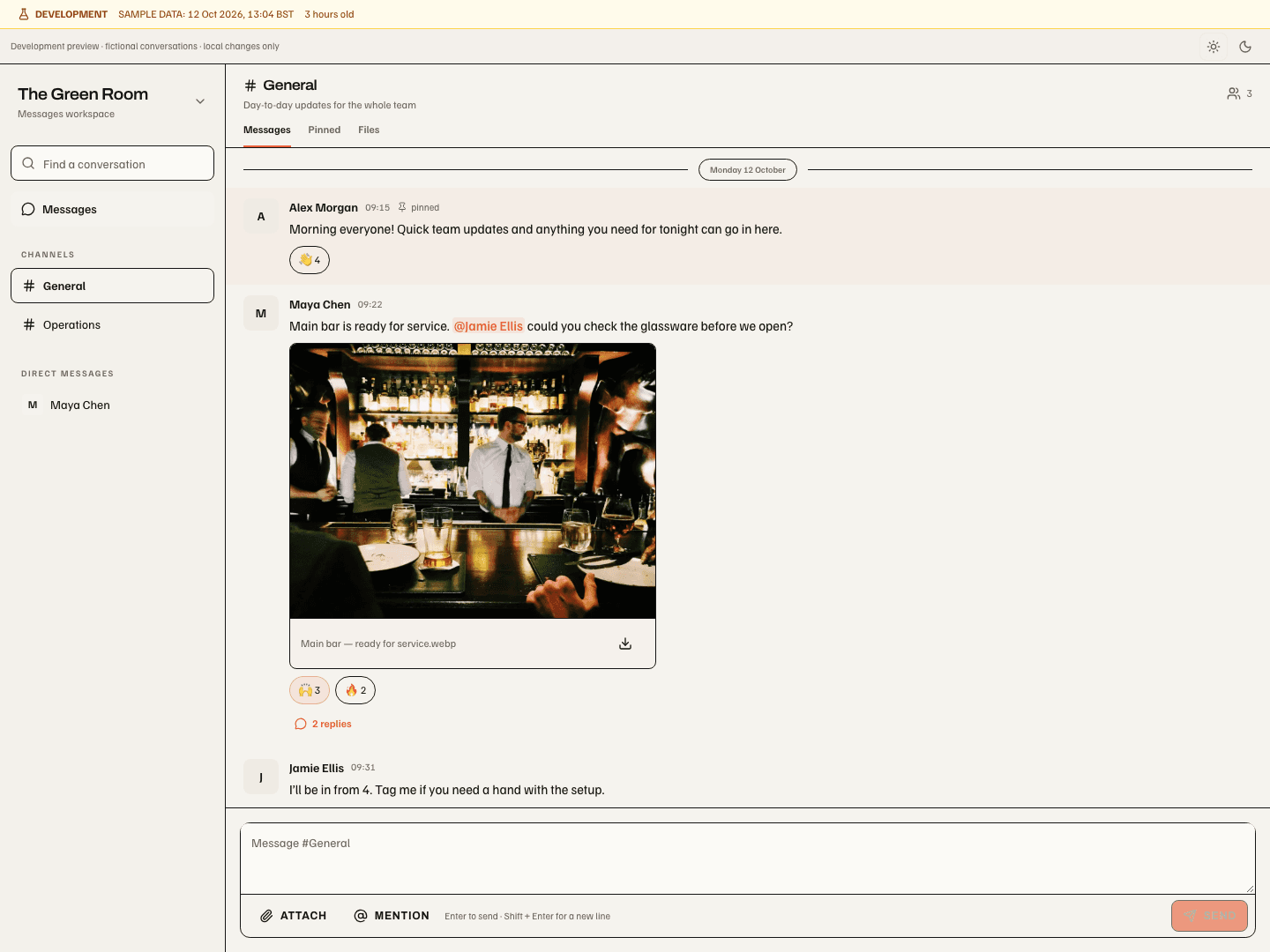
Preview evidence, 12 October 2026: the photo stays inside its source message; orange text marks the selected person mention; reaction chips toggle your contribution; the reply count opens the discussion directly below. The expanded narrow thread shows the thread reply composer above the independent channel composer. These are local fictional examples, not production records or authenticated upload evidence. The native validation and screenshots show the shared iOS/Android implementation with synthetic conversations, including the reply editor above each platform's software keyboard.
Knowledge and learning
Knowledge lists published knowledge available to the current audience. My training lists assigned learning and the state of each assignment. Manage learning supports draft knowledge, exact-version publication and assigning that version. Supported knowledge types include handbooks, how-tos, training and quizzes. These are operational learning records inside Messages, separate from Soupy’s product help.
A manager creates title, summary, body and type. The current web form creates an organisation-wide draft, requires acknowledgement and provides a first quiz question with two choices and a 100% pass mark. Editing an existing document preserves its existing audience and validity metadata; the backend supports richer question and policy records than this form exposes. Publication is explicit. Assign a published version to up to 25 active staff with an optional due date; training/quiz assignments are marked required for eligibility. Staff without a linked login retain their assignment but receive no My Work item until linked.
Staff read the exact assigned version, acknowledge where required and answer every quiz question before submitting. Attempts retain score and pass/fail evidence; a successful completion may expire according to stored validity policy. Rotas consumes current training eligibility without rewriting learning history.
Training detail and eligibility use current source permissions. An assigned person can read their exact assigned version after a newer version is published; other readers need current training-management authority over its audience. Changing or publishing a document requires authority over both the existing and proposed audiences. Web and native detail clear when their current access receipt expires or access is lost. An incomplete eligibility scan is unavailable rather than treated as a complete answer.
Permissions, drafts and settings
team.view grants permitted reading and participation; team.manage governs ordinary channel creation,
membership and moderation. team.training.manage controls learning management. team.settings.view and
team.settings.manage control the dedicated settings route. Channel membership does not grant another module's
capability, and employment alone does not grant access to Messages.
Uploads belong to the sender, current entitlement, channel/thread and draft. Staged uploads expire after 24 hours; Send consumes them with the message. An uncertain Send freezes the exact submitted payload for resolution. Web drafts are separated by channel/thread while the workspace is mounted; native drafts retain encrypted local evidence across restart. Reconnection does not upload or send a draft automatically. Uploaded draft files remain private before Send; a competing public image registration or reference cannot turn those private bytes into public artwork.
The Messages settings page has saved workplace controls for General, Channels, Posting and
Automations. Settings administration does not grant channel management or access to private
conversations. Viewing needs team.settings.view or team.settings.manage; saving needs
team.settings.manage at the workplace scope. A concurrent edit is refused rather than overwritten.
| Section | Controls and consequences |
|---|---|
| General | Allow or prevent new direct conversations. Existing direct conversations remain available to their participants. Your notifications opens My Work, which owns personal quiet hours, timezone, urgent overrides and digest preferences across the workplace. |
| Channels | Separate default retention periods for new channels and new direct conversations, from 7 to 3,650 days, initially 365. Defaults do not rewrite existing channels, message expiry or history. Channel managers may still select an explicit retention period when creating a channel. Manage channels opens the existing membership and archive tools; People remains the owner of groups. |
| Posting | Allow all permitted members or only Messages managers to send new messages and replies in ordinary channels. Private direct conversations retain their participant permissions. Allow or prevent new reactions; people can still remove their own existing reactions. Pinning and moderation remain manager actions. |
| Automations | Allow or prevent new Soupy-authored automated posts. Existing posts and exact retry receipts remain available. A permitted source action and destination are still required; this switch does not create a recipe or authorise another module's action. |
Changing a section does not save or discard edits. Saving commits the displayed policy; failed saves keep the draft, and refreshed saved values do not replace unsaved changes. A different signed-in session, workplace or Messages entitlement starts a separate editor. Posting-policy changes keep existing message drafts and allow an uncertain send to be reconciled. The settings editor is on the web; backend policy also applies to native and older clients. This does not establish native publication or device acceptance.
Soupy-authored automated posts identify their source and linked record. The backend declares a source-labelled automated-message destination; the current general Automation builder does not expose an event-to-channel posting editor. No new automatic posting integration or notification delivery is enabled by visiting settings. Existing channel retention is not editable through this page; membership and archive remain in Channels.

Local fictional preview, 14 October 2026: the retention fields are separate, existing-history consequences are stated beside them, and Save applies the whole workplace policy. This image is not a production or authenticated-save receipt.