People keeps the employment record for each human across the Group. A Person, Legal Entity Employment, workplace Assignment and Soupy account are different records. Adding an employee does not invite them or give them application access. A performer booked through Talent remains a Talent act unless an authorised People manager explicitly links an existing Person.
Screens and navigation
| Surface | What it contains |
|---|---|
Organisation People, /app/{orgSlug}/people | Employee directory, search, add-person form and CSV import. |
Group People, /portfolio/{groupSlug}/people | Directory, Positions, Contracts and Contract reviews. Contracts contains the agreement library, reusable templates, preparation and retained batches. |
| Person profile | Overview, Assignments, Contracts and Employment history. |
| Profile Overview | Operational identity, permitted private contact details, compliance state, original start, continuous service and current-employment dates. |
| Profile Assignments | Employer/workplace, position, department/area, effective dates, allocation and permitted pay terms. |
| Profile Contracts | Structured versions, clauses/templates, review/issue actions, signing requests, amendments, signatures and retained history. |
Adding and maintaining a person
- Open People → Add a person. The organisation form captures name, email, optional job title, employment type and phone. The Group form also captures legal/preferred name, employee number, work versus personal email, employer, primary venue, position, status, contract type, service dates and pay.
- Use Positions for reusable position code/title, department, responsibilities, scheduling defaults and private default-pay information. These defaults do not overwrite an individual Assignment.
- Open the Person and add an Assignment for the exact Employment, workplace, position and effective dates. Optional department, area, pay and allocation describe that placement. Assignment authority determines operational pickers.
- Use End assignment with effective date and reason when the placement ends. Use Change status for employment status; use Rehire for a leaver or archived Person to preserve identity and create a new employment period.
CSV import accepts a file and maps source columns to Soupy fields. It normalises email and employee numbers and skips duplicates. Review the import results; imported employee records do not create sign-in accounts or grant permissions. The basic organisation CSV creates directory records; it does not create an Employment. The Group directory and organisation directory project the same canonical data. Employment contract preparation below can explicitly create both the Person and Employment during review.
Employment templates and bulk preparation
Contracts also exposes Employment contracts from Group Contracts to People managers; general agreements retain their separate Contracts permissions. The Named job-role packages builder selects an employer, role, main contract and job description versions in authored order. Publishing retains the exact wording and typed fields; revising creates a new package version. Package templates can only prepare contracts for their selected employer and role. Job descriptions reuse the reviewed local PDF import and wording editor. Package choices wrap long names and keep each version/status visible on narrow screens. If a package no longer matches the selected Employer and Position, preparation explains how to correct those selections and retains the entered employee values. It never changes an employer or role automatically or creates records from a refused selection. Agreement cards show verified opening counts and last-opened time for the latest employee invitation. Each mounted private reader counts once; automatic access renewals do not add openings. Counts describe document access, not proof that every clause was read. Earlier invitation events remain in the timeline. The web Messages → My contracts disclosure reads retained signed versions for the current business's explicitly linked employee account. Email equality does not establish that link. Each private read rechecks the active principal, unique active business membership, employee, employer, Group and exact signature hash. Versions become readable only after employee and employer signatures; historical signed wording is retained. The native app's Profile → My contracts shows the same signed versions, with current employee-link checks and on-demand signed text. Native rendered/device acceptance remains pending. The web view can prepare a signed PDF from retained wording and actual marks; it rechecks access after rendering and before saving. Native Profile → My contracts can prepare and share the same complete signed PDF through the private-file service. Bytes are checked against the current account/source before preparation and sharing, and the temporary file is removed afterwards. Device acceptance of native PDF sharing is also pending.
The employer selector opens the existing Assistant inside Group Contracts. A request naming a job role, employee, email, start date, pay and probation resolves one published package for that employer and role. Required custom fields must be supplied. The proposal shows the document order and terms; confirming it creates or resolves the canonical Person and Employment and prepares a contract batch for internal review. It does not send signing invitations, invite an app account or grant access. Wording approval and confirmed sending remain separate. Native proposal cards direct the detailed approval to the web workspace.
Each new draft proposes a seven-day signing deadline, signed copies to recorded signing parties, signature notifications to the creating manager and unsigned-email reminders at 24, 72 and 120 hours. Review Signed copies, reminders and completion in the employee's contract record to change the deadline (1 to 30 days after the email invitation), change recipients, add reviewed HR copy addresses, or change or disable reminders. Reminders must fall before the deadline. Batch sends use the approved deadline; a single send starts from it and can change it. The existing approval-for-issue boundary approves these settings; batch approval and sending bind the exact settings revision. Changed settings require a fresh review. Issued settings are frozen, but automatic completion can be cancelled. Replacement versions retain prior signed wording and signatures; amendments inherit delivery settings without repeating new-starter onboarding.
After both employee and employer sign the same hash, a background job retains a private PDF containing all wording in authored package order and actual signature marks, then sends separate copies to reviewed recipients. A signature notification can be sent as each mark is recorded. Provider configuration and current approving manager authority are required. Each recipient has its own provider receipt; acceptance does not prove reading. Retries retain accepted recipients and artifact identity. Unknown provider outcomes are blocked for support reconciliation, rather than automatically resent. Unsupported PDF wording fails visibly without truncating it. Reminder hours count from sending. When a failed invitation is accepted on a later retry, reminders whose time has passed are skipped, not sent with it. Reminders use the original invitation address and deadline, never extend expiry, and are skipped when they would fall at or after expiry. They stop on cancellation, expiry or an actual matching signature, including a signature recorded by a manager. Link-only invitations without a provider-accepted email do not start email reminders.
Optional completion onboarding selects published checklist versions and exact employer-wide user-type/work-area access for an explicitly linked employee account. The approving manager needs the existing independent Tasks and Access permissions and delegation reach; automatic grants never include delegation. No email comparison creates an employee/account link. When both parties sign, the system checks the contract's exact current Employment, effective placement, account and permissions again. Future starts wait until that Employment's start date. Canonical Access grants and canonical Tasks creation commit together; refusal leaves no partial changes. A later explicit employee-account link can resume blocked checklist work; other refused sources are shown for review and retry. A newer checklist publication blocks an older selection for explicit review rather than silently changing its content. App-account invitation creation and Site-scoped completion grants are not part of this workflow; their existing Access workflows remain available.
Reports by job function and status searches the complete authorised contract library with server-side filters and pages of up to 20 agreements. Signed, partially signed, awaiting-signature and other lifecycle states remain distinct. Each employee contract has a paged Contract timeline and opens, plus delivery and onboarding reports. Opening counts describe verified access, not proof of reading, and historical timeline pages remain reachable. Ordinary renewal uses small immutable version headers and fresh account/signature records, without reloading document text. Full list/history/body reads run when opened, refreshed or re-admitted after foreground or connection changes. Headers hold no permission decisions. Canonical version creation writes them atomically; legacy bootstrap requires a fully authorized signed-version read and refuses mismatches. Unsupported direct database changes are detected on full refresh, not advertised as detectable by metadata-only renewal.
Open Group People → Contracts, or follow Employment contracts from organisation People. Agreements link
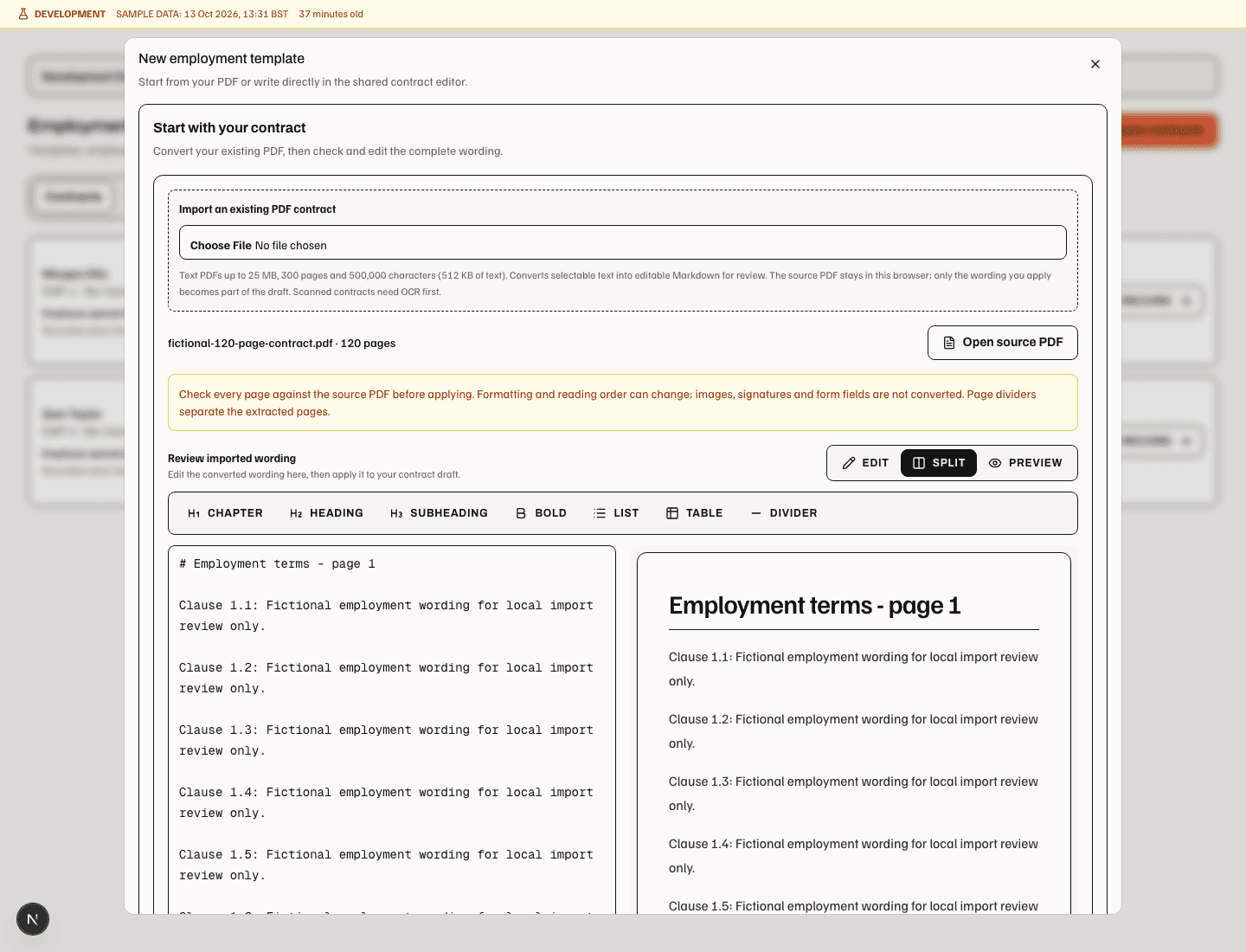
back to the employee's record. Choose New template to write in the shared contract Markdown editor or import
an existing text PDF. Review the extracted wording beside its rendered preview and use Open source PDF to
check the original before Apply reviewed wording. Selecting replacement text and choosing an employee field
inserts a variable such as {{employee_name}} at that position. Save the reviewed template for reuse.
Template, agreement and batch libraries load in pages; use Load more templates, Load more agreements or
Load more batches to reach older entries. Loading more preserves the current template selection and draft.
PDF extraction runs locally and converts selectable text into editable Markdown for review; selecting a PDF does not save a template. It accepts text PDFs up to 25 MB, 300 pages and 500,000 characters of converted wording (at most 512 KB of UTF-8 text). These wording limits also apply when saving and personalising templates; an oversized document is rejected, never shortened silently. Encrypted, form-bearing, unreadable and scanned/no-text pages require a corrected text PDF. Images and signatures are not converted, and there is no OCR. Formatting and reading order can change, so every page needs review. The original PDF stays in the browser; Soupy saves the source filename and reviewed Markdown, not the uploaded binary. The desktop shell offers Save source PDF through its Downloads handling instead of opening a browser tab.
Templates support employee name/email/number, start and optional end dates, hourly rate/currency, probation length/unit, employer and position, plus named text, date and number fields. An empty end date renders as No fixed end date. Published templates are available for preparation. Edit as new version saves revised wording and fields as a new template version. Each batch freezes the selected template version, attached clause wording and personalised values; later template changes cannot rewrite prepared contracts.
Prepare contracts accepts one employee or a CSV/TSV of up to 50 employees (1 MB). Choose the employer, position and template. Long documents may require smaller batches: the combined personalised wording and terms must fit within a 2 MB preparation budget, including after correcting an employee match. Split the CSV when prompted. Map columns and review validation errors. Dates accept ISO or day/month/year; rates require at most two decimal places. Match existing records by email or employee number within the selected employer. A name alone does not identify a Person. Ambiguous matches require an explicit Person and Employment choice.
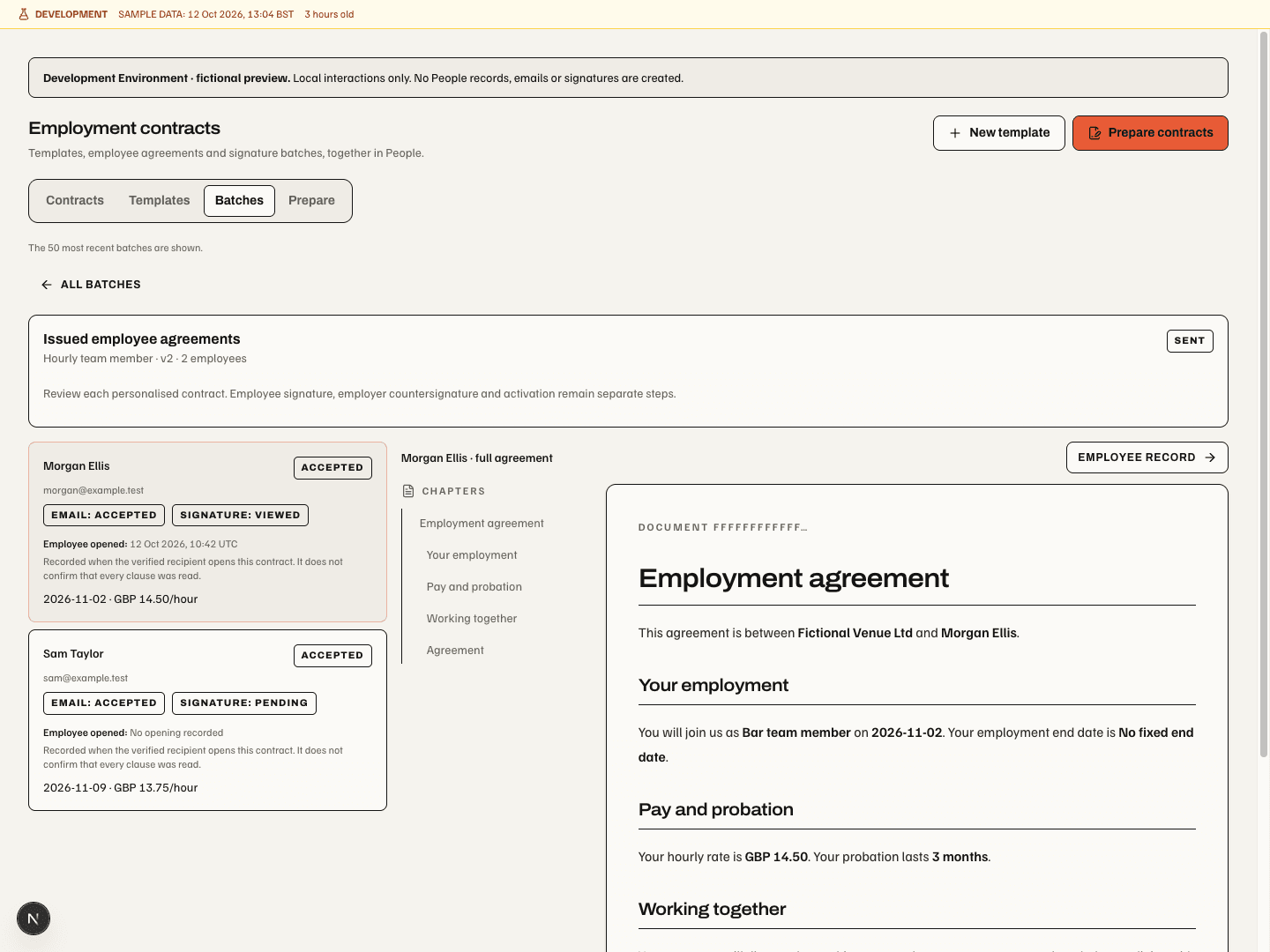
Create a People record and Employment when no match exists permits creation during review. Each row states whether it links an existing Employment or creates one; records are created only with Create drafts. No Soupy account or permission grant is created. Invalid rows prevent advancement. If another manager changes the reviewed batch, reload and review it before advancing or confirming a send. Review each personalised document, then use Create drafts → Start internal review → Approve for issue → Send for employee signatures. Sending has a separate confirmation listing eligible recipients. Batches retain individual contract links, delivery states and signature progress. Employee opened shows the first verified open's date and time (UTC) in the contract list and batch review, separately from Email and Signature. No opening recorded means no recorded open for that invitation; it does not infer whether an older email or document was read. The employee record shows employee/employer receipts for the current version and invitation receipts within each version's history. A replacement invitation or version has its own receipt; prior evidence stays in history. An accepted email is not a signature; failed or unconfigured delivery remains visible and can retry the retained invitation without creating another contract or signing grant.
This preparation UI is web-only. Provider-backed email and verified signing require the existing configured delivery service and public signing endpoint. The isolated Development Environment blocks those provider actions; its fictional preview proves local preparation only. Native apps do not provide PDF/template/CSV preparation.
Contracts and review campaigns
A new contract requires an exact Employment and a position. A manager can create reusable clauses and templates, prepare structured pay/hours/dates and wording, and identify a historical import. Issued content is versioned and hash-bound. The workflow offers Start internal review, Approve for issue, employee signing, employer signing and Activate contract at the appropriate state.
Send to employee/employer prepares a signing request for a named recipient. The recipient reads the exact document through the shared contract-signing journey. Record manually is a separate manager-entered signature path: it records the authenticated manager and entered signer details, rather than independently verifying that signer's identity. Both Sign by hand and Sign by typing are available in this dialog and the recipient reader. Choosing a method does not record the signature; the explicit consent and recording action remain necessary.
Propose amendment records reason, change summary, effective date, updated terms and wording. The comparison keeps source and proposed versions available. Approval, issue, employee signature, countersignature and making effective remain separate stages. Legacy contracts stay readable but require an explicit matching Employment link before amendment. A review campaign records its name, effective date and reason for a set of employment reviews.
Permissions and boundaries
people.view permits operational directory identity and workplace context. people.manage governs private
employment details, personal contact information, pay, templates, clauses, contract review, signatures and
employment changes. The directory uses work email; it does not fall back to personal email. A partial management
grant does not expose another workplace's private terms.
Training belongs to the Person; Messages provides learning screens, while Rotas owns planned and actual work. People does not copy shifts into another schedule. An employment position or People group may assist an access review, but neither creates security grants. Payroll delivery and specialist identity verification are outside these People screens.