Sport is a separately entitled work area currently in preview. Its Abelson feed supplies televised/streamed sport coverage; an operator's screening plan remains a private decision for a stored Site.
Browse and plan screenings
At /app/[orgSlug]/sport, browse provider listings and Our screenings.
Show chooses the period: All upcoming (the default, 120 days from
today; one request may cover at most 124 days), This week, one of the next seven days, or Another date. Sport
and channel filters and search narrow it. Saved usual sports are the default
filter; All sports or a one-off search can find other coverage. Selected
screenings remain visible even when outside the saved sport defaults.
Each day chip in Show notes what the chosen Site has that day: N showing, None chosen when matches are listed but none picked, or No sport. The summary above the list counts what the Site is showing in the listed period.
A Soupy feed row shows both sides with their club crests where the source supplies them (initials otherwise), the competition and round, the channel and the ground. Crest images load from TheSportsDB's image host. Feed and source names, and the coverage times, are under Details.
Choose a specific Site and mark a broadcast from its row with Show match; Remove takes it off. Sound on / Sound off and Big screen / Any screen toggle in place, with private notes beside them, for that Site. All sites is an overview; editing requires a selected Site. These flags record plans, not equipment control. With a Site chosen, Show all N listed adds every current listed broadcast not already showing there, and each day's heading offers the same for that day. Both appear only for 2 to 60 broadcasts, add them one at a time under the usual access checks, and stop at the first failure, keeping those already added.
Your board beside the list, headed Live sport, is the chosen Site's running order for the listed broadcasts: kick-off, match, channel, big screen and sound, grouped by day. It reads the page of results on screen, and says so when more pages exist. A Sound clash warning names different matches that start at the same minute with the sound on; it is advice and blocks nothing. Provider coverage start and sporting-event start are separate, with local London/Dublin time and explicit cross-date labels where needed.
Settings chooses United Kingdom/Ireland feed region, London/Dublin timezone, usual sports and preferred channels. Provider status exposes actual sync freshness/failure; an authorised refresh resumes the durable provider checkpoint. Search can continue through empty pages, showing progress and a continue action instead of prematurely claiming no matches. Our screenings uses the same continuation behaviour while combining saved plans from both feeds. An initial page can continue before showing results, without changing the saved Site, notes, flags or listings feed.
Choose and compare listings feeds
The feed selector does not mean the independent feed is commissioned. In
Settings → Listings feed, save
an explicit business-wide choice of Abelson or Soupy feed. Abelson remains
the default for existing businesses and stays selectable for switching back.
Its connection health is shown separately. Merely opening or choosing an option does not save.
Changing the feed requires sport.settings.manage; viewing settings requires
sport.settings.view. A conflicting saved revision requires reload, and a failed
save retains the draft. The web editor and desktop shell share these boundaries.
Each option shows its availability, underlying sources and freshness: Abelson's last successful refresh or Soupy's last verified coverage. Soupy remains unavailable until fresh, permitted, independent live broadcast coverage is found. A selectable subset is labelled Limited coverage; this does not establish parity with Abelson. Private observation fixtures, recorded samples and the Abelson bridge cannot qualify as independent coverage. There is no automatic switch or silent fallback when a source fails. Abelson's manual refresh remains explicitly labelled; Soupy source collection is hosted.
The Soupy feed's TheSportsDB sources list one row per match and territory, so a match can be marked from the day its fixture is known. The channel text names the live channels once the supplier lists them, about a week before kick-off, plus any streaming service a known rights deal puts every match on (HBO Max for the 2026/27 UEFA club competitions in the UK). Until then it reads Channel to be confirmed. The row keeps its identity as the channel fills in, so a saved screening stays attached. A match the UK Saturday afternoon blackout keeps off television has no UK row. Coverage is limited to the competitions those sources carry, and its UK rows are Northern Ireland's listings: channels specific to Great Britain, such as STV, are not listed yet.
Switching changes the listings browser without rewriting saved screenings. Our screenings retains selections from both feeds, with their original Site, private notes, sound and big-screen flags. Source labels distinguish them; unavailable selections remain visible without exposing withdrawn supplier facts. Sports and channel preferences are retained separately for each feed. Existing Displays approvals retain their identities, while cancellation, freshness and source-permission checks continue to withhold unsupported output. The Displays Sport operations list shows saved screenings from either feed. Feed selection does not enable automatic planning, public publication or physical TV control.
Compare with Abelson runs an explicit snapshot of broadcasts beginning in the next 24 hours for Great Britain, Northern Ireland or the Republic of Ireland. It checks up to 150 rows per feed and marks capped or stale samples. Counts distinguish verified matches, possible name matches, unmatched records and timing/channel differences. Possible matches never merge records or certify coverage. The UK reference does not establish Northern Ireland availability or venue rights. The comparison changes no listings or settings, sends no provider request and does not start or satisfy the thirty-day replacement acceptance run.
Automatic comparison collection — internal commissioning. Once explicitly started, an internal run records hourly comparisons of the next 24 hours, retaining aggregate differences and a separate GAA category breakdown for thirty days. It keeps the same bounded sample and eligibility rules as the explicit comparison. Missing sources, gaps, stale data, changed source permissions and capped samples remain visible in retained operational evidence. It does not switch the business feed, import a supplier or start replacement acceptance. No independent GAA/TV source or live automatic run is established by deploying this code. The comparison runbook records outstanding supplier and validation prerequisites.
Soupy source status. In Settings → Listings feed, Check source status shows connected source names, configured territories, the latest successful check and record counts from the latest import. Private fixture observations are explicitly labelled and remain separate from eligible TV listings. Zero independent broadcasts in the comparison does not mean there are no connected sources: fixture observations still need verified live coverage, a channel and permission for the comparison territory to qualify.
This panel additionally requires sport.view. Refresh source status and
Load more sources read stored status in bounded pages; they do not contact
suppliers, start imports, change the selected feed or poll in the background.
Failed checks retain the previous results with a retryable error. Source status
alone proves neither replacement readiness nor venue broadcast rights.
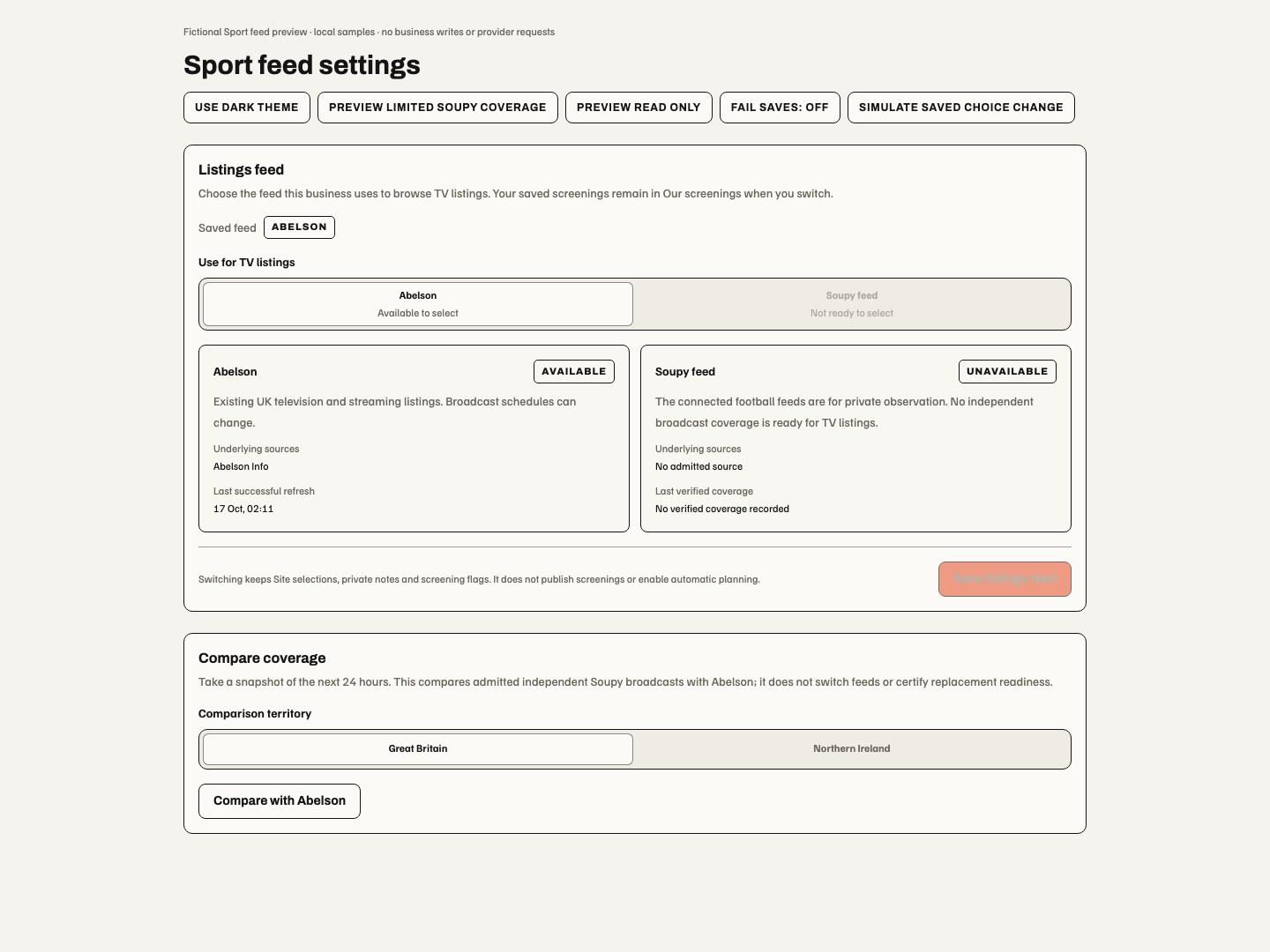
This local preview illustrates the selector release, not commissioned independent coverage. The saved-feed badge identifies the current choice; the availability cards explain what can be used, and Save listings feed applies an edited choice.
Selecting a screening does not publish a Ticketing Event, sell admission or change broadcaster subscriptions. Public display requires a separate approved Displays publication. Provider changes/cancellations remain visible; channel preferences do not prove venue broadcast rights.
Capabilities are sport.view, sport.schedule.manage, sport.settings.view,
sport.settings.manage and sport.sync.manage, each under current Site/workspace
scope. Feed configuration and a test credential do not establish a paid tenant
entitlement or production readiness.
Put a Site's sport on its website
The Website embed tab (/sport?section=embed, sport.view) creates
customisable website embeds of one Site's chosen sport. Each embed belongs to
one Site and shows the matches that Site has marked in Sport on the Soupy
feed, with the sound and big-screen choices made there. Visitors see it in
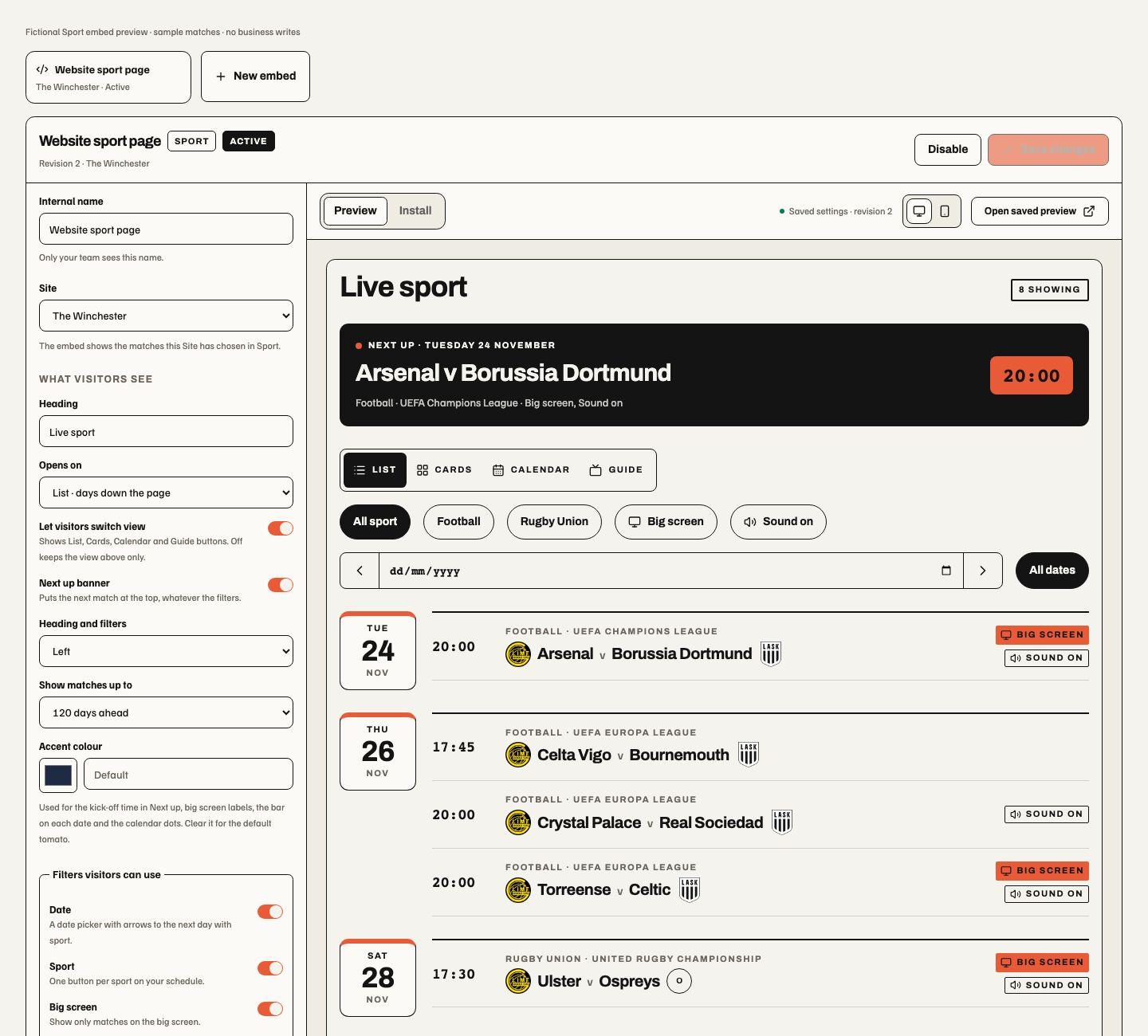
four views they can switch between: List (days down the page, each with a
date block; on a phone each match is a short row with the two sides stacked
and icon-only big-screen and sound labels), Cards (one card per match, the
two sides facing each other), Calendar (a month with a dot and count on
match days; picking a day shows its matches, and weeks before the first match
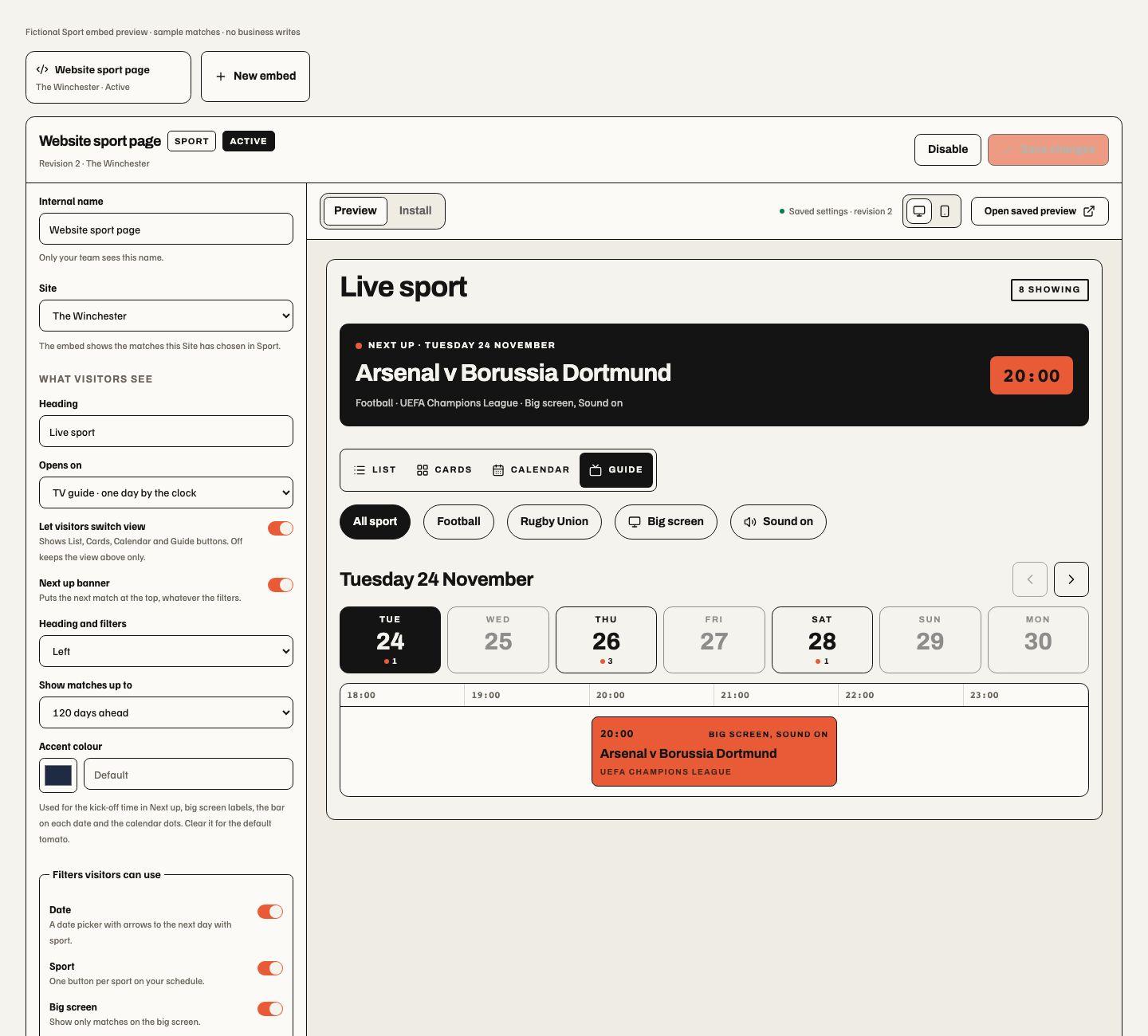
are left out) and Guide (seven days at a time; the chosen day is laid out
by the clock, with matches on at the same time one under the other, and a
phone gets that day as rows). An embed can instead be a small box for a
homepage: the next match, the four after it and an optional button to the
venue's full line-up page, with no views or filters. A Next
up banner puts the next match first whatever the filters. Visitors can
filter by the sports on the schedule, by big screen and by sound, and in List
and Cards by date (a date picker whose arrows step between days that have
sport under the other filters).
Creating, changing, disabling or moving an embed needs sport.schedule.manage
for its Site; moving needs it for both Sites. People with sport.view can
open an embed and its preview but not change it. A business can hold up to 50.
The studio follows the managed embed pattern: settings on the left, and
Preview and Install on the right with desktop and phone widths. Preview
shows unsaved changes against the Site's real schedule; the installed embed
uses the saved revision only. Settings cover the internal name, Site, heading,
the view it opens on (or the small box, with its full line-up link, which must
be an https:// address), whether visitors can switch view, the Next up banner,
centred or left heading and filters, how far ahead to show (7 to 120 days), an
accent colour (Soupy's tomato unless changed), which filters visitors get, whether competition, TV
channel, the big-screen/sound labels and club crests appear, and the shared embed width,
spacing, corner radius, colours and scoped custom CSS. Saving checks the
revision, so a stale editor cannot overwrite a newer save.
Install gives one snippet that loads /widgets/sport-v1.js and a
<soupy-sport embed="spe_…"> element. It frames /embed/sport/v1/<publicId>,
resizes to its content and follows later saves and schedule changes without
new code. An open page asks again every five minutes while it is visible, so a
change can take that long to appear and a finished match leaves the page by
itself. The public ID addresses the embed; it is not a credential.
Publication rules: only screenings on the Soupy feed are published, never Abelson test-feed marks; a match appears only while its listing is still supported by an admitted source, has not finished and falls inside the embed's period; one match marked on two broadcasts is one row. Private screening notes, source names and business identifiers are not sent. The TV channel is sent only when the embed is set to show it. Club crests are off by default; when a venue switches them on, the crest addresses the source supplied are sent and each visitor's browser loads the images from TheSportsDB's image host, without a referrer. A match with no crest on file, or a crest that fails to load, shows a round badge with the team's initials. Cards always carry a badge for each side, initials when crests are off. Showing crests on a public website is the venue's choice under its agreement with the source. A disabled embed, a closed Site or a lapsed Sport subscription shows visitors a short notice instead. The embed reads a Site's marks from the last 150 days, newest first, up to 300; a match marked longer ago than that (for example one postponed by months) needs marking again. An embed whose Site has closed stays listed so it can be disabled or moved. There are no embed statistics yet.


Automatic Site schedules
The Automatic schedule tab adds an opt-in standing policy for a selected
Site at /sport?section=engine, under the same sport.view route permission
as listings and screenings. The backend is deployed in preview. Two free
football feeds are commissioned for private observation only; broadcast/GAA
coverage, semantic lanes, venue publication and replacement acceptance are
not commissioned.
Existing Abelson listings and private screenings remain available.
Site setup saves opening hours, London/Dublin timezone, separate GB/NI/ROI
territory, commercial services and channels, screens, receivers, routes, sound
zones, stream limits, priorities and optional locks. Enable planning and each
publication destination explicitly. Saving requires both sport.settings.manage
and sport.schedule.manage; settings read access controls visibility of the
saved configuration. sport.view can read the permitted Site's running order.
Changed permissions retire drafts; failed saves retain changes and a conflicting
saved revision requires reload. New drafts do not change a running schedule.
The running order uses only fresh, supported times and live broadcast coverage. It lists screen/receiver assignments and reasons why a screening is unavailable. Locks cannot override source uncertainty or equipment constraints. An unverified overrun holds existing capacity; the next programme uses spare compatible capacity or remains unavailable. Missing coverage is distinguished from an empty schedule. Staff carry out the plan unless a separately commissioned Lavery's hardware installation is enabled.
Approved automatic projections share canonical fixtures and publication state.
The website schedule is /sport/schedule/[key]; its calendar subscription is
/api/sport/calendar/[key]. Stable calendar identities survive reschedules, with
increasing change sequences and cancellation revisions. Calendar applications
choose their refresh interval. Displays can approve the automatic running order
as a dynamic Sport source through its existing publication workflow. Private
notes, staff instructions and equipment topology are excluded from public data.
Source conflicts, stale facts, revoked standing access or changed policy versions withdraw unsupported promises automatically. Recovery restores eligibility; there is no routine manual fixture-review queue. Only admitted coverage is promised. OpenLigaDB fixture support does not supply complete pub broadcast or televised GAA coverage. No supplier or paid fallback is enabled automatically.
An internal source-observation run can measure thirty days of source health before replacement acceptance. It keeps source/configuration drift and missing measurements visible; elapsed days alone do not certify fixture completeness, channels, published schedules or unattended recovery. Observation-only sources are withheld from customer fixture queries and running orders and cannot support public screenings. Free football coverage is not a claim of complete televised sport or GAA coverage.
This web surface is shared by the desktop shell and retains its draft/lifecycle guards. It does not establish native mobile or installed-television acceptance. Source admission, evaluation and hardware controls are internal commissioning interfaces, not ordinary operator screens.

In this fictional preview, Coverage distinguishes confirmed and provisional items and explains that unavailable listings can overlap provisional ones. The screening card separates its start, estimated finish and buffered equipment reservation. The sample is visual evidence, not a live fixture or installed-equipment claim. Narrow rendering and interaction checks record the development acceptance boundary.