CRM is an available module over organisation-owned customer relationships.
Ticketing, Bookings and till activity contribute facts without becoming separate
customer databases. A purchase, submitted email, imported list or phone number
never grants marketing consent.
Screens and relationship service
Customer visit history distinguishes a pending source read from a refusal: loading shows Loading visit history…; denied summary or evidence reads show Visit history is unavailable and hide the history. A successful read displays the accessible evidence, including an explicit empty state when none is recorded.
The web workspace at /app/[orgSlug]/crm groups work into Overview, Customers,
Audiences, Offers, Campaigns, Journeys and Sales. Each person sees only admitted
destinations. Companies is a Customers subview, and governed Export is an Audiences
pane under separate export authority. Old Companies, Opportunities and Exports
links retain their original permission checks and open the corresponding host.
CRM Settings remains available when Growth is off. The optional CRM Growth
switch gates Sales, Companies, Journeys and behavioural tracking surfaces; Sales
also requires Bookings access, and Journeys requires Automation access.
| Screen | Main use |
|---|---|
| Overview | Setup progress, admitted capability cards, Where customers come from (source, Series and shows-bought breakdowns), database/contactability snapshot, creation cohorts, audience comparisons and compact source-owned feedback. Detailed measurements and metric drafts stay in disclosures; unknown or truncated counts remain explicit. |
| Customers → People | Search the paginated customer table by indexed name or exact email, or choose a Source Series to list its linked customers, import roles, one imported show or one Soupy Event. A Sources column shows where each record came from. Contact/order filters apply to loaded results only. Map, validate and review imports under Customer import and data preparation. |
| Customer profile | Contact/verification context, birthday, postcode, preferred venues, typed custom fields, tags/interests, consent and accessible source-owned history. Orders & purchases separates Soupy orders from published Series ticket imports. The web Notifications tab adds governed email/SMS delivery evidence. |
| Audiences | Saved definitions and snapshots first; open the definition editor with New audience/Continue draft. Preview and Build for… remain explicit operations over the exact version. |
| Offers | Explainable individual proposals, eligibility, cost and operator judgment; funded promotions keep their own Loyalty source authority. |
| Campaigns | Email evidence table, then an explicit Email/SMS composer with current guardrails. Each email campaign's Delivery evidence holds its delivery report. Email and SMS retain their separate source-owned delivery evidence. Saving, reviewed approval, queueing and delivery remain distinct. |
| Audiences → Export | Review and prepare a purpose-bound export of the selected published version, reopen progress and download completed rows. Opening this pane neither previews nor builds an audience; a different row cannot reuse the previous row's frozen snapshot. |
| Sales | Board/list projection of Bookings private-event enquiries, owner, company, value and follow-ups. |
| Customers → Companies | Maintain business names, websites and notes; link existing customers and view authorised enquiries in the selected inline detail. |
| Journeys | Draft, dry-run, approve, pause and inspect automated customer steps. |
| CRM Settings → Marketing activity and interests | Existing CRM-view readers retain access to policy and preference topics. Editing keeps each setting's existing requirements; this destination grants no tracking/provider-settings authority. |
Preparing an export opens that exact run's progress inline without a page reload. Its URL can reopen the same authorised run; reopening does not prepare another export or reevaluate the audience. Download acknowledgement removes only that run from the URL, preserving the selected section and other navigation context.
The header shows current sender readiness and links to Email connections only when that settings route is admitted. An unusable email sender disables campaign review and approval beside its reason; SMS keeps its own provider checks. The toolbar opens the current tab's creation form. Closing a pane, changing channels or switching tabs preserves a valid same-source draft. A retained existing editor is labelled Resume, including an audience editor that has not yet been saved; use the explicit new-campaign/preset action to start separate work. Received source/management loss still retires copied drafts and confirmation dialogs. Selected tabs remain visible inside the narrow horizontal rail; tables and boards scroll within their own containers.
Export review and preparation pause while current access is being checked. The purpose, retention acknowledgement and open review remain available until access renews or the source is refused; a temporary renewal delay does not discard them.
While CRM opens, the header stays in place and shows Loading CRM…, or Waiting for a connection to load CRM… while offline. A failed workspace read (refused access or a server error) shows CRM couldn't be loaded and retires private content and copied drafts. The page retries while online and reopens CRM when a read succeeds; retired drafts do not return.
These are web layouts; native CRM keeps its platform-specific screens and acceptance. The annotated fictional overview illustrates the count, attention and source-health arrangement; it is local component evidence, not production authentication or provider acceptance.
Customer records are organisation-scoped. Governed contact creation starts unverified with no purchase total or marketing consent. Editing name/phone does not rebind email identity, merge customers, alter spend or change consent. Orders and attendees link to a CRM profile only when an explicit consistent customer link and current CRM permission exist; names are not identity proof.
A Series' CRM tab can import a CSV, tab-separated list or pasted emails into explicit Series audience membership. It reuses exact normalised email, fills missing details only and stops ambiguous identities for review. Importing a relationship does not claim attendance, purchases or consent.
The web Series CRM → Series customers table shows Source shows from linked native Orders and the currently published ticket-history import. It shows up to five dated shows per person with an explicit notice when more source history exists. Imported ticket associations can describe a buyer or holder; they never prove attendance. Older contact-only lists display Imported customer list — show not recorded. No show is inferred from the Series name.
Staff with current CRM contact-management and exact Series-management authority can select up to 24 loaded people and choose Edit selected. Names and phone numbers are individual fields; added/removed tags apply to the whole selection. These edits affect the shared business CRM contact. Email identity, verification, consent and purchase totals are outside this editor. Every selected row is rechecked for current permission and revision; one stale or unavailable row rejects the complete batch. Changing the business, actor, source revision or management access retires the pending selection or dialog.
Remove from this Series requires typing REMOVE and unlinks only the selected Series audience memberships. Full CRM records, Orders, Tickets, consent, other Series and historical ticket reports remain intact. Removed people are excluded from Series audience evaluation and new Series Event-offer selection. Routine purchase/history refreshes preserve the removal. An explicit contact-list reimport into this Series restores membership deliberately; it does not change marketing permission. These controls are web-only; native CRM is unchanged. The annotated fictional validation shows the selection, source and confirmation boundaries; it does not prove production acceptance.
On the web Series CRM tab, Save as audience saves the whole Series customer list as a named draft in the main CRM → Audiences panel. Existing imports are included without another upload. New people linked to that Series join when the audience is evaluated again; this is not a snapshot of one file. The initial definition has no minimum orders, spend or attendance requirements. Saving reuses customer records and does not change consent or send anything.
The Series shortcut is available under the same CRM-management and exact-Series-management access as the import controls; the saved definition remains governed by CRM management and same-business Series ownership. Review the name and choose Save audience draft, then Open saved audiences. In the main panel, Continue draft opens the saved definition; its Series restriction remains visible and is preserved when saving later versions. Additional rules narrow that Series list. Start a new audience from a preset creates a separate unsaved definition and clears the previous Series restriction. Opening or saving a draft does not evaluate customers. Preview saved draft explicitly evaluates the saved version; unavailable or still-preparing facts do not prevent an authorised operator from editing and saving the definition. If an available preview later becomes unavailable, the definition edit stays in place while dependent preview, campaign and export copies clear. Current definition access must still be ready: pending checks disable the fields and Save action. Loss of business or Series access, or withdrawal or replacement of the exact definition version, retires the copied edit even when another published version remains accessible. Preview the matching and contactable counts before the separate publication action. Source readiness and freshness can still block campaign/export use even when the audience is saved. Failed saves retain the entered name; loss of current access prevents further actions. This shortcut is web-only; it adds no native workflow.
Smart Series audiences: ranked, lapsed and corporate
The Series CRM tab, and Series CRM inside Series promotions, show Smart audiences under the same CRM-management and exact-Series-management access as the import controls and Save as audience. Each type includes imported Series ticket history and new Soupy activity, and future members when the audience is evaluated again:
- Ranked customers: every Series customer, ranked so a campaign can send to its top share.
- Lapsed customers: previous buyers with no booking for 3 months, 6 months, 1 year, 2 years or a custom number of days (1–3,650). Booking dates are the dates of imported shows and Soupy Events bought for, and Soupy purchase dates, in this Series and as the buyer. A bought event dated today or later counts as booked today, so an upcoming booking is never lapsed. Customers with no booking history are not included. Days are whole UTC days.
- Suspected corporate clients: imported company details, a non-personal
email domain with a group order (six or more tickets), two or more group
orders, or a
corporatecustomer tag. Signals suggest a company booker; they never confirm one.
Rank customers by is required for ranked customers and optional for the other two: Total spend (imported Series ticket spend plus Soupy net spend in the business currency; other currencies are not converted), Events bought for (distinct imported shows and Soupy Events, as the buyer) or Visits (checked-in tickets on Soupy orders, plus observed visit days for business-wide audiences; imports carry no check-ins). Ranking orders matching customers; it never changes who matches. A purchase is not attendance.
Publish audience saves and publishes the definition so promotions can use it straight away; Save as draft leaves it for review in CRM → Audiences. If publishing fails after the save, the draft remains and the message says so rather than saving twice. Neither action evaluates customers, grants marketing permission or sends anything. Missing or still-building history, including purchase facts still being prepared, is unknown and never matches, even inside an exclusion. Booking recency, shows bought for and ranks read each customer's current purchase facts, which order and check-in events keep up to date, so customers who haven't bought for months need no refresh before an audience is prepared. A matching customer whose ranking measure isn't known yet stays in the audience but is never in a top share. In CRM → Audiences, Rank customers by edits the same ranking, and the Lapsed buyers and Suspected corporate clients presets start business-wide versions. The rule editor adds Days since last booking and Business signals, each optionally within one Series.
Saved Series audiences
Beside Smart audiences, Saved audiences lists the business's published audiences whose rules target this Series, with their figures. Draft Series audiences follow for people who can manage CRM audiences. It needs CRM view and Ticketing view access for this Series; without it the card is hidden. Each audience shows:
- Contacts and Can email (with the share of contacts) from the latest count of that exact version: preparing a campaign or previewing the audience in CRM records one. An audience never counted shows a dash and Not counted yet.
- Campaigns sent, Delivered (with the share of recipients) and Link clicks across email campaigns sent to that audience, in any version. Link clicks are tracked-link visits from the last 90 days and can include repeat clicks; without access to campaign behaviour they show Unavailable. Soupy does not record email opens, so there is no open rate.
- When it was counted and last sent.
Send campaign appears on published audiences for people with campaign-send access. It opens Series → Marketing → Email templates with that audience selected in the campaign; choose an email and review before anything is sent. Drafts offer Publish in CRM, which opens CRM → Audiences. Reading the figures never counts, freezes or sends anything. Refresh rereads them; saving or publishing from Smart audiences refreshes them too. The card covers the 50 most recent audiences and the 100 most recent campaigns and says when either limit cut the list. This is a web workflow; native screens are unchanged.
Customer notification history
On the web, open a Customer profile's Notifications tab to review retained email and SMS records from CRM campaigns/journeys, Ticketing and Bookings. Its saved section link requires the same current customer access as the profile; unknown sections remain unavailable. Each row shows channel, frozen recipient, subject, source, purpose, recorded date and current delivery state. Delivery evidence reveals attempts (for email, those that count toward its limit) and saved update/provider timestamps. Message bodies, attachments, private links and raw provider errors are not disclosed here. This screen sends nothing and changes no consent.
Accepted by provider means the sending provider accepted the message; Delivered requires retained delivery evidence. Failed, bounced, suppressed, skipped and outcome-unknown records remain distinct. These are current saved states, not a complete timeline of every provider event or proof of reading. Recorded dates describe saved evidence, not a reconstructed send time.
Outcome unknown also marks an Order email with an attempt that reached the provider without a clear answer, because that attempt may already have arrived. An unclear answer is a timeout, a lost connection or any provider error other than a rate limit or rejected sending credentials. An attempt whose answer was never saved counts too: sending that stopped part-way, an email connection revoked mid-send, or a connection revoked while an accepted email was delayed. The record reads Outcome unknown while Soupy retries and after the email ends failed or skipped, until the provider accepts a retry. When every attempt that reached the provider was clearly refused, nothing was sent, so a later stop or skip shows its plain state.
Retries reuse the provider request of the first attempt to reach the provider, so Soupy saves that attempt and does not send a different copy under it. An attempt that fails before then, such as a Ticket PDF that could not be drawn, sends nothing and saves nothing. After an unclear answer, a retry that no longer matches the saved copy says Retry stopped, and an email skipped afterwards says Skipped after an attempt: a retry skipped because a Ticket, its Event or the Order changed, or one whose email connection was revoked. An email too large to save (about 850 KB) is not compared, so its retries go out as rebuilt. If the recipient still needs the email, use the source's resend action, such as Resend confirmation.
Order emails queued before Soupy recorded unclear answers keep the earlier reading until a new attempt's answer is unclear: a stopped retry, or a skip after an attempt reached the provider, reads Outcome unknown even after a clear refusal. One that ends Failed shows its plain state although an earlier attempt may have arrived, as does a skipped retry of an older Order email other than a Ticket email, queued before Soupy recorded its provider attempts.
Customer-linked notifications pages explicit customer links. Attendee-origin Ticket messages also require a consistent canonical attendee identity: a copied buyer ID cannot attach another holder's email to the buyer's CRM record. Older Order and Booking emails pages separately and requires a canonical same-business purchaser or primary Booking link plus the frozen email address. The current customer address discovers candidates; it does not establish identity. Conflicting explicit links, pre-order guest fallback and earlier unlinked addresses are excluded. Explicitly linked purchaser/CRM history retains its frozen address when the current profile address changes.
Current unrestricted CRM profile access and each message's existing source communication/recipient permissions apply. A restricted or unsupported source does not disclose customer membership through a masked row. Pages can be empty after filtering; Next records continues when more records remain. External mailbox messages, unsupported sender families and messages without a proven link are not included. Missing records do not prove that no email or SMS was sent. No historical backfill or permanent retention guarantee is introduced.
Order details has a lazy Notification history disclosure for exact Order message jobs. View delivery records pages the recipients of that selected message. A completed job does not establish delivery; authorized attendee deliveries can appear here without attributing them to the purchaser profile. On the web, each email recipient has View email. Where retained, it shows the rendered subject, sender, recipient, reply address and body captured before the provider send attempt, plus attachment names and sizes. The delivery state above remains authoritative: captured content alone does not prove sending, delivery or reading. Attachments cannot be opened from this preview.
A Ticketing transactional email without retained content shows Reconstructed saved content from the frozen template and recipient details: an older email, one too large to save, or one that has not reached the provider (still queued, or each attempt failed before sending). It may differ from the final sent email; current Ticket credentials are never regenerated to fill gaps. Other sources without retained content say it was not retained. An email queued before Soupy recorded provider attempts saves content only from its first attempt: its retries do not create retrospective send evidence, because an earlier retry may have reached the provider unrecorded. Images and links are disabled, and every disclosure rechecks current Order and communication access. This is not a resend or a historical backfill. See the fictional preview and validation. Native customer and Order screens are unchanged.
Stripe invoices and payments on a customer record
Available on the web after release of the Stripe customer history update. In Settings → Payments → Stripe Connect, choose Import Stripe customer history, a connected live seller account and a UTC date range. Preview selects objects by creation date. It shows invoice value excluding drafts and voids, captured payments, and successful refunds separately for each currency. Records outside the selected dates may supply the other side of a payment or refund. Preview adjacent periods to complete the history.
Review the source records and proposed matches before selecting Apply reviewed history. An interrupted import can continue from its saved batch. This requires current business-wide CRM view and manage access and direct seller finance management access. A unique billing email can match an existing CRM customer. Inconsistent names, competing contacts, and shared or missing emails stay available for review. New contacts carry no marketing permission.
Open CRM → Customer → Orders & purchases → Stripe invoices & payments. Staff with business-wide CRM and direct seller finance view access can see the issuing account, invoice balance and payment status and open the record in the seller’s Stripe Dashboard. Expand an invoice for its payment allocations or a payment for its refunds. Tito ticket value and Soupy order spend keep their own totals. A verified Tito order reference can also show the payment link on its imported purchase.
After importing ResDiary, find the retained Stripe record in Stripe Connect settings using its exact source ID or billing email. Review the customer, choose a specific booking if the evidence identifies it, and record the reason. A shared customer email can put both records on one profile. Booking allocations require a separate source match or staff decision. Historical links leave booking payment status, consent, and customer communications untouched.
After applying the preview, Keep this account up to date checks subsequent Stripe events and retrieves the current records. New or changed identities may need review. If the event history expires, preview and apply the missing period through today. Restarting then rechecks earlier retained records before moving the account checkpoint forward. The native app has no import or finance panel. Web screen examples and verification.
Series ticket history imports
The web Series CRM tab also provides Import tickets & build CRM for recognised Tito ticket exports in GBP (up to 100,000 rows / 25 MB). Choose the CSV, optionally confirm These contacts have consented to marketing, then select Upload and build CRM. No column mapping or separate audience setup is required for that format. Contact-only files retain Import customers. This import is available on the web; individual imports keep their own processing and completion state. Ticket rows, orders and unique customers are different counts.
The final-processing recovery keeps imported show history readable while permission choices and audience inputs finish, under the same source and access checks. The independently authorised import panel stays available if the customer list fails, with an explicit unavailable notice and automatic retry. Retry building CRM continues retained rows without uploading the file again. This recovery does not itself complete a paused production import. Fictional recovery preview.
The import shows a five-stage progress bar with measured row, show and customer counts. A stage with no known denominator shows ongoing activity rather than an overall percentage or completion estimate. Keep the page open while the CSV uploads. Once all rows are retained, the server continues the build when the dialog or browser closes. Opening the Series adopts an older retained build automatically. Interrupted batches retry three times with short delays, then show CRM build paused and Retry building CRM. Retained rows and completed stages survive retries; access or product changes can require an authorised operator to resume. Current import, Series and marketing-permission authority is checked for every batch. Completion refreshes the open Series summary. This is a web workflow. Progress preview and checks.
An upload that stops before every row is retained shows Upload paused with the rows uploaded so far, never a stalled "uploading" bar. Brief connection or background interruptions wait up to 30 seconds, then pause with an explanation. Choose the same file again and select Continue upload; the marketing-permission choice confirmed at the start is reused and its controls stay hidden. Cancel upload discards that unfinished upload's retained rows and original copy, leaves the CRM unchanged and frees the Series for another file. It needs current import authority, not consent authority, and is refused once processing has begun. A different file cannot start while an upload is unfinished. Close is always available; closing mid-upload keeps it running while the page stays open. This is live. Recovery checks.
Every resting state of the import dialog offers a next step in the same view:
| State | Shown | Action |
|---|---|---|
| Upload stopped | Upload paused with rows uploaded | Continue upload (same file) or Cancel upload |
| Build paused after retries | CRM build paused | Retry building CRM or Stop build |
| Build shows no measured change for 2 minutes while open | CRM build not advancing | Retry building CRM or Stop build |
| Retry failed | The error | Retry building CRM |
| Finished | CRM ready with Series totals | Import another file |
| File byte-identical to an earlier finished import | Already part of CRM with its import date | Import another file |
| Import cancelled elsewhere or access changed | Unavailable notice | Start again |
Retry building CRM never forks or duplicates a build: when the scheduled batch is still pending or running it changes nothing, otherwise it continues from the stage and position where the build stopped. A byte-identical file returns its earlier finished import and adds nothing, whatever permission choices are selected; permissions on that import do not change.
Stop build is for a build that keeps failing. It frees the Series for another file and needs current import authority, not consent authority. Rows already added stay in the CRM, but the published Series history stays the previous import until an import of the Series finishes; that build includes them. Until then a stopped build no longer counts as building: CRM views, audiences and event-offer Shows bought for read the previous history, so customers the stopped build created show as contact-import records with no imported shows and existing customers keep their earlier imported figures. Audience inputs captured while it ran stay Not yet known until something recaptures them. If the failure comes from tickets already added, later builds fail the same way and still need support; the dialog does not show the failure reason. A build stopped during the final permission step is already published: it completes with the permission step covering only the customers reached so far, records no more, and the dialog says how many were covered. Someone with import authority but not consent authority can end that step early, and a completed import cannot resume it. Choosing a stopped build's file again finishes it once the Series is free. It resumes where it stopped only while it is still the Series' newest import and the same permission choices are selected, because only the newest import runs and its figures are then still current. Otherwise the file imports again from the start with the selected choices: rows already added count as already part of the CRM, and its fresh build publishes current figures. Marketing permission requested by a stopped file is recorded only when that file's build finishes, so choosing the file again without marketing permission is refused and names the choices to select (finishing it then needs marketing-permission authority); choosing different permission choices imports it afresh with them. A stopped file's earlier copy and summaries are kept, not purged. Stop build is not offered while a build is advancing. A different file whose tickets overlap earlier imports appends only new tickets; tickets already imported (same Tito ticket URL) stay single and update only from a newer Tito update time. The finished view then reports new or updated rows separately from rows already part of CRM. A refused start, a cancel and a finish re-read the Series summary, so an unfinished upload started elsewhere appears in the dialog with Continue upload and Cancel upload. Closing or leaving a finished import never reopens it in place of the file form. This is a web workflow. Recovery-view checks.
Each dated show receives an imported history record, a ticket-type breakdown and a saved CRM audience draft. Imported shows also appear under the Series Events tab for CRM readers. These are historical records: they cannot publish events, issue tickets, reserve capacity or change native orders/payments. Show audience membership follows valid purchased tickets; selecting a ticket type stays inside that exact show. Reimports refresh the history without replacing an operator's saved audience edits. Publication, campaign approval and sending remain separate.
The Series dashboard shows imported ticket value, customers, repeat buyers (two or more distinct shows), regular buyers (three or more), per-show buyers, and potential corporate/group leads. Drill into a person's Series relationship for their shows and ticket types. Buyers and named holders remain separate; spend belongs to the buyer once. A Table for Two is one priced ticket/package and two admissions; it does not invent a second known customer. Voided tickets remain in source history but are excluded from valid-ticket spend and buyers. Imported prices are not settled revenue or refund evidence. Purchases do not prove attendance.
The web Series customer table shows reported spend and the imported order count beside the separate Soupy order totals. Open a customer's CRM profile and choose Orders & purchases to see the current published ticket history by Series. View imported orders shows an associated show and its date alongside the full ticket count and reported amount for each buyer order. A single order can cover more than one show. The date refers to the listed show. Named holders can have imported tickets without buyer spend. A free order can show £0.00 reported spend. Existing published imports use their retained records, so no upload is needed. Contact-only lists cannot supply missing purchase evidence. Current CRM and Series authority governs these web reads. Reported prices stay separate from Soupy order spend, accounting, refunds, attendance and marketing permission. The fictional CRM preview illustrates the separate source totals and the expanded order details.
On the web, the Series CRM view groups source summary figures above a Ticket history by type chart. On a wide screen, Top imported buyers, Regular buyers and explainable Potential business / group leads follow in three equal columns, then Series customer history, Shows & audiences and Series customers in three more. Each of those six cards lists its first five records. View customer history, View all regular buyers and View all potential leads open Series customer history at full width with that audience filter. View all customers, View all shows and View all Series customers widen that card across the row with its full list and load-more; Show top 5 returns it to five rows. Smart audiences and Saved audiences share the row below, half each; when access shows only one, it takes the whole row. Narrower screens stack every card. With no published import, Series customers sits alone across its row. Import tickets & build CRM, Import customers and Save as audience keep their labels and existing review boundaries. Series customer history keeps its Audience filter in the five-row view and retains buyer/holder detail and complete-source filters at full width. Expanded Series customers retains contact editing, Series removal, source shows, whole-CRM totals, marketing permission and profile links.
The chart opens All time with yearly totals across the published import, independently of the 24 shows first loaded in the table. Choose Year and enter a calendar year, or Custom range with inclusive start and end show dates. Valid Tickets and imported Ticket value support Yearly, Monthly, Weekly and By show grouping. Inspect period and View as table expose exact values. The date window applies to the chart and its type totals. Source summary figures cover the published import, and selecting a show still opens that show's figures. Very large chart windows ask for a narrower range rather than presenting partial totals. Large views display six types and 48 periods at once, with further type and period pages available.
The profile panel opens the full CRM record from a customer in Top imported buyers, the other buyer highlights, Series customer history or Series customers. Select their name or a customer table row to open it from the right. Switch profile tabs inside the panel, then close it to continue in the same Series view. The full record uses the existing CRM access checks and profile sections. A modified click on the name can still open the direct CRM page. The panel is a web workflow.
Show and ticket-type filters select buyers of that exact show. Highlights describe loaded customers; full-audience shortcuts apply to the complete imported history. Regular-buyer squares show purchases, not attendance. No business confirmation, season classification, revenue claim, export or new marketing authority is added. Tables scroll within their section on narrow screens; controls stack in both themes. Native screens are unchanged. See the annotated fictional preview and validation.
Potentially lapsed defaults to 90 days, adjustable in the view. It means no valid imported ticket for a show since the cutoff and no future ticket recorded. The original file's latest recorded purchase date is displayed; neither this nor an event/update date proves complete sales coverage. Old exports cannot prove a customer has stopped attending. Company fields, non-personal email domains with group purchases, and repeated orders of six or more tickets explain possible leads; a group organiser is not necessarily a business. No outreach is automatic.
The optional marketing checkbox is an operator attestation bound to that file,
actor, time, selected channels and scope. Email and SMS can be selected separately
under Marketing options; scope defaults to this Series and may be business-wide.
Recording permission requires customer.consent.manage separately from import
management. Existing opt-outs and suppressions win. SMS claims without current
verified ownership of the phone stay pending; later verification does not
silently activate them. Importing never verifies email/phone or emits live
consent-change events, welcome messages or journey triggers.
Imports preserve the original UTF-8 file and all column values in private source records. Unique provider URLs, qualified by business and source account, identify tickets and orders; short references are labels and may repeat across shows. Replays resume without duplicates. Newer source revisions may update history; stale revisions cannot undo newer voids. Changed show/order identity and conflicting equal-time updates are retained under Needs attention. Resolve source/CRM identity conflicts and upload a corrected export. Clear rows are included; missing rows in a later export do not cancel history. The browser runs bounded batches; interrupted work can resume from the retained import. Original source-file access requires import-management authority because it may contain private order URLs and IP addresses. Imported customer/show reads retain current CRM authority and Series restrictions. This workflow is web-only.
Ticketing sources and breakdowns
On the web, CRM shows every customer that reached it through Ticketing, not only direct CRM imports. Sources are read from existing evidence, so existing Series imports and Soupy orders need no re-upload. One customer can have several sources.
| Source | Meaning |
|---|---|
| Ticketing | Linked to a Series audience or holding an active Soupy ticket order. |
| Series ticket import | A buyer or named holder in a Series' published ticket-history import, or a ticket row in an import still building. |
| Series contact list | Imported into a Series without ticket rows. |
| Soupy ticket orders | At least one active Soupy ticket order; a Series link uses that Series' order facts. |
| Bookings | A Bookings order or completed booking. |
| Direct to CRM only | No Ticketing or Bookings link: CRM imports, forms or manual entry. |
Overview → Where customers come from reads the latest completed Database snapshot; opening it never builds a report. It shows each source's count and share, a Shows bought for distribution and a By Series table (customers, ticket import, contact list, Soupy orders and customers who bought for two or more shows). View customers opens Customers filtered to that Series; the Series name opens its CRM tab. The 50 largest Series are listed and a report counts at most 200. Reports made before this change ask for a refresh. The card also explains a stale total: customers added after the report, a refresh that failed or is in progress, and customers still awaiting audience preparation.
A refresh no longer fails because a Series ticket import is paused or unfinished. Customers created by the import whose audience inputs are not yet captured are counted, with their sources, and reported as awaiting preparation. They are left out of contactability and visit figures and count as unknown in audience comparisons. Audiences and campaigns still require captured inputs. Ticket imports now capture inputs for new customers in the same batch that creates them, so a paused import no longer leaves uncaptured customers.
Customers → Source lists every matching customer, not only loaded rows: All linked customers, Imported ticket buyers and holders, Imported contact lists, one imported show (its buyers) or one Soupy Event (each customer with an active ticket order, listed once). The filter is kept in the URL. Name search covers all customers, so it is unavailable while a Source is chosen. A link to a Series that was deleted, moved or is not in this business shows all customers with a notice instead of failing. Imported ticket buyers and holders come from the published import; before the first publish they come from the import still building, including customers already linked to the Series by a Soupy purchase. Rows list each source with its Series: Ticket buyer when the customer bought a valid ticket in the import, Named holder when they only held one, no valid tickets when every ticket was voided, or still building while that import runs. The ordinary customer list shows the same Sources column. Shows bought for in that Series reads Not yet known while its import is building. A stopped build is not building: its customers read from the previous published history until an import finishes. Imported shows list only after an import publishes; while capture finishes the show list is labelled accordingly.
Shows bought for counts distinct shows a customer bought tickets for as the buyer: valid imported Series tickets plus Soupy Events with an active ticket order. Named holders who did not buy are not counted. It is a purchase measure; a purchase never proves attendance. Imported prices are not settled revenue. The Overview distribution adds Not yet known for customers whose Series ticket import is still building or whose history exceeds the read limit, instead of counting them as no shows.
The audience editor adds Customer source (optionally within one Series for Ticketing sources), Bought for an imported show, Bought for a Soupy Event and the Shows bought for, Days since last booking and Business signals measures, each optionally within one Series (see Smart Series audiences). Presets add Ticketing customers, Repeat show buyers (two or more shows), Lapsed buyers (no booking for 180 days) and Suspected corporate clients. Rank customers by orders matching customers by total spend, Events bought for or visits so a campaign can send to a top share; it never changes who matches. Choosing a Series in a show condition only filters the picker; the saved condition holds the show and its Series is checked on save. Every referenced Series must be in the business and, under capability access, within the editor's CRM authority. Missing source evidence, more than 100 Series links or a ticket import still building makes the evidence unknown. More than 100 Soupy order records (ticket or Bookings) makes only order-based evidence unknown: Shows bought for, Days since last booking and Bought for a Soupy Event; imported spend and business signals stay known. A condition that needs unknown evidence never matches, even inside an exclusion. Importing never grants marketing permission.
Source breakdowns, the Source filter, source chips and Series choices disclose business-wide purchase and import evidence, so they need unrestricted CRM access. The Overview tab, with the breakdown and the rest of the saved report, needs CRM view; the Customers Source filter and source chips need CRM view or management. Scoped staff see an explanation and the ordinary customer list without source chips. These are web changes; native CRM is unchanged.
Customer data and reviewed imports
The Airship replacement additions below are web features. Native parity, production provider readiness and actual Airship account migration are separate checks; an import workspace is not evidence of a completed cutover.
Customers uses indexed name search or a complete normalised email and loads additional table pages on request. A profile can record a month/day birthday without a birth year, optional full birth date, postcode, preferred venues and business-defined text, number, date or yes/no fields. Changes preserve a revisioned before/after record labelled as an operator edit, verified preference edit, verified form capture or reviewed import. The profile shows paginated change dates, fields and source kinds; internal source identifiers and hidden Site values remain private. Business-wide purchase totals and histories are unavailable to operators with scoped CRM-view restrictions; customer lists, profiles and Assistant evidence apply the same rule. Series relationship history, ranked audience evidence, recommendations and exports require unrestricted business-wide CRM source access: even a tag-only audience carries scores derived from purchase history. Profile facts require a current completed relationship projection; oversized or unavailable evidence is labelled unknown instead of showing a partial history. Earlier changes without this evidence are not reconstructed. These preferences neither verify an identity nor grant marketing consent.
Managers can stage a CSV with up to 100,000 rows, map its columns, inspect rejected and conflicting rows and approve an exact reviewed revision. Application runs in bounded resumable batches. Suppressions are applied before any contacts. Exact email matches require review where identity or profile values conflict; a shared phone number or similar name never merges people. Replaying the same source and mapping resumes the existing import. Totals distinguish applied, skipped and quarantined rows.
Airship export — not a completed production migration. Import customer data offers Upload CSV for standard customer lists with column mapping, and Move from Airship for a guided migration. Import history, row review, restrictions and resumable application are shared. Opening or changing these options performs no import and keeps the selected file and mapping draft. Choosing new files replaces that draft. An Airship file uploaded through Upload CSV retains its protected mapping and offers Continue in Move from Airship without selecting the file again. A generic CSV must use Upload CSV to stage.
Move from Airship guides the operator through choosing an export, reviewing
contacts and resolving exceptions, then explicitly confirming the import. Its
Export format defaults to Full export · all contacts; Contacts CSV and
group memberships accepts the prepared list with its companion. For the full
archive, select export-manifest.json and all the raw
Contact_export_by_group CSV files named in that manifest together (up to 25 MB
per file, 50 MB combined, 100,000 unique contacts and source membership rows).
Do not select the aggregate additions report or the prepared list for this option.
The browser checks every declared checksum and row count before staging. It
joins overlapping groups by the exact text ContactID and refuses conflicting
customer fields; inactive records remain included. A cached Airship total that
differs from the export is shown for reconciliation, never used to remove rows.
All original cells remain in the reviewed row evidence. Group IDs, unit, original
addition dates/times and archive filename/record references remain under Original
source evidence. Group names add Airship: customer tags; they do not assign
Soupy Sites, verify identities or claim visits. The manifest and companion identity
participate in replay matching. Changed files create a separate review; unchanged
uploads resume. The prepared contactable list requires its complete companion,
with orphan, duplicate or mismatched memberships rejected before upload.
Recognised Airship mapping is fixed. AllowEmail and AllowSMS remain separate
from DeadEmail, DeadMobile and derived contactability; Active Email never
grants permission. Email opt-outs, dead email and SMS restrictions are applied
before customer rows, including negative evidence on quarantined rows. False
dead-channel flags never remove existing suppressions. UK country-coded numbers
starting 44 with ten national digits gain the leading +; local or malformed
numbers need review. The 0000-00-00 placeholder does not create a birthday or
replace a saved birthday. Source consent claims are retained, but this export
contains no consent-change timestamps: campaign eligibility still requires the
existing separate consent and verified-phone rules. Shared email/phone identities
and invalid source values remain quarantined for an explicit decision.
Booking/visit events, email engagement, consent-change history and complete venue memberships cannot be reconstructed from these contact snapshots. The raw archive is not a marketing audience. No imported contact starts a journey or receives a message. Native import screens are unchanged. See the Airship import validation record.
Imported affirmative consent claims remain evidence for separate permission review. Prepare contact methods appears within the selected import when its mapped data contains phone-only records, rather than before every upload. Saved imports with preparation-related exceptions also expose Prepare phone-only contacts in their row review, so the original files need not be reselected. It backfills existing relationships in resumable pages and still requires an explicit Prepare existing contacts action. Once preparation is ready, an import can create phone-only relationships with stable source identifiers and valid E.164 numbers; no invented email is assigned. Shared numbers never resolve or merge customers. Email-bound commerce and Wallet flows still require their own identity evidence. Historical import does not verify email, create purchases, emit welcome/visit signals, enrol journeys or issue rewards. Ordinary Series imports retain their existing membership behaviour.
Capture, preferences and verification
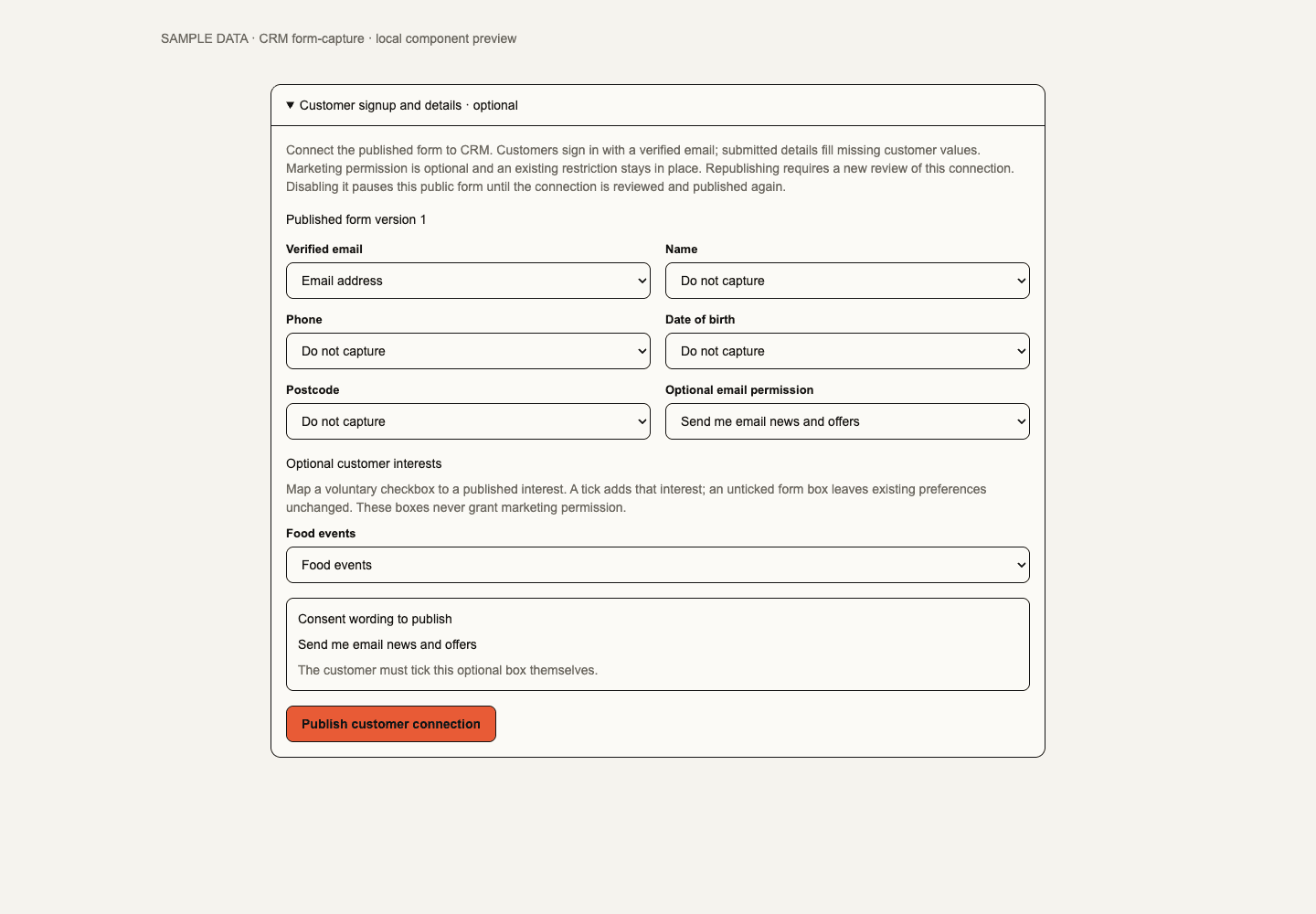
An Inbox form remains an ordinary form until a manager explicitly maps an exact published version to CRM. The mapping selects profile fields and an optional, unchecked email-consent field with frozen consent wording. CRM capture requires the guest's signed-in verified email to match the submitted address. Embedded capture opens a secure standalone continuation. Republish, disable the mapping or lose its publisher's authority and capture pauses until reviewed; it never falls back to anonymous CRM capture. Ordinary Inbox forms keep their current behaviour. Managers publish up to 50 named interests in CRM Settings → Marketing activity and interests. A form can map up to 20 distinct interests to optional checkboxes. Ticking one adds that interest; leaving it unticked preserves existing preferences. The preference centre supplies explicit withdrawal. Changing or unpublishing a mapped interest pauses capture until the current choices are reviewed. Concurrent connection edits preserve the local draft and require an explicit reload before publication.
The customer preference centre at /org/[orgSlug]/preferences derives the exact
organisation relationship from the signed-in verified email. It can update
supported interests, public venue preferences and channel choices, and submit
data-access or deletion requests. A request is not completed deletion. Unsubscribe
links remain available without sign-in. An existing suppression prevents a new
email opt-in; neither a form nor a preference edit overrides it.
Phone verification is available only after platform review binds this business to the configured Twilio account and Verify service. Send code starts a 10-minute request for the current phone and identity; changing either invalidates it. Limits apply to starts and code checks. An uncertain provider response remains pending and does not silently resend. Verified phone proof grants neither SMS consent nor Wallet identity. Phone-only sign-in remains unavailable. A signed-in customer may separately opt into SMS after current phone verification and reviewed business SMS sender readiness. The consent records the exact phone proof; changing or re-verifying the number requires a fresh opt-in. STOP suppression blocks a new grant and is not cleared by replying START. Expired challenge payloads are removed after the retention interval. A separately reviewed phone-proof erasure step does not complete the entire deletion request. For Guest Wi-Fi, support must also finish the separate reviewed Wi-Fi evidence-erasure batches before recording account deletion as complete. Data-request review must include profile change history and interest decision history alongside current profile values, source import/form evidence, consent, visits and messaging records. Before/after profile evidence may contain birthday, postcode and custom values; copying or clearing the visible profile alone does not resolve those retained records.
Guest feedback from CRM
Overview's Guest feedback lists accessible Events and opens their verified visit evidence, current feedback policy and aggregate rating. Ticketing retains form configuration, checked-in holder invitation approval, timing, sender checks and private service recovery. CRM does not create a second feedback record. Ratings honour the source minimum cohort; comparisons use the same exact form version and a bounded Event sample. Anonymous responses never join a customer profile, and recovery counts/links require the separate recovery permission.
Unprepared or changing visit evidence is unknown. Events exceeding the current 500-ticket evidence-review limit show that limit instead of a partial count; the source feedback workflow remains available. CRM also links to Bookings → Visit feedback for completed Bookings and explicitly reviewed linked till visits. That entry stays disabled with an access-check message until the current CRM read is admitted; opening it still checks current authority. This workflow is available on the web.
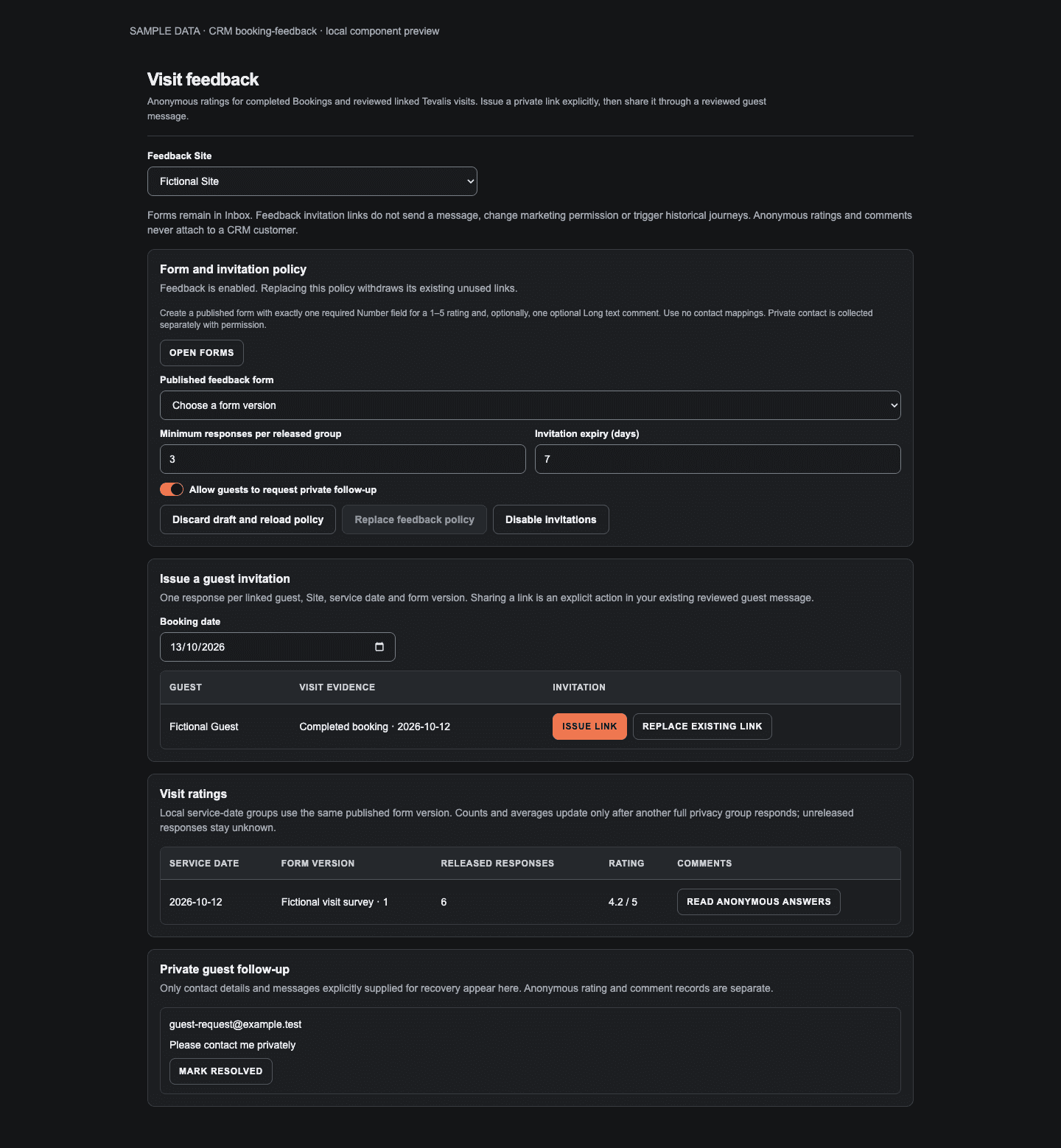
Booking feedback managers select an exact published anonymous Inbox form with a required 1–5 rating and an optional comment. Configuration fixes the Site, privacy floor (at least three), link lifetime and optional private follow-up. Issuing or replacing a link is explicit and requires guest-read and invitation authority for every contributing Site/Space; till evidence also requires its current EPOS scope. The current visit is checked again when the guest opens or submits the single-use link. Historical import does not issue links or send messages. Copy the link into the existing reviewed Booking/Inbox communication workflow.
With two or more feedback Sites the workspace opens on All sites: each Site's ratings and private follow-up show in their own section under that Site's permissions. Policy and invitations configure one Site, so under All that card asks which Site to manage. Feedback Site narrows the workspace to one Site and keeps the choice in the page link.
Anonymous answers retain only the Site, form/configuration cohort and local service date. Reports and raw answers release in groups meeting the privacy floor, with no customer, invitation or Booking join and no individual submission timestamp. An optional private follow-up records contact details the guest explicitly supplies in a separate recovery record and My Work item. It does not link back to their anonymous answer. Ratings, raw comments and recovery each require their own source permissions. Resource or access changes recheck both retained and current scopes; unavailable evidence is withheld.

Reviewed SMS campaigns
Campaigns includes a separate SMS review for managers with campaign-send access. Use a frozen published campaign audience, plain message text, maximum recipients and a cost cap. Prepare SMS review evaluates verified phone ownership, explicit number-bound SMS consent, suppressions, duplicate numbers, reviewed destination rates and limits in pages. Audience membership is separate from email contactability. Preparation sends nothing and can run with a configured but disabled sender for rehearsal. The managed “Reply STOP to opt out.” footer is part of the segment and cost calculation; unsupported template variables are rejected.
The completed review shows the exact sender revision, included/excluded counts and reasons, SMS segments, currency, estimated Twilio cost and evidence expiry. Review SMS approval opens an explicit send or schedule confirmation; the chosen time uses the device timezone and must precede evidence expiry. Edits need a new review. Approval requires current business/provider readiness. Queued delivery rechecks current authority, frozen phone proof and consent, STOP suppression, daily budget and throughput. Cancellation stops remaining work. Known provider acceptance, delivery and failure receipts remain distinct; an uncertain attempt is not silently resent. Signed callbacks cannot reverse a terminal receipt or affect a different business's sender. Delivery status and exclusions remain visible under current management and sending permissions.
CRM SMS sends only from the business's own Twilio account, connected through Twilio Connect. Twilio bills the business directly; Soupy adds no SMS charge. A platform operator reviews the sender against that exact connection revision with independent account-ownership evidence. The business moves its UK reply-capable number and regulatory bundle into the connected account and creates the Messaging Service there; Soupy never buys numbers. Destination rates estimate Twilio's price. The daily budget, throughput and campaign cost cap are Soupy send limits, not charges or a cap on the Twilio bill, so the business sets its own Twilio usage triggers. Soupy's shared Twilio account does not send CRM SMS, and the phone Verify binding alone does not configure campaigns.
Disconnecting the account, a verified Twilio revocation or a reconnection withdraws the review. Queued SMS are skipped with a Twilio-connection reason and never resume; sending needs a fresh review and new approvals. After a disconnect in Soupy, receipts and STOP replies for texts already sent still record; after a revocation in Twilio they record only if Twilio keeps sending them, which provider acceptance has not yet shown. Sending also stays unavailable until the deployment holds the Connect credentials and the callback-signing credential proven in provider acceptance. Isolated development blocks provider sends. These are web additions; no live SMS pilot or native parity is established by the local fixtures.
Optional marketing activity control
CRM Settings → Marketing activity and interests contains the Marketing activity policy, disabled by default. Overview links to its current decision. A manager with campaign-send permission and unrestricted CRM Site access can review and save a business-wide inactivity threshold of 30–730 days and a 0–90-day explicit-signup grace period. A recent recorded purchase or qualifying visit passes this additional check; recent explicit consent to the particular channel can use the grace period. Email opens, imported relationship creation dates and consent to another channel do not substitute for that evidence.
When enabled, complete but inactive history and missing history have separate exclusion reasons; both withhold delivery. Source authority is checked again. This affects pending and future CRM email/SMS campaign and journey deliveries, including already approved messages. It does not rewrite audience membership, historical contactability or source consent. Concurrent setting changes preserve unsaved edits and block stale review until the operator explicitly reloads.
Funded promotional rewards
Overview exposes Loyalty-owned funded promotions when the operator has Loyalty access. Create a draft against a published reward and current business activation, with an explicit currency, positive known unit liability, budget, funding reference and validity window. Review and publish under current Loyalty management and reward responsibilities. This is an explicit funded path; it does not invent points or change a published reward into a zero-points reward.
An email campaign draft or email journey step can reference the reviewed promotion. Approval freezes that source. At delivery, current authority, activation, reward scope, inventory and budget are checked before reserving one promise per frozen recipient/run step. Provider acceptance issues a normal redeemable Loyalty claim; points balances remain unchanged. The email carries the reward terms, reference and expiry. An uncertain provider outcome retains the reservation until a verified receipt or expiry resolves it. Cancellation before an attempted send can release it.
The funding ledger separates committed budget, outstanding liability and consumed value. Consumption retains spent budget; expiry/cancellation releases unused budget and inventory. Failures remain visible for reconciliation and bounded expiry retry. Existing credential and redemption controls govern use. This implementation awaits financial/operator and provider acceptance; it does not migrate Airship codes.
Overview setup and database snapshot
On the web, Overview begins with a five-step setup path: import customers, connect an email sender, publish an audience, review the optional marketing activity policy and configure optional customer interests. Only the first three determine Ready to send. The two recommended steps never block this setup state; they retain their existing policy and consent semantics. Unavailable settings remain unknown. Set-up complete requires evidence for all five steps. Sender readiness uses the same workspace source as the header and campaign approval.
Each admitted tab has a capability card with a current count or a labelled availability fact and its primary action. Review drafts opens the existing audience draft when management access allows it. New campaign requires sending access, a usable sender and a published audience before opening the retained email editor. These actions do not import, publish, approve or send. Journeys, Sales and other destinations keep their existing module/route gates.
CRM uses the latest completed Database snapshot for Overview customer totals, labelled with its saved time. Before a report exists, the count is unavailable; Customers remains browsable. Opening CRM never starts a historical rebuild. Completed report payloads reload on saved revision changes, foreground/reconnect, or an explicit retry; a small status read keeps current access, entitlement and comparison-source checks. Refresh report explicitly recalculates a new dated report, including time-dependent eligibility. Inactive CRM tabs suspend private refreshes while retaining local drafts. Compare audiences and Metric reports and drafts load when opened and pause when closed; metric-draft deep links open their disclosure. Detailed campaign and audience authority checks remain live. This web update does not establish production or native acceptance.
Database snapshot retains explicit customer and operational timestamps. Its four facts are customers, email contactability, repeat guests seen in 30 days and campaign deliveries. Customer growth is labelled against an earlier recorded report; email-contactable growth keeps its separate compatible-report measure. Who can be emailed shows disjoint current eligibility, missing consent, missing email, suppression and frequency limits. Frequency-limited customers remain part of the email-contactable total and are not counted twice in the bar.
Incomplete visit history is unknown, not zero. Its preparation control reuses
the existing source-owned crm.manage permission and leased read; preparation
sends no messages and starts no journeys. Refresh the report after preparation
for the new snapshot. The creation-month chart uses the snapshot's current UTC
month and previous eleven months; creation is not consent or first visit, and
older relationships are outside the chart. Comparison requires two distinct,
accessible published audience versions. How these numbers are measured folds
six definitions plus the existing detailed observations, currencies, monthly
retention and historical reports into one disclosure. Source health, feedback
and collapsed metric drafts occupy the adjacent column. An empty feedback page
shows a labelled empty state and retains source-owned Booking navigation.
Desktop light, desktop dark, narrow light and narrow dark.
24 October 2026 local component fixtures with fictional aggregates. These show the layout and local interaction, not production data or authenticated acceptance. Native CRM is unchanged.
Visit evidence and retention insights
Prepare visit history builds source-labelled observations in resumable pages. Customer/Site/local service date is the default observed visit unit. Completed Bookings, verified ticket-holder attendance and eligible linked Tevalis party bills remain distinguishable. Booking confirmations alone do not count. Corrections remove outdated contributions; source events remain available for explanation. Party bills never become an individual's Order spend. Legacy purchased-ticket attendance rules count check-ins associated with Orders and differ from verified holder visit days.
A profile shows bounded recent activity, paginated Order history and visit observations under current source permissions. Missing or unprepared history is unknown. Source-dependent audiences cannot treat it as zero. Audience starters include new explicit subscribers, first-time visitors, regulars absent for 90 days, upcoming birthdays and high-spend lapsed guests; review their thresholds and calendar timezone before saving. Grouped All/Any/Exclude conditions select active, accessible Sites and configured typed fields. Saved unavailable references remain visible for correction; they never silently become broader conditions. Spend inputs use the business currency, including its supported fractional units. Grouped editor controls remain disabled with an access-check message while current audience authority is being checked. Same-business draft values remain visible; the first enabled action applies without requiring a repeated click.
Overview's Prepare report or Refresh report starts a resumable retention report. Customer/contactability facts use one fixed watermark. Business-wide email contactability excludes absent consent and suppression; temporary frequency limits are separate. Daily growth compares compatible completed reports on different UTC dates. Missing dates are unmeasured. Visit totals require complete coverage; repeat guests have at least two observed visit days, and the recent repeat count also requires a visit in the last 30 UTC dates.
The report also separates visit recency/frequency buckets and known individual Order value by currency, with explicit purchase and visit coverage. Customer creation cohorts compare current contactability and recent activity; creation month is not consent month. Monthly retention cohorts use the first recorded qualifying visit month and count each guest once per subsequent month, across Sites. The twelve completed calendar months align to the snapshot's UTC month. Current/future months, empty-cohort rates and incomplete monthly coverage remain unknown. First recorded visit does not establish first-ever visit.
Compare two published audiences evaluates both exact saved versions at the same customer watermark and evaluation time. It reports matched/contactable contacts, RFV and overlap separately; unknown evidence makes the affected totals explicitly partial. Version access and referenced Sites are checked at preparation, continuation and read. Preparing older visit data upgrades its monthly projection and all customer input versions before claiming complete coverage.
Campaign delivery totals are collected during preparation, separately from the contact watermark. Tracking covers the displayed UTC date window and keeps redirect requests, bookings, payment receipts and refunds distinct; currencies are never added together. Redirects may include scanners/repeats. Missing tracking or revenue remains unknown, and these observations do not prove causal impact.
Publish an audience and run a campaign
- Choose an audience rule over explainable facts such as spend, visits, recency, engagement, tags and declared interests. Review source readiness.
- Preview the relationship match, currently contactable customers and exclusion reasons, then publish an immutable audience definition.
- Create campaign content/offer and freeze the intended audience, purpose, channel, frequency and cost limits.
- Review the exact campaign and explicitly approve it. Delivery rechecks each recipient's current scope, consent, suppression and frequency.
- Inspect delivery outcomes and separately reported conversions/revenue.
Rules over completed orders, net spend, days since purchase, checked-in tickets, the relationship score, inferred interests, Soupy Event purchases, or the Any Ticketing link and Soupy ticket orders customer sources read purchase facts that order, refund and check-in events keep current. Customers who haven't bought or checked in for longer than Maximum fact age (days) need no refresh: for these facts the age counts from the evaluation. The Bookings and Direct to CRM only sources are different. A booking's completion doesn't update purchase facts, so their age still counts from each customer's last rebuild, and preparation fails while any customer's facts are older than the limit. The age also still limits verified website activity and reward facts from when they were summarised. Facts through shows the evaluation time, or for Bookings and Direct to CRM only the oldest customer rebuild; it isn't when customers last bought. If any customer's purchase facts are still being built, or their build failed, preparation fails; build the audience again once they are ready. An update to a customer's facts that fails all its retries starts a rebuild of their facts, and failed builds are retried every six hours. Date rules and expiring interests can end validity sooner, and a score rule can drift as purchases age. Delivery rechecks each recipient's current match. Overview audience comparisons and the saved-audience check in Journeys and Event offers judge an audience the same way, and a Journey that finds facts too old requests a rebuild. Event offer candidates and lapsed-customer Journeys also need purchase facts rebuilt within the last day, and request that rebuild themselves.
A frozen audience can shrink when somebody becomes ineligible; it cannot silently grow. Expired/stale source evidence requires reevaluation. Suppression is provider-independent: changing email connection cannot restore an unsubscribed, hard-bounced or complained recipient. Booking recovery campaigns additionally bind a demand run and offer; a filled target can stop the campaign. Attributed revenue and holdout-adjusted incremental contribution remain distinct.
Audience definitions retain their legacy basic requirements and can add nested All/Any/Exclude groups over supported relationship measures, tags, interests, birthday, postcode, preferred/latest/favourite Site, typed custom fields, verified website activity over 30/90 days, historical issued/consumed reward claims, customer source, imported-show and Soupy Event purchases, distinct shows bought for, days since last booking and business signals (see Ticketing sources and breakdowns). A definition can also rank its matches by total spend, Events bought for or visits; ranking never changes who matches. Favourite Site uses observed visit-day frequency, then latest service date and a stable Site-ID tie break. Latest Site uses latest service date with the same stable tie break. Membership and contactability remain separate. Large evaluations use immutable customer input versions at one fixed watermark, so later purchases and imports do not repeatedly restart a build. Preview/build counts are partial until completion. Missing captured history, source readiness or authority blocks the build. Old frozen evidence keeps its original version meaning. Engagement facts require currently permitted tracking, verified email-linked sessions and completed bounded source preparation. Only website visits, campaign visits and interactions contribute. Ticketing embed views and Event impressions remain separate Ticketing metrics and never establish CRM engagement coverage. Opens and forwarded redirect clicks never establish individual activity. Missing coverage remains unknown, including inside an exclusion. Reward conditions refer to an exact published reward version and require current Loyalty source access; pending funded reservations are excluded. Analytics withdrawal or a tracking-policy/site change invalidates earlier engagement-derived counts, samples, exports, approvals and journey history immediately. Ordinary new observations retain the frozen watermark.
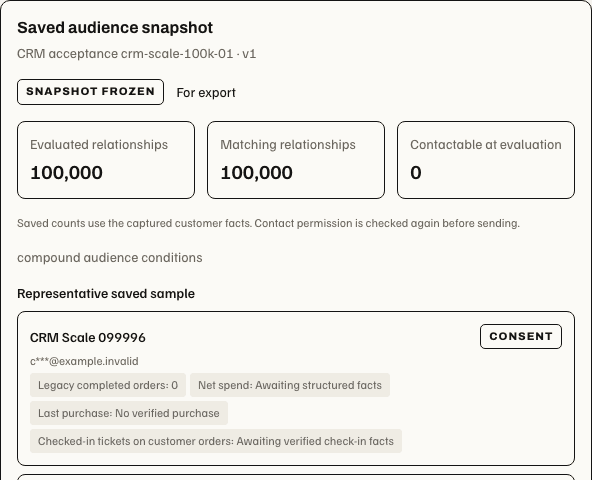
Open latest snapshot reopens a saved audience's state, captured counts and definition under current read authority. Opening CRM or reloading the page does not start a new preview. Preview remains an explicit action; an unfinished snapshot shows partial counts and cannot supply completed export evidence.
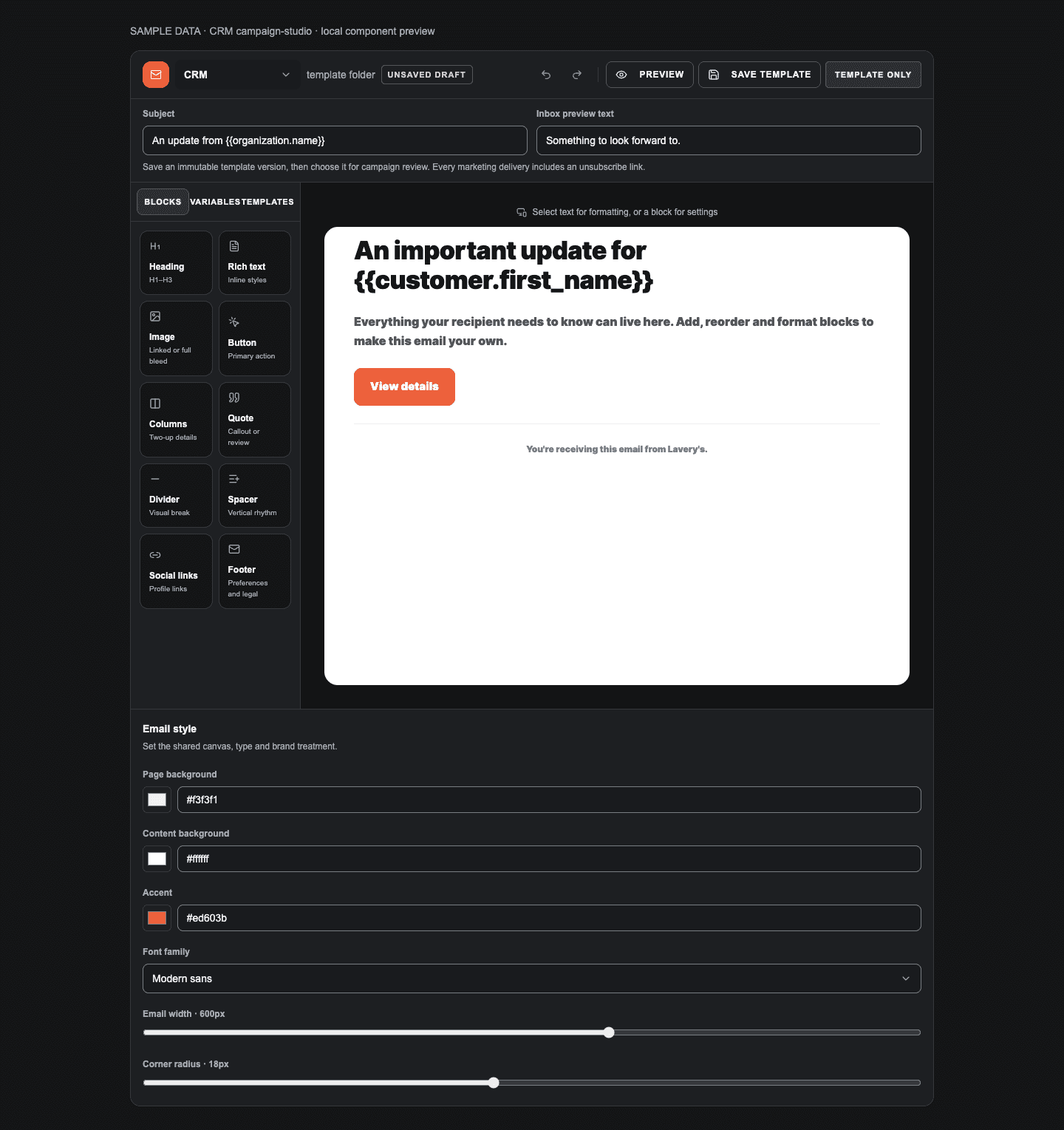
Campaigns can select an immutable CRM marketing template version from the shared visual email studio. Test sends target the signed-in operator's verified email with synthetic guest values; provider acceptance does not prove inbox delivery. Templates support the approved CRM variables and fallbacks. Selecting a saved version freezes its content; a later template edit does not rewrite a reviewed campaign. The schedule is explicit and must remain within audience validity.
A saved campaign can define a two-version content experiment using immutable approved templates. Assignment is stable for that campaign/customer and separate from impact holdouts. Both content versions are frozen with campaign approval. The experiment reports actual delivery, redirect and consented conversion evidence with currency-separated amounts. After completion, an operator explicitly records a winner and reason; choosing it does not send another campaign. Opens do not select a winner. Material campaign changes require a new experiment review.
Every supported marketing email includes an application-owned unsubscribe footer and one-click headers. The public link can revoke marketing without sign-in; it cannot view a profile or grant permission. Previously queued legacy marketing messages without a protected unsubscribe path stop with an actionable failure and require an edited, newly reviewed campaign. Existing sender/rate budgets still apply; a 100,000-contact database does not imply permission to send that volume immediately. Marketing email (campaigns, Journeys and Event offers) goes only through the business's own Resend connection, never Soupy's sender or a Gmail mailbox, at up to 3,000 emails an hour per business. Emails over that pace wait for the next hour.
Delivery report
Opening Delivery evidence on an email campaign that has started sending
reads its Delivery report once; Refresh reads it again. It needs
crm.view or crm.campaign.send and the same audience and Site access as the
campaign row. SMS campaigns keep their own evidence. The report covers the
campaign's current send:
- Sent: messages handed to the email provider, out of the send's recipients. Messages still sending and those Soupy skipped before sending (consent, suppression or eligibility changed) are listed separately.
- Delivered, Bounced and Spam complaints: from the provider's delivery events. A complaint follows delivery, so it also counts as delivered. Delivery and bounce rates are over sent; the complaint rate is over delivered. Until the provider reports any outcome for the send, these show Not reported, not zero. They need delivery events set up for the sending Resend account (step 5 of email setup). Messages accepted with no report yet, delayed, failed or refused by the provider are listed under the figures.
- Unsubscribes: the first use of each recipient's unsubscribe link, counted per day with no person stored. The rate is over delivered, or over sent while the provider reports nothing. Sends queued before Soupy began counting show Not counted; their unsubscribes still suppress the address. An unsubscribe from a send that a newer reviewed attempt replaced doesn't count towards the new one.
Delivered means the receiving mail server accepted the email, not that anyone opened it. Soupy doesn't record email opens.
Large campaign preparation and exports use bounded batches. Prepared recipients remain held until preparation completes; cancellation stops remaining delivery. Export review prepares a run and retains its link in the current business's URL. Reloading that link reopens authorised progress without preparing another export. Download prepared CSV becomes available only when every row is ready; the download reads authorised pages and records its acknowledgement separately. Export preparation is not a partial downloadable result. Browser CSV downloads are bounded to 100,000 source records and 50 MB; a file that exceeds those limits is refused before download.

The browser retains an actor/business/export-bound handoff marker before attempting the file. Reloading an unacknowledged attempt offers Retry audit acknowledgement without another file; check that the original file was saved first. A recorded download shows its receipt. Unavailable browser recovery storage blocks a new file, and an expired, wrong-business or inaccessible link returns no export data. This browser recovery behavior does not promise exactly one copy across devices.
Exports require crm.export; managing a segment does not grant export authority.
Downloaded/copied private content and pending actions are bounded by current
source access. A revoked grant can remove an open editor or review dialogue.
The custom CSV layout keeps the same reviewed purpose,
retention acknowledgement and audience export permission. Custom CSV appears
on a completed prepared run and reads its frozen pages. It cannot fetch live
customer values or add a field absent from that run. Standard and custom
downloads share the same handoff marker and audit-recovery workflow.
Sales, companies and follow-ups
In Sales, the Bookings enquiry pipeline opens on All sites: every enquiry at a Site where you may read private events, each checked at its own Site and named with it. Sales Site narrows the pipeline to one Site and keeps the choice in the page link; filter by stage and choose board or list. Open an enquiry to link a company, assign an owner, record an estimated value and create dated assigned follow-ups. Under All, the editor loads that enquiry's own Site's options and says so if that Site has left your access. Complete a follow-up when done; open the Bookings detail for its governed proposal, capacity, contract or cancellation transition.
Create a Company with name, website and notes, then link an existing customer by email and optional role. Linking/unlinking is reversible and does not change that customer's identity or marketing permission. Enquiries and guest details remain subject to Bookings and guest-read access; CRM does not widen them.
Automated journeys
A journey can respond to supported enquiry, booking, purchase, consent, segment or ticket milestone signals. Choose its audience, daily customer limit and budget, pilot recipients or production audience, and whether conversion stops remaining steps. Arrange up to eight Wait, Check audience and consent, Send approved email, Send approved SMS or Create assigned task steps.
Save the draft, run its dry run, inspect the outcome and approve the exact version before enabling automatic work. Pilot mode allows at most 20 designated addresses or verified phone numbers per channel, each of which still needs a customer record, current channel consent and audience eligibility. Pure SMS journeys support phone-only relationships; a mixed email/SMS journey requires both channels. Draft saving and dry runs send nothing. Production approval permits future qualifying customers to enrol.
Four starters create disabled test drafts: Welcome, Birthday greeting, After an observed visit and Lapsed guest. They still require saved templates, a dry run and approval. Birthday drafts require an explicit timezone, start checking from 09:00 local time and enrol once per customer per year; 29 February uses 28 February in non-leap years. Post-visit uses a newly observed qualifying customer/Site/service day from a completed Booking, verified ticket-holder check-in or explicitly reviewed linked till evidence. Its live signal must occur after journey approval; historical reconciliation and imports stay silent. Current source retraction, moved identity or lost Site authority stops unsent steps. Legacy completed-Booking recipes retain their original trigger. Confirmation alone is not visit evidence.
The lapsed starter uses the last observed qualifying service date and resets only for a later qualifying date. Temporary audience loss or correction to an older visit does not create another lapse. Legacy recipes retain purchase-based lapse; operators can explicitly choose the basis. With “stop on conversion” enabled, a current future confirmed Booking suppresses a lapsed reminder at entry and before delivery, including a booking created while the journey waits. Cancelled bookings do not suppress it; incomplete or excessive source evidence withholds the message. This booking check requires unrestricted business-wide CRM source access for both purchase-based and observed-visit lapse. Observed-visit lapse requires complete business-wide visit preparation and unrestricted CRM Site access; Series-specific observed lapse is unavailable.
Published email and Communications-owned SMS template versions are selected explicitly. SMS approval binds the reviewed sender, rates, segment limits and budget; changing the binding invalidates the dry run. A disconnected or reconnected Twilio account skips queued journey SMS as it does for campaigns. STOP, changed phone proof or consent and uncertain provider outcomes are governed by the same rules as SMS campaigns. The approved journey never silently retries an uncertain SMS attempt. Unsubscribe, suppression and audience loss stop further steps. Recent runs show outcomes; failed runs can retry with their existing message receipts. An approved journey is not evidence of a completed or delivered individual run.
Contextual Series and Event promotion planning
Availability: the contextual planner and explicit Event inheritance described here are web operator features; no native promotion editor is added.
Series → Marketing → Email templates shows the Promotion email library: nine cards for New events on sale, First to know, Next up in this Series, Tickets moving quickly, As a regular customer, For fans of…, Before the weekend, We’d love to see you again and Groups & corporate. Each card gives its use and a suggested audience. Choosing a card opens the shared Email Studio with a styled HTML email in the Ticketing confirmation look: the Series name, a headline, a greeting, Event cards with date, time, status label and Book tickets link, and a sign-off. New events on sale, We’d love to see you again and Groups & corporate list up to six of the next twelve live dates; the others feature the next one. With no live date, a See what’s on link replaces the cards. Every block stays editable, and Event card is available in the Studio block library. Urgency and affinity remain operator-reviewed claims; starters use neutral copy. Unpublished Events receive no customer booking link. Choosing a card alone creates no template, campaign or send. Percentage/fixed code management is the sibling Discount codes section; Automatic rules and Series CRM follow Email templates in the same stack. The Event workspace keeps Plan promotions and Discount codes tabs under Event → Tickets → Promotions.
Saving the design creates a CRM marketing template version, and that saved version becomes the campaign email; another saved marketing template and version can be chosen below the Studio. The campaign sends exactly that saved HTML and its plain-text alternative, with the automatic unsubscribe link. Unsaved Studio edits are flagged and are not sent until saved. Test sends use the same panel. Leave Send a test to blank and Send test to my verified email sends the chosen saved version to the signed-in staff member's verified email; type one plain address and Send test email sends it there instead. Either way the sender must be signed in with a verified email. A test always uses example guest details, never a real customer's, goes to that one address only, and sends through the business's own marketing sender; it never falls back to Soupy's sender. When Soupy can't send it, the notice says why: enter one plain address (no name, brackets or list), the address has unsubscribed, bounced or complained, sign in with a verified email, connect a verified marketing sender in Settings → Communications → Email, reactivate that sender's credential, wait 30 seconds between tests, each person's 25 tests per 24 hours, or the hourly marketing email allowance. Other failures show a general notice. Each test is recorded in the email connection's audit with its typed address.
Send campaign in Series CRM Saved audiences opens this view with that audience linked: a notice names it, and the campaign of the email you choose (or a draft already open) starts with it selected. A linked audience that is not a current published audience for this Series under your access shows a warning and is never selected.
Choose a published audience, prepare its current contactable membership, and optionally choose a delivery time in the device timezone. Maximum recipients (optional) left blank sends to everyone eligible; a number stops there, highest-ranked first. Cost cap (optional) left blank sets no cap of its own. Once the audience is prepared, the summary shows Estimated cost: up to the contactable customers within the maximum (or top share) at Soupy's email delivery budget rate of 10p per email (10 minor units in other currencies). It is a budget figure, not the provider's invoice. A cap below the estimate is refused before saving, with how many emails it covers, because preparation would otherwise stop the campaign; raise the cap, lower the maximum or leave the cap blank. With a prepared audience and a saved email, Preview as a customer shows the saved email and subject with the name of a contactable customer from that audience, highest-ranked first; the arrows step through contactable customers among the first 100, up to 25. Their email is masked and every link is disabled; previewing sends nothing. It needs campaign-send access (to read the template) and CRM view or management (to see the customer). For a ranked audience, Send to offers Entire audience, Top 10%, Top 20% or Custom share (1–99.9%, one decimal place). The share is a share of every matching customer, taken from the frozen rank order and rounded up, so a small audience keeps its top customer. Only customers with a recorded measure (spend, Event purchases or visits) are ever in it: a customer with none, or whose measure isn't known yet, is not a top customer, and the summary says how many have no recorded measure yet. A top share that would reach nobody is refused at approval. Top-ranked customers who cannot be contacted are skipped, never replaced from lower ranks, and Maximum recipients still caps delivery, highest-ranked first. Other audiences always send to everyone eligible; a share is refused for them, and for recommendation and demand-recovery campaigns. Save draft & review needs a saved email and saves the same draft across audience refreshes; it sends nothing, and the review says so. Only approval sends: Approve & send now starts delivery straight away, and Approve & schedule for the chosen time starts it then. Emails already sent can't be recalled. In CRM → Campaigns, Maximum recipients likewise defaults to blank (everyone contactable now), and the approval dialog's button reads Approve & send to N now or Approve & schedule N for the time. Frozen membership can shrink at delivery, never expand; existing consent, suppression, sender, source and budget checks still apply. A blocked approval is handed to CRM → Campaigns for recovery. There, the editor, Live guardrails and approval review show the top share. Saving keeps it unless Send to the entire audience instead is chosen. A plain campaign issues no discount.
An Event in a Series uses that Series's published audiences and opens its shared CRM within the planner; Open Series goes to that Series's CRM view. Standalone Events use published business audiences. Check this Event explicitly reads current admissions and availability, explains an invitation/reminder recommendation and lists admitted audience choices. Eligibility remains unknown until the audience is prepared. Below 50% sold, the suggestion starts with an invitation now and proposes only future 48-hour or 24-hour checks. Sell-through does not establish sales velocity. Unknown inventory shows a reason rather than an urgency claim. Hidden panels suspend private reads; refreshing options retains same-source drafts. Event reassignment or changed CRM entitlement retires the former context, and preparing, saving and approving validate the current Event/Series audience binding again on the server.
CRM and exact Ticketing view access admit the library. Audience/history access retains its stronger existing source boundary; an unrelated Site restriction can leave the library available while withholding audiences and shared history. Campaign management/send permissions remain separate. Automatic rules also need CRM Growth, Automation authority and exact Ticketing financial target authority. Options load on entry or explicit refresh, up to 100 published versions; the UI states when the list is partial and links to CRM. Sales and customer history are not loaded by each short access-lease renewal.
Automatic Event offers
In CRM → Journeys → Automatic Event offers, choose a recurring Series or an individual Event. Send timing applies to every stage: days before at a local send time (up to 30 days), or a fixed number of hours before the Event start (1–720, for example 24 or 5). Configure one to six stages in chronological order, each with a sales threshold, recipient cap, expiry, published CRM email template and incentive: Percentage off, Fixed amount off, Buy one get one free or No discount (reminder). The starter draft uses T−2 and T−1; its sample amounts are editable, not an activated campaign.
Create a rule email template offers Reminder and Discount offer cards in the same styled layout. Event name, date, time, link and any offer terms stay variables until the rule runs.
The contextual Automatic rules pane uses the same Journey service. Its starter sets 48 hours / below 50% / buyers of at least three shows, then 24 hours / still below 50% / buyers of exactly two shows. Each stage can narrow the rule audience with a published segment and optional minimum/maximum Series shows bought for. These are hard eligibility boundaries: a short first tier is not filled from the next tier. Both gates are rechecked before delivery. Standalone Events require a business audience and cannot use Series buyer counts. Completed imported buyer history and retained native sales count distinct shows, excluding holder-only rows and deduplicating only unambiguous overlapping dates. Partial/active imports, ambiguous overlaps or excessive history produce an unavailable decision, never a zero count or inferred marketing consent.
Event modes are Use Series rules, Custom rules and Off. Series rules are the default. Approving a direct Event rule, including a pilot, selects that exact rule and replaces inheritance; saving a draft does not. Pausing a custom rule does not restart the Series rule. Switching mode invalidates already queued unsent work; switching off and back on cannot revive those receipts. Already issued codes keep their stated expiry/terms. The Event pane shows the published Series rule even while its Series editor has a draft, marks which rules are selected, and restricts displayed stage/run history to that Event. Changes remain subject to fresh review and current permissions.
A reminder stage sends the Event link with no code. It reserves no discount allowance, ignores the discount cooldown and may reach more customers than the remaining places; consent, suppression, activity rules and the fresh-audience rule still apply. Its template may use only Event and customer values; discount smart values are refused. Discount fields appear only while a stage has a discount.
Each stage can select up to 5,000 recipients. Send in batches of (25–500, default 250) paces delivery. Within a batch, emails go out one at a time at the business's 3,000-an-hour marketing pace (one every 1.2 seconds). Batches start across the beginning of the two-hour send window, one to ten minutes apart and never before the previous batch has finished; the last starts at least 15 minutes before the window closes. A stage may need at most 20 batches, so a large cap needs a larger batch size. A stage selects only as many customers as its remaining window can email at that pace, less the business's marketing email already sent that hour, so a stage frozen within 15 minutes of its window closing selects no one. When a batch is due but other marketing email has used this hour's allowance, including other Event offer stages, the batch waits for the next hour, or the stage stops if that is too late. Batches never start within the last 15 minutes, even after a wait; customers not yet reached get no email or code and stay excluded from later stages. Pacing spreads provider load for deliverability; it does not extend the window, and unsent batches expire with it. Stages approved before batching existed send unpaced. A stage also selects no more customers than the journey's Customers per UTC day and Daily budget can still send that day, and saving refuses a policy whose largest stage exceeds either. An Event can be issued up to 5,000 offer codes.
Sales thresholds use current confirmed admissions for the Event against finite configured capacity. A ticket moved to another date follows its current Event; original-sale revenue reporting remains separate. Reservations reduce availability but are not confirmed sales. Unknown/incomplete inventory, unsupported seller routing or unavailable source facts stop the stage with a recorded reason. The scanner checks every 15 minutes; a stage has at most two hours to select and send, shortened by its expiry. Missed stages and ambiguous clock-change times are not sent later. Approval covers future stage times only.
Customers are ranked by relevant Series attendance, purchases and declared or evidenced Series interest; recency and repeat activity break ties. This is an explainable ranking, not a predicted conversion probability. A selected audience can narrow eligibility; an Event without a Series requires a published organisation audience. Every later stage uses a fresh audience, excluding previous Event offer recipients, current buyers, ticket holders and active reservations. Guest email matches suppress offers without merging identities. Consent, suppression, purchases, access and availability are checked again at send time. If relevant facts are stale, bounded refresh and rescanning occur before selection; unresolved evidence stops the stage. Enabled activity rules, audience privacy and source permissions apply before ranking. If those rules change or activity evidence expires while a cohort is being assembled, the unfinished selection must refresh before it can issue offers.
This release checks a complete audience of up to 5,000 customers and bounded Ticketing evidence of up to 2,500 Ticket records, including prior generations, and 500 distinct Orders per Event. Larger or inconsistent evidence stops the stage rather than selecting from a partial sample.
Every discount-stage recipient gets an Event-specific, single-use bearer code. A use applies to one Order, not one ticket; a percentage also has a mandatory monetary ceiling. Buy one get one free makes the cheapest paid ticket free when the Order has at least two paid tickets, up to Most a free ticket can be worth. The per-Event discount allowance reserves the maximum exposure of frozen selections and issued codes across all offer rules, while the daily email budget limits delivery cost. The customer cooldown counts Event offer codes and milestone ticket codes across the business. Selected audiences and message/code receipts are retained so retries cannot enlarge a stage or issue duplicates.
Discount stage templates must include discount_code, discount_value,
event_url and offer_expires_at; reminder templates need only event_url. The
CRM template editor lists these smart values. Discount terms include the maximum
amount. Save, dry run and Approve & activate remain
separate. Pilot is the default and only admits designated, consented CRM
customers. Production approval permits future automatic selection and sending;
no recurring per-email approval is required. Recent stage history shows selection,
enrolment and stop outcomes. Provider acceptance and delivery remain separate.
Offer templates also support customer name/email, organisation name/website, the Event date/time and unsubscribe values. Templates using other CRM-only values, such as company, tags or last visit, are unavailable for these offers; unsupported values do not silently become blank text. Event dates and expiry times use the Event's timezone, including each date in a Series.
Pausing stops new offers and unsent messages. Already-issued codes retain their original terms until expiry or explicit deactivation; a changed Event schedule invalidates its old codes. Buying a different Event does not stop this Event's journey. This authoring surface is web-only; no equivalent native editor is claimed. CRM Growth, current CRM and Automation access, Ticketing target authority and a ready approved email sender are required. A real provider send is separate from the fictional preview.
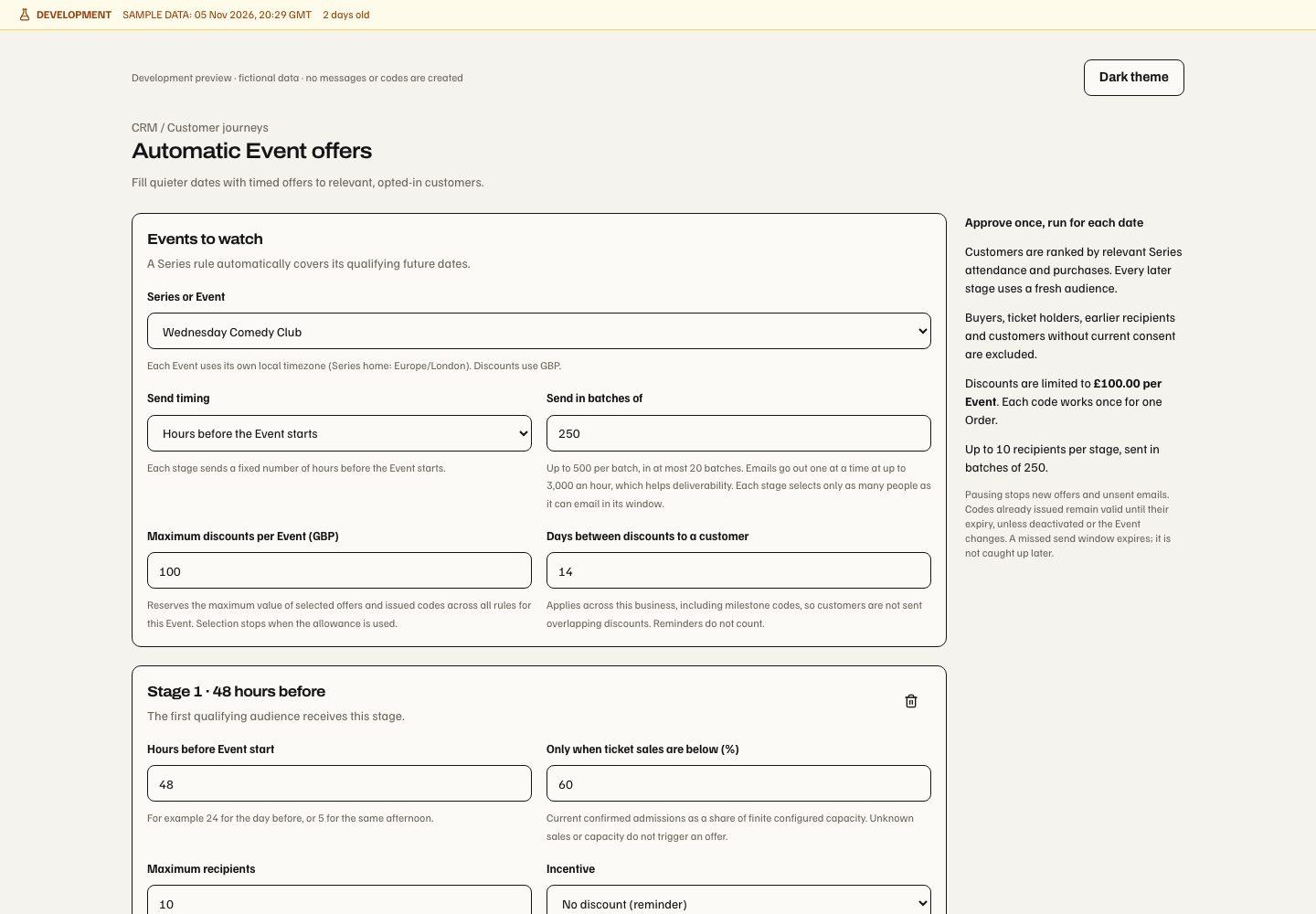
Ticket milestones and single-use codes
Choose Customer reaches a ticket milestone as a journey trigger, then pick the count: Events bought for (purchases) or Events attended (verified check-ins), and Start at this many Events (1–50). Counts use distinct Events in the journey's Series, or across the business. Purchases count retained primary ticket sales plus imported Series history; a purchase does not prove attendance. An imported show on the same Series date as a counted live Event is treated as that Event, and an imported show with an unreadable date is skipped when its Series has counted live Events, so overlap undercounts rather than inflates. Check-ins count only checked-in, non-test tickets bound to the customer. Editing, viewing or running a check-in journey requires unrestricted CRM visit access, because it reveals who attended.
A new live purchase or verified check-in after approval, in scope, starts the check. Each customer enters once per journey, the first time they reach the count; earlier history counts towards the total but cannot start the journey by itself. Each check reads at most the customer's 200 most recent Orders, 50 imported Series memberships or 200 visit observations, so a very active customer can be missed but never invented.
Give a single-use ticket code adds offer terms: percentage off with a maximum
per Order, a fixed amount off, or buy one get one free with a maximum free-ticket
value; validity of 1–90 days; a total offer budget; and the customer cooldown.
Turn the code on in exactly one email step. Its template must use
discount_code, discount_value and offer_expires_at; tickets_url and
discount_maximum are optional. The step cannot also attach a funded promotion.
The code is created when that step sends, in the business currency. It works once, for one Order, on any live Event in the journey's Series or across the business whose ticket types use that currency; elsewhere checkout refuses it. Each code reserves its maximum value from the budget; new codes stop when the budget or Series is unavailable, or the customer had any Event offer or milestone code within the cooldown. Delivery and checkout recheck the frozen code, terms and expiry. A code created for a message that is later withheld stays reserved until it expires; it was never disclosed. Series codes are listed in Series → Promotions; business-wide codes have no promotions list.
Approval freezes the milestone, offer terms, template and sender. Approving or testing a code journey requires organisation-wide Ticketing authority for a business-wide code, or Series authority for a Series code, plus CRM Growth and Automation access. Operators cannot create buy one get one free codes by hand. This authoring surface is web-only.
Campaign links, analytics consent and PostHog
Campaign destinations use versioned /r/[key] links. Redirect requests include
scanners/repeats; consented visits, enquiries, confirmed bookings, Orders,
collections and refunds have distinct counters.
Links & outcomes → Link activity opens a campaign's link report. It is read once each time it opens, and Refresh reads it again. It covers the last 90 days by UTC day:
- Recorded requests, Likely automated and Likely people: likely
automated covers
HEADchecks, browser prefetches and previews, requests without a browser identity, and known link scanners, previewers and scripted clients. Some scanners look like ordinary browsers, so likely people is an estimate, not unique visitors. - A daily chart, split into likely people and likely automated, with a Daily breakdown list.
- Requests by link, ranked by likely people. Each link version is its own row; a version no longer listed shows as Earlier link version.
Only the likely-automated classification is kept, as daily per-link totals. No IP address, header or browser identity is stored. Redirect requests in the outcome figures still counts every request, automated or not. Requests recorded before per-link counting began count there only; Link activity says how many have no per-link breakdown. Link activity needs the same CRM view access as the outcome figures. Like them, it counts only while CRM tracking is enabled.
The owned source placements increment extends manual CRM campaign links. Links & outcomes → New tracked link creates one campaign-owned source and a stable placement; New version retains that placement and leaves the old address and destination unchanged. An unchanged retry after an uncertain response reuses the same version. Changing draft fields starts a new version identity. Pending saves disable editing and cancellation. Source removal, lost management access or a different actor, business or campaign retires the private draft and retry state; adding another permitted link preserves it.
New destinations must be public HTTPS marketing links without private access routes, fragments or arbitrary query fields. Authored UTMs are retained; a conflict names the affected tag for correction before saving. External links have redirect-request evidence until an approved installation separately proves consented visits. Previously issued legacy links retain their original redirect behaviour. Existing CRM view/manage, audience, Site, Series and entitlement checks still apply; source metadata grants no additional access. No new screen or permission is added. This web increment does not yet automatically rewrite email CTAs, bind experiment variants or Display QR placements, add service-message assistance, expand PostHog exports or change native apps. Those remain later increments of the automatic Sources plan.
CRM Settings → Data controls CRM Growth, tracking, analytics-consent wording and website registrations. Changing published consent wording requires fresh consent. Register an approved website and copy its installation code; disable an installation to stop its collection. Settings itself remains accessible when Growth is off, so the business can manage these controls. The customer-linked website tracker begins opted out and collects bounded page paths/campaign tokens only after analytics consent. It does not collect form contents, arbitrary sensitive query data or unrestricted replay/autocapture. Website handoff is limited to approved origins in the same organisation.
The separate basic Ticketing statistics counts public pages and visible managed widgets by default with its own opt-out. It creates only daily aggregates, never CRM sessions, identity links, campaign attribution or PostHog exports. Changing either preference leaves the other unchanged.
First touch and last non-direct touch are separate. Identity association requires verified customer evidence and analytics consent; matching submitted emails or forwarded links are insufficient. Withdrawal stops collection and pending exports. Deletion additionally severs browser identity and queues provider deletion while retaining required commercial records. Raw browser activity and browser attribution have a 90-day retention window.
Growth-enabled Integrations / PostHog connects the business's own EU/US account through its supported provider flow. Select the exact project, run the connection check and explicitly enable the intended export; disable the connection when it should stop. It receives observational exports; Soupy retains campaign and conversion truth. Connection, provider acceptance and verified ingestion are different readiness states. Capture acceptance confirms receipt of a valid payload; a separate provider query must find its observation before ingestion is verified. The local capture-response correction linked under Embed audience still needs production verification.
Project-only PostHog consent keeps project selection inside the projects authorized by that connection. The integration reads those projects in bounded pages without asking for wider organization access or extra OAuth scopes. Invalid, revoked or changed connection authority leaves project listing unavailable. Production acceptance of this discovery repair remains pending.
| Responsibility | Capability |
|---|---|
| Read / manage CRM | crm.view / crm.manage |
| Campaign sending | crm.campaign.send |
| Activity policy changes | crm.manage, crm.campaign.send and unrestricted CRM Site view |
| Funded promotions | Current Loyalty view/management/issuing responsibilities and exact reward scope; CRM permissions do not grant them |
| Event feedback / private recovery | Current CRM view plus source Ticketing feedback/recovery and Site permissions |
| Export | crm.export |
| Consent changes | customer.consent.manage and the exact source policy |
| Settings | crm.settings.view / crm.settings.manage |