Invoice image evidence has a conditional direct-upload adapter on web and native. The current representative or business finance scope owns the upload; verified attachment completion remains separate from Submit invoice evidence. Purchasing adoption retains the original private identity. PDF invoices keep their document path. Actor/workplace changes stop unfinished upload work from submitting into a different draft.
Talent is an available, separately entitled business work area. Representatives
use a free authenticated portal. An act has one shared identity; each business
has its own private roster relationship, negotiated rates, notes and agreements.
An act membership does not create employment or grant buyer workspace access.
Roster, discovery and Event lineup metadata remain complete while optional photos load in bounded batches. Each batch repeats current Act or engagement authority; changed, denied or stale sources clear their previews. Profile edits remain intact while authorized images load. Roster and lineup screens remain usable when image results refresh or become unavailable. The artwork recovery permits an exact saved current-profile/version association to retain a legacy Act photo for reading and unchanged publication. Representatives can update biography, name or alt text without replacing that saved image. New images still require verified upload or adoption for the same Act; private, foreign or conflicting images remain unavailable. Provider cache and production acceptance remain separate from the bounded photo reads. The web editors give profile, featured-photo and lineup ownership failures safe replacement guidance while retaining the working draft. Retained reuse does not register an old image as a newly verified upload or grant a business ownership of the Act’s images.
Private-event Talent requirements
On the web, Talent → Calendar includes Private event needs. It lists upcoming unfilled DJ, band and sound-technician requirements with pagination and an event-specific link from the Private events detail. Choose Talent reuses the existing roster, fee and time form. An offer remains pending until acceptance; eligible venue-created acts also support confirmed venue assignment. Both use the canonical engagement and diary conflict checks. The selected role, exact Site/Space and time within the event are rechecked before linking the engagement to the requirement. A changed event interval or cancelled event can require review of an existing commitment; it does not silently move or cancel Talent. Completion accepts only matching completed engagements.
Filling requires current Talent management plus Booking management and guest access to that event. Booking-only readers see a linked marker without private Talent details. No public Ticketing Event or lineup is created. Native Talent fulfilment and provider acceptance remain separate. Source.
Business screens and booking workflow
At /app/[orgSlug]/talent, use My roster, Discover, Calendar,
Money and Settings. Discover adapts to the available work area: one card
across on narrow screens, then two, three and up to four across on wide screens.
On web/desktop, My roster opens as a List of acts with their pools, usual fee, last confirmed booking and one primary action: Assign for venue-created Talent or Offer dates for network acts. Last booked spans every venue, so it shows only to whole-business Talent readers; operators whose Talent access is limited to some Sites or Spaces see the list without that column. The row's ⋯ menu holds Offer dates, View act card, Invite to manage profile, pool membership, Report duplicate and Delete from roster. Cards shows the same acts and menu as photo-led cards and is the default on phone-width screens until the operator chooses a view. Selecting rows offers Add to pool and Remove from pool. See Talent pools for the left-hand pool list.
Who's free? takes a date (today in the business timezone by default) and start/finish times; a finish at or before the start runs past midnight. Checked acts sort free, booked, then unavailable, and the toolbar counts each state. Free means a clear diary. Booked names this business's own Event when the operator can view both that booking in Talent and the Event in Ticketing, otherwise says Booked by this business, and says Booked elsewhere for another buyer without naming them. Unavailable keeps the act's reason private. A checked act that is not free cannot be directly assigned from its row. Availability is checked again when assigning or offering a date.
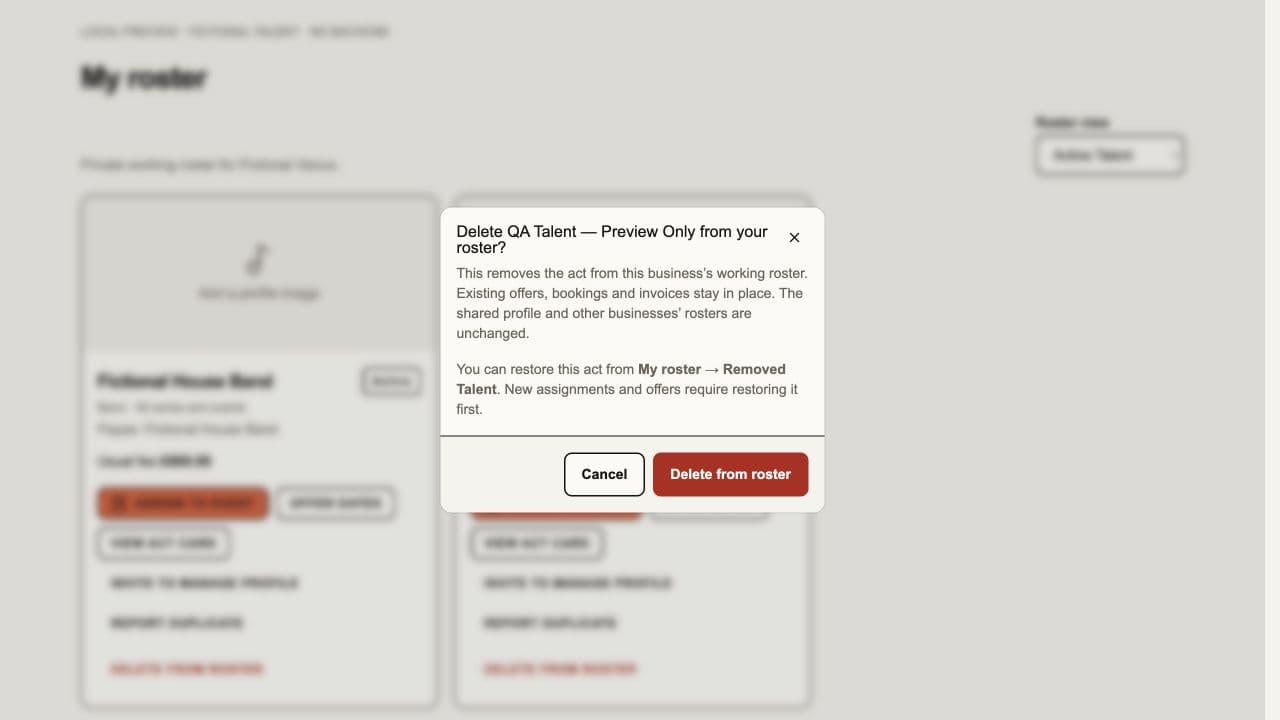
On the web, whole-business Talent managers can choose Delete from roster on an act's My roster card. The confirmation names the act and business-roster scope. Confirming hides that relationship from the active roster and new assignment/offer choices. Existing offers, bookings, reserved diary time, agreed fees, invoices and the shared profile remain intact; other businesses and representatives keep their existing records and access. Already-sent offers can still be accepted. Roster deletion is not a booking cancellation.
Choose ⋯ → Show removed Talent in the Talent header to restore a removed
act to this same business, including private venue-created acts absent from Discover. Restoration
retains its identity, payee, rates, programme eligibility and notes. The recovery
list is bounded to 100 entries and labels additional results for review. Both
commands require current whole-business talent.manage, an active subscription
and the current relationship revision. Failed or stale commands keep the review
open with correction guidance. Removal does not permanently erase Talent or
financial history. Native mobile controls are unchanged.
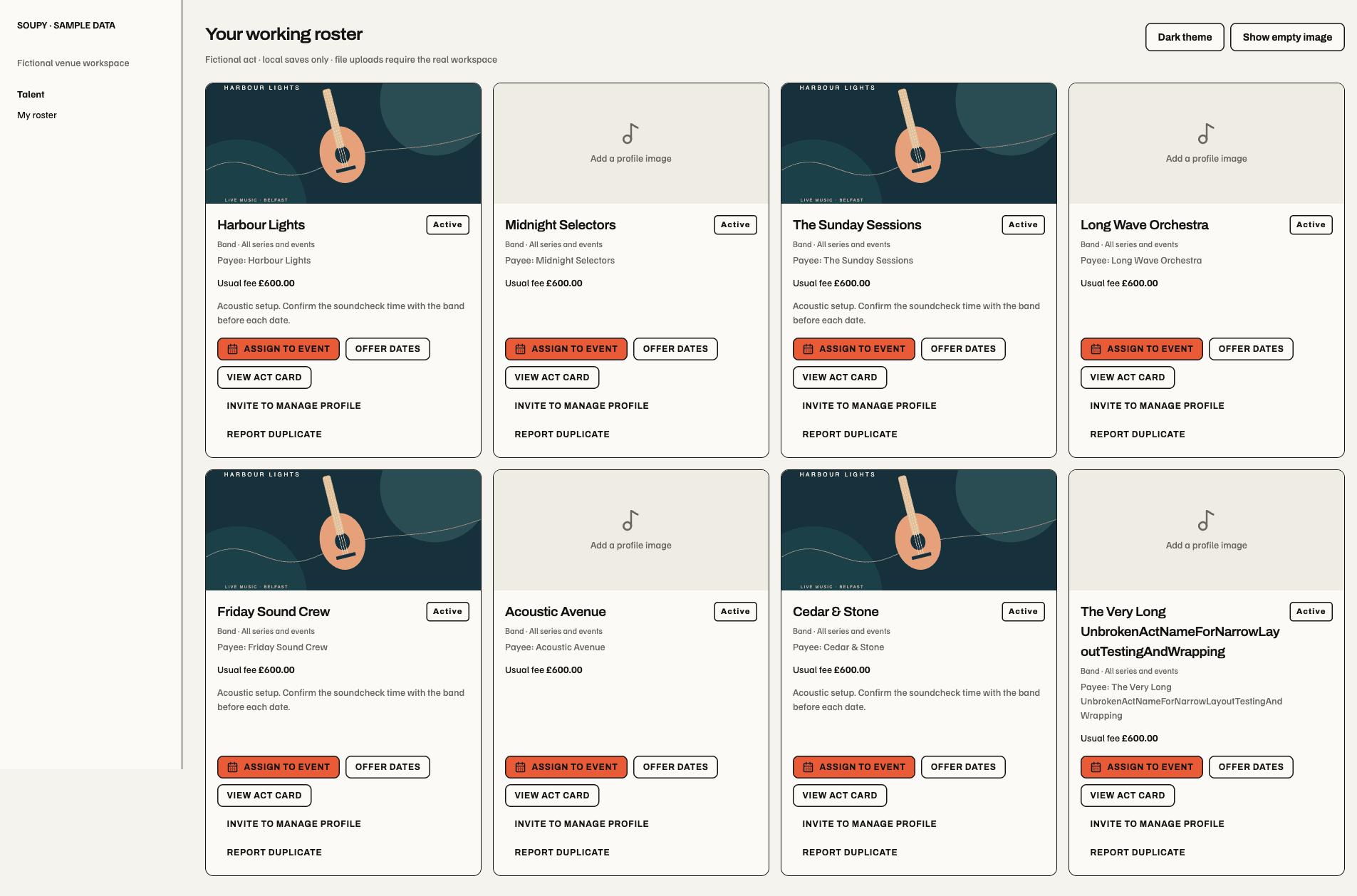
Source component preview, 16 October 2026: eight fictional acts in a wide work area. The same grid reduces columns as available width narrows; this is not a live venue or authenticated acceptance capture.
Add talent creates a private provisional act: music artist, band, DJ, comedian, sound technician, lighting technician, quizmaster or other; the web also offers tour guide. Enter payee, usual fee and currency, then add a profile and hero image. The first approved photo is the hero; Use as hero changes its order. Each image needs an accessible description. The originating venue can edit the provisional profile until a representative takes over.
The profile recovery opens both a new Act with no photos and an existing Profile & hero editor without restarting its photo subscription on every render. Business or source changes still retire stale photo results. Production retesting remains required for this recovery.
View act card (or the roster image) opens a photo-led card with Profile & media and, for roster managers, Private details. The identity and section selector stay visible while the chosen panel scrolls. Switching sections keeps both drafts; Save profile and Save private details save only their own section and leave the card open. The private panel groups booking defaults, programme eligibility and notes, with weekday/special-date rates in Rates by date. Expanding or collapsing rates never clears them.
On web/desktop, Profile & media → Act type updates the shared classification with Save profile under the existing profile editor's authority. It also controls suitable new Event billing roles. A refused or stale save retains the classification draft; source changes do not silently replace it. Older clients that omit classification retain the saved type. Native editing has no new classification control in this change.
The web/desktop close action dismisses the card and its overlay without reporting the act as unavailable. A genuinely withdrawn roster entry still retires the open editors and shows a dismissible availability notice. Closing does not save either section; reopening reads the current roster entry. Production confirmation remains separate from this correction.
For venue-managed acts, upload a hero image or add gallery photos from the card: JPEG, PNG or WebP, up to 5 MB each and 12 photos in total, with a description for every photo. Uploaded files join the draft until Save profile. Failed uploads retain existing photos; unavailable saved previews have replacement guidance. After representative handover the profile is read-only for the venue; permitted private details remain editable. Uploading/saving never changes a published Event without its separate lineup review. This card is web/desktop only; native editors and live upload acceptance are separate. A calendar inside the act card remains future work; use the existing workspace availability check and Assign/Offer actions for bookings.
Videos & social pages supports up to eight YouTube videos,
Instagram profiles/posts/reels and Facebook Pages to the shared act profile.
The separate Instagram handle field accepts @handle, a bare
handle or a full HTTPS Instagram profile URL. An existing Instagram profile
populates this field; clearing it removes that profile when saved, preserving
other links. It shares the eight-link allowance with videos and other social
pages. Paste HTTPS links for posts, reels, videos or other pages, remove unwanted
entries and choose Save profile. Invalid
or duplicate links stay in the draft with correction guidance. Preview videos
& social pages lets editors review them; read-only roster cards and Discover
show the same media. Load [provider] preview contacts that provider only when
selected, without autoplay. Open on [provider] remains available if a provider
blocks the embed. Public, unrestricted content with embedding enabled is needed;
Facebook personal profiles/groups and Instagram Stories are not supported.
Links share the existing venue-before-handover/representative editing authority.
They do not become Event lineup media or change published Events automatically.
The roster and dedicated handle-entry update uses the existing backend media-link
contract and changes the web/desktop interface. Native mobile editing and
installed desktop playback acceptance are not claimed.
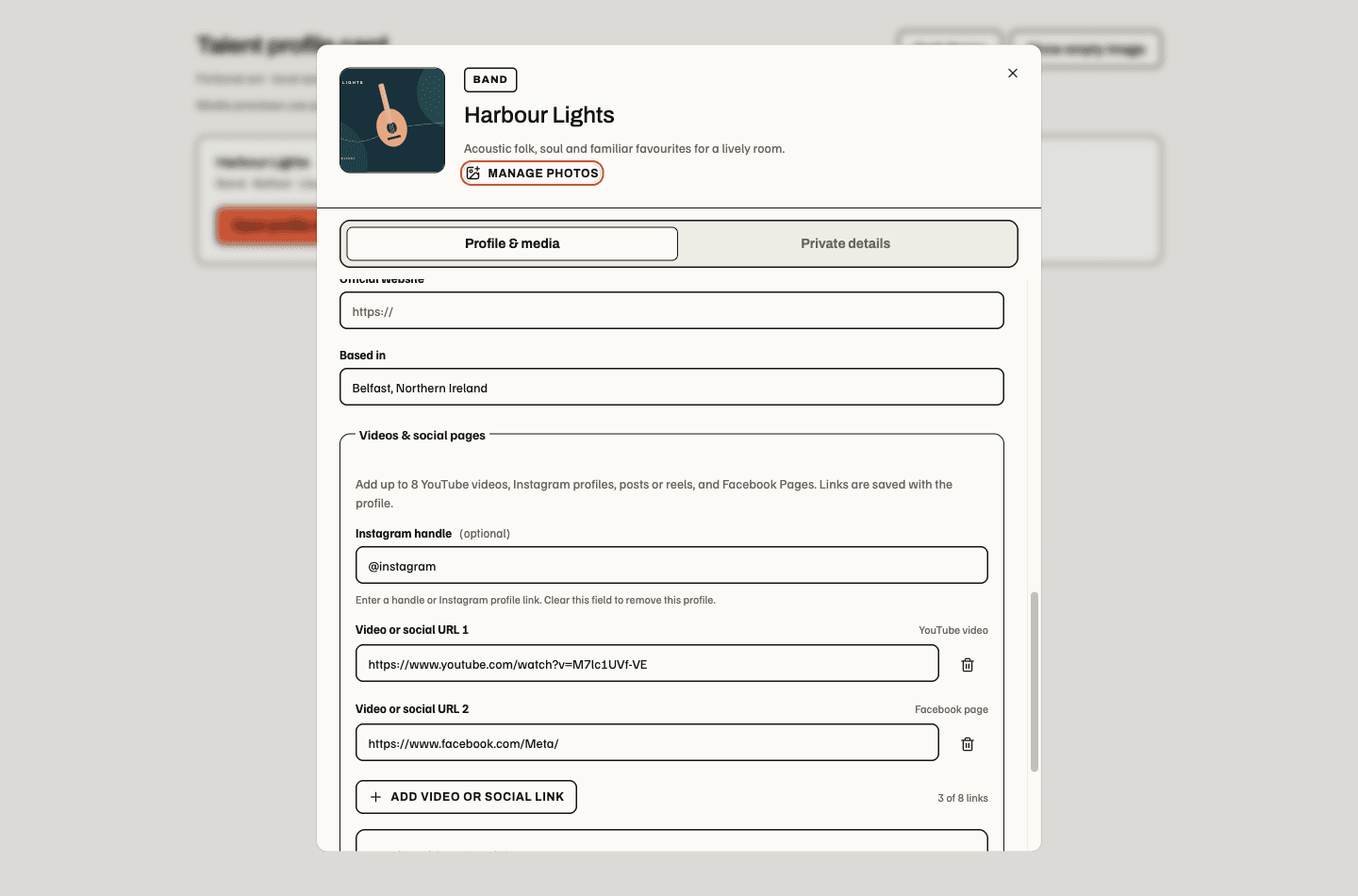
Source component preview, 16 October 2026: Instagram is named separately and shares the profile's social-link allowance. Provider examples are unrelated to the fictional act; save verification here uses local fixture transport.

Source preview: the three provider links belong to the shared profile save. The sample URLs demonstrate providers and are not this fictional act's accounts.

Source preview: the header identifies the act, the tabs keep shared profile and private terms distinct, and the hero editor retains image descriptions and its own save action. The illustrated act is fictional; this is not a live upload.
Provider acceptance of these venue workflow additions is not yet recorded.
- Set private payee, usual fee, weekday rates, exact-date exceptions and notes. Exact-date rates override weekday rates, which override the usual fee.
- Choose All series and events or selected Series and individual Events. A selected Series includes its future occurrences. The main roster keeps all Talent; Event and Series choosers show only eligible entries. Eligibility does not book dates or cancel existing bookings when it changes.
- Assign to event immediately confirms venue-created Talent and reserves its diary, without a representative account or acceptance. Offer dates asks the representative to accept; an unanswered offer reserves no time. Both remain available after profile handover. Direct assignment does not extend to arbitrary acts added from network discovery.
- Review confirmed dates in Calendar and their contributions in Bookings/Rotas. Confirmation identifies venue assignment or representative acceptance. Representatives report performance; the venue confirms completion.
- Propose later agreement changes for acceptance. The existing time, place, fee and reservation remain in force until replacement acceptance.
Availability reveals recorded conflicts without another buyer's identity, venue, fee or documents. Assignment and acceptance recheck conflicts atomically. Repeated/invalid daylight-saving wall times require clarification. Saved rate changes never rewrite confirmed fees. Group roster discovery reuses act identity while private Legal Entity relationships stay distinct.
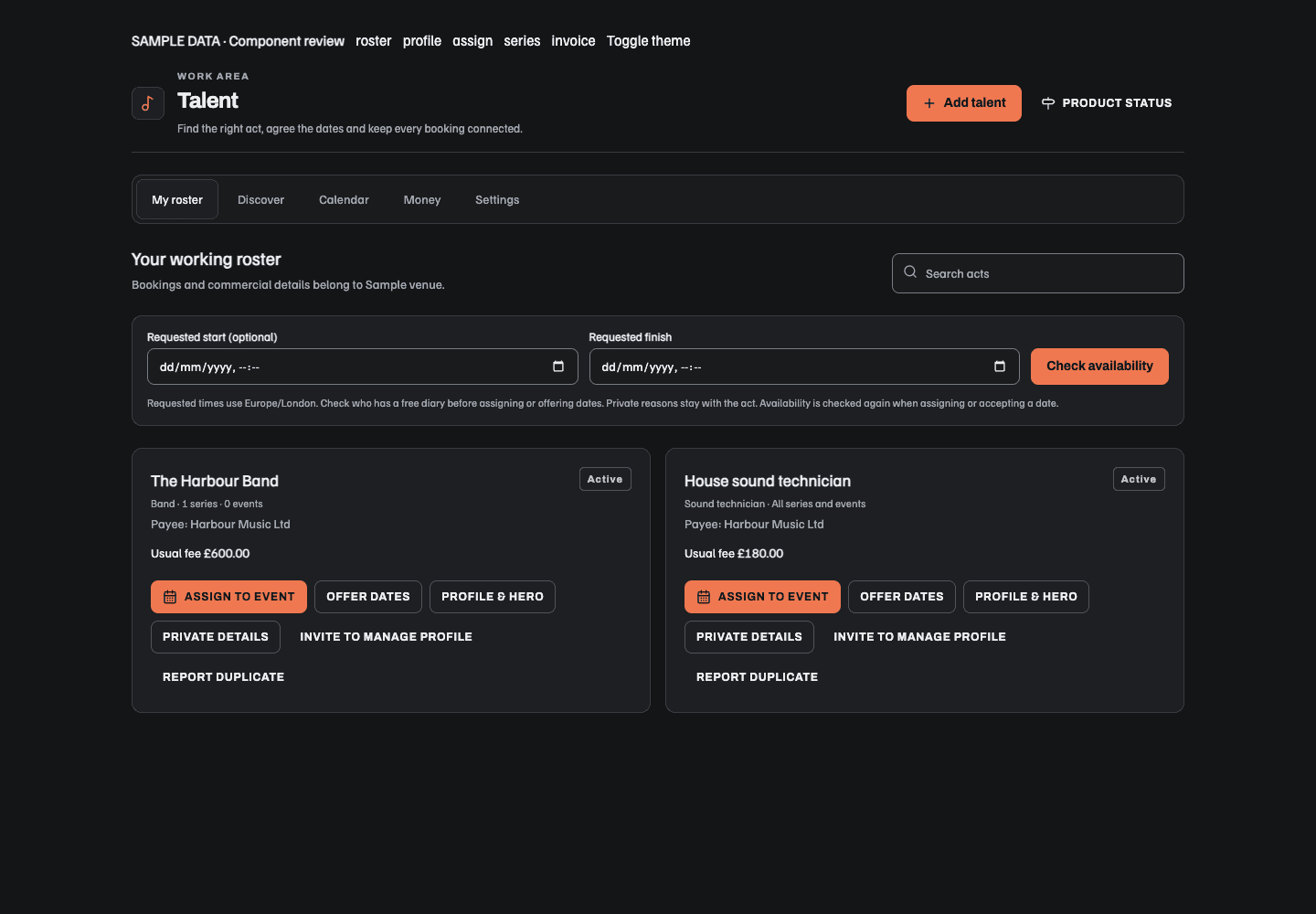
Source preview with fictional records: the band belongs to one Series; the technician appears in all Series/Events. Both retain separate Assign and Offer actions, private details and profile invitation controls.
Talent pools
This is a web/desktop feature; native mobile screens are unchanged.
A pool is a private named group of this business's roster acts, such as
"Comedians" or "Friday DJs". My roster lists All talent, Not in a pool
(with a count when acts need sorting) and each pool with its colour and current
roster count. The selection is kept in the page address (?pool=). A selected
pool shows its description, Edit pool, Add acts and its Linked event
series with each series' upcoming Event count. Series the operator cannot view
in Ticketing are counted but not named.

New pool (or Edit pool) opens a side panel: name (unique in the business, up to 60 characters), one of six colours, an optional description (up to 300 characters), linked Event series, Only book from this pool, and acts. The panel suggests unpooled roster acts whose act type matches a word in the pool name. Delete pool asks for confirmation; it unlinks its series and keeps every act on the roster. Removing an act from a pool never removes it from the roster. A business can keep up to 50 pools, each with up to 200 acts and 50 linked series. Saves use the pool's current revision; a stale save asks for a reload.
When an Event's series is linked to a pool, Event → Lineup shows a pool banner with Manage pool, and Assign, offer or attach another act lists that pool's acts first. Acts then sort free, booked, unavailable and most recently booked. Acts already in this Event's lineup or unavailable for its time cannot be chosen; the lineup mark comes only from bookings the operator can view; a booked act cannot be directly assigned and an offer warns that the act cannot accept unless the clashing booking changes. Show N acts outside [pool] or All talent widens the list.
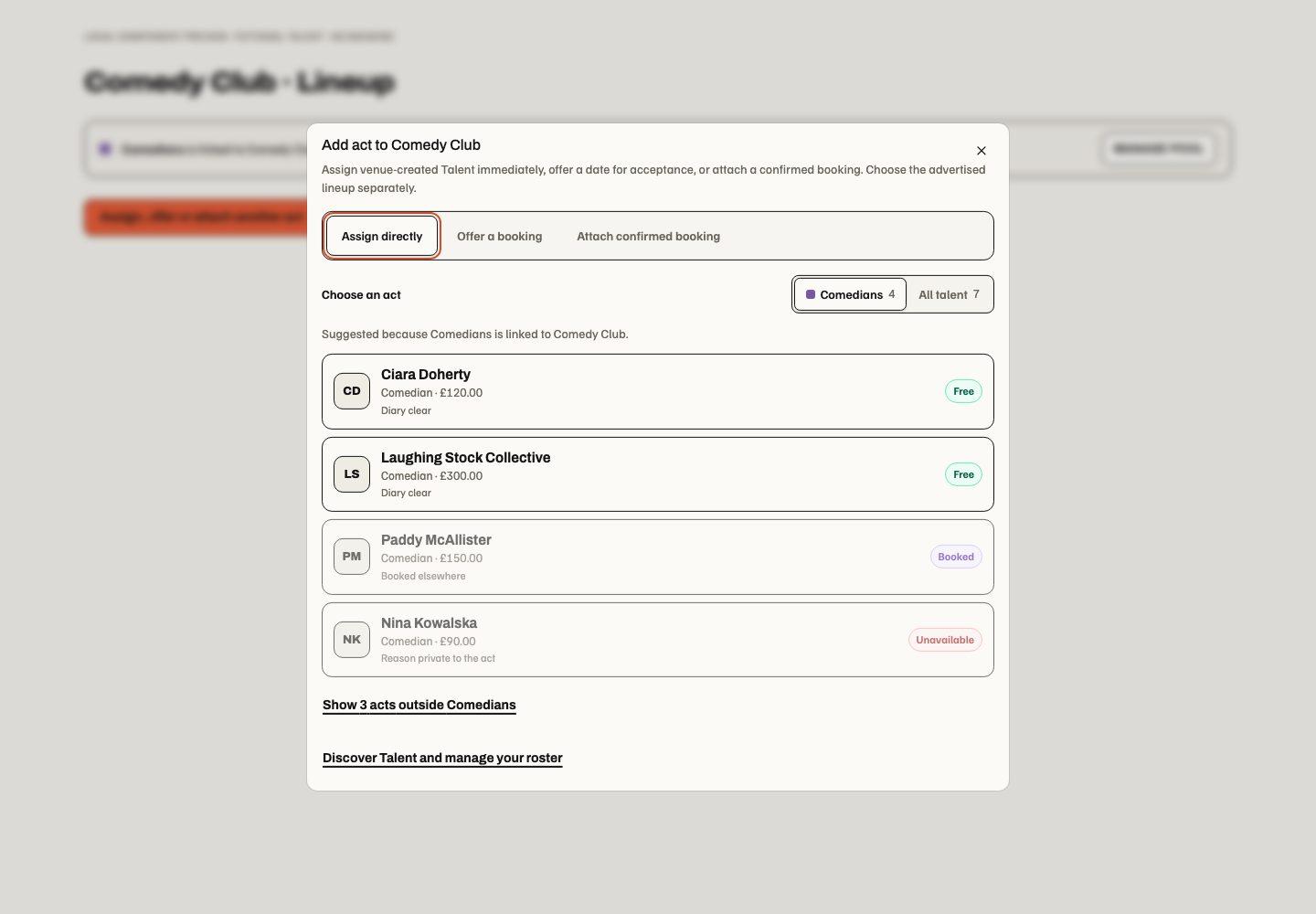
Only book from this pool hides outside acts from that series' choosers and,
on the server, refuses new offers, assignments, series date offers, attached
bookings and moves of an existing offer or booking onto that series' Events for
outside acts. The refusal reads "Only acts in [pool] can be booked for this
series. Ask a Talent settings manager to book another act." For an act outside
the pool, the roster-side Offer dates Event picker leaves out restricted
Events and says how many it left out; Talent settings managers see those Events
marked "outside the series pool". Talent settings managers (talent.settings.manage) can
still book outside the pool, and only they can turn the limit on or off or edit,
unlink or delete a limiting pool. Existing bookings that stay on their Event,
fee-only revisions, cover, swaps and representative responses are unaffected.
Creating and editing other pools needs whole-business talent.manage.
Validation and narrow/theme evidence
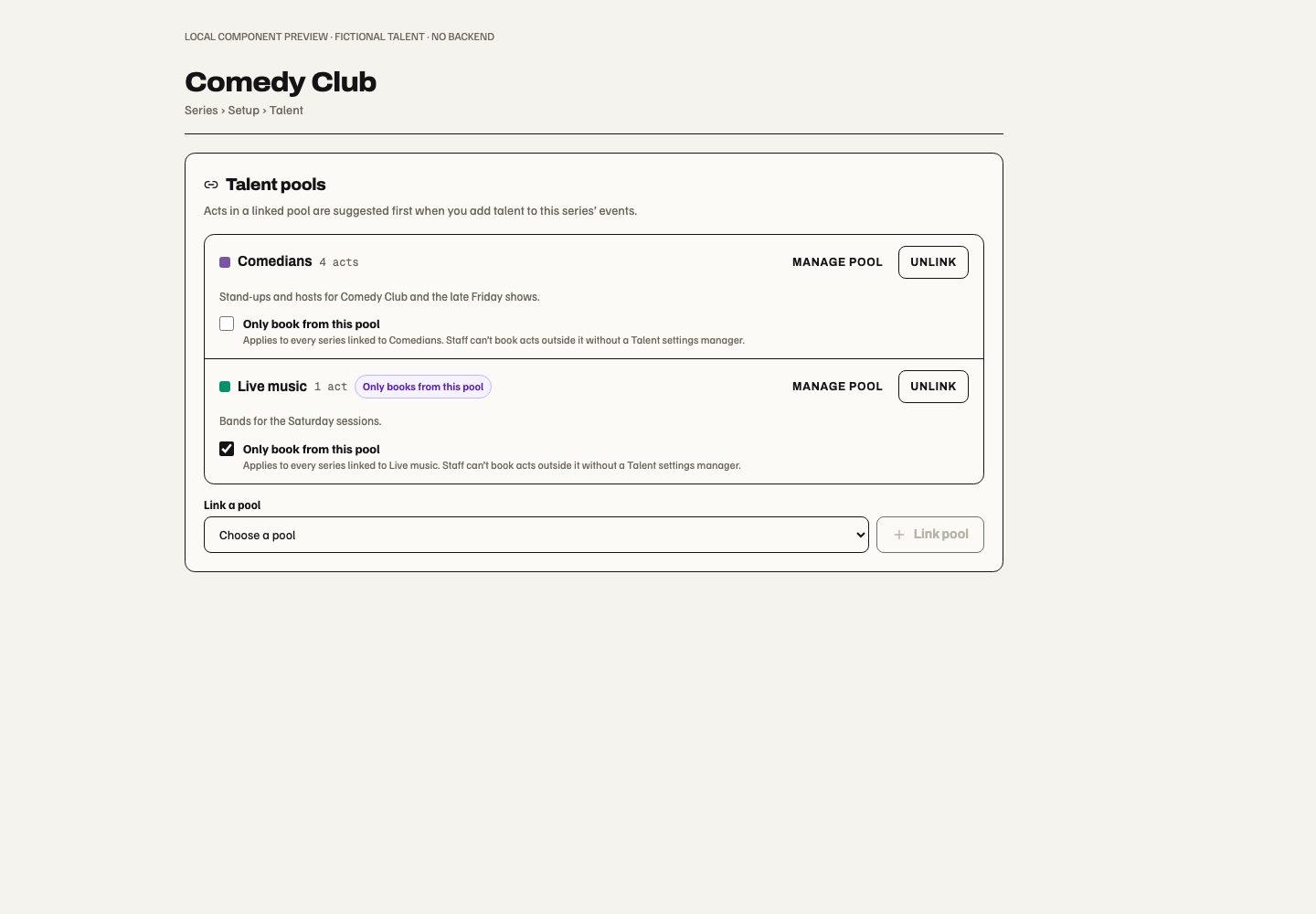
Series → Setup → Talent lists the pools linked to that series, each with
Manage pool, Unlink and Only book from this pool, and Link a pool
links another. It changes the same link as the pool panel and uses the pool's
current revision. Linking and unlinking need whole-business talent.manage;
only a Talent settings manager can link or unlink a limiting pool or turn the
limit on or off, and other managers see why those controls are unavailable. Unlinking
keeps every act on the roster. Operators without Talent view in the business,
or who cannot view the series in Ticketing, do not see the card.
Event → Lineup also has a Running order: the planned sets for the Event, each with a start and finish time and a role such as Opener, Support or Headliner. A badge counts the slots still to fill. Add slot (up to 26 per Event) asks for a role and times; a slot lasts up to 12 hours. A time before the Event's start is on the next day when it falls in the Event's after-midnight part or is 12 hours or more before the start (00:30 after a 20:00 show); otherwise it is a pre-show set on the Event's date. The dialog names the date for any slot outside the Event's evening. An open slot's Add talent opens the act chooser for that slot with its date and times filled in. Assigning or offering an act books it and fills the slot in one save, so two operators cannot fill the same slot. When the Event already has bookings outside the running order, Use a booking for this event places one in the slot without booking again. Each slot shows its booking's state (Confirmed, Offer sent, Offer expired or Declined) and the booked time when it differs from the slot. A declined, expired, cancelled or moved booking leaves its slot to fill; approved cover or a date swap passes the slot to the act now booked for it. The slot's ⋯ menu edits, moves up or down, or removes it; removing a filled slot asks first and keeps the booking. The footer totals offered and confirmed fees when every one of them is visible to the operator.
Changing or filling slots needs the same Talent and Event management as other Lineup changes and is refused for cancelled or past Events. A pool limit applies to slot bookings. Changes use the running order's revision; a stale change asks for a review of the latest slots. Lineup readers see the slots, acts and states without commands. Fees follow the booking views: they show to operators who can manage the booking or have Talent finance. A booking the operator cannot view shows only that its slot is filled. The running order plans and fills sets; On the bill still chooses and publishes the advertised lineup.
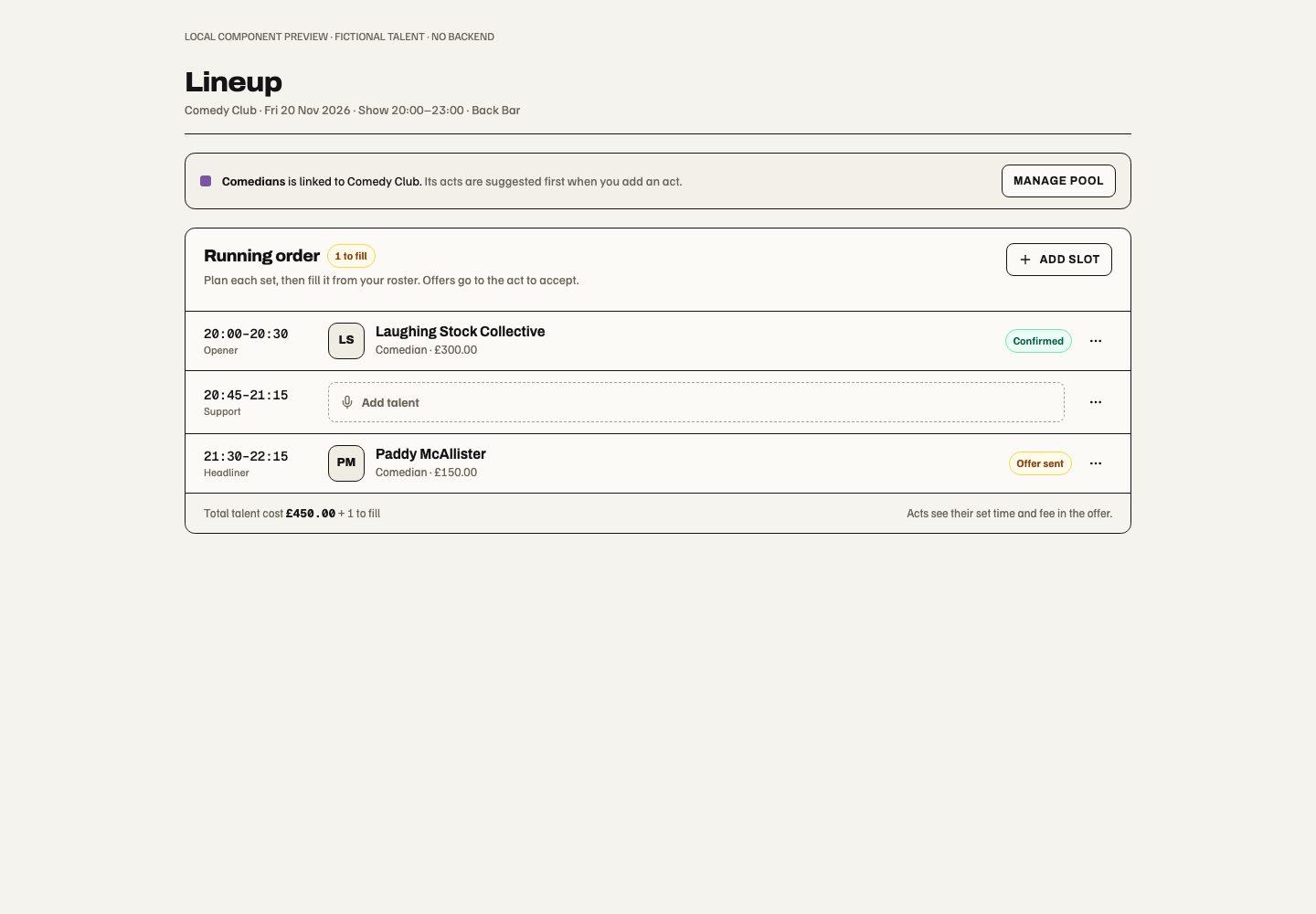
The Event setup navigation does not show the slot count, and slots are ordered with Move up and Move down rather than dragging. Slot and Series link validation
Representative portal, availability, cover and swaps
The portal at /talent/portal has My rota, Offers, Cover & swaps,
Calendar & availability, Earnings, Profile and Invoices. It shows represented
acts' commitments across venues while preserving each buyer's private boundary.
Representatives can respond to offers, inspect agreements, report completion,
maintain approved promotional information and block unavailable dates/hours.
The Earnings tab reviews one Act and month, grouped by currency. Work in the selected service month separates confirmed future fees, completed uninvoiced fees, dates awaiting completion and already-claimed dates. Pending offers do not count as confirmed earnings. Invoice balances use invoices issued in the selected month and distinguish outstanding amounts, recorded paid amounts and reconciliation needs; they include invoice tax and are not a statement of net payouts or cash received during that month. Partial Purchasing settlement and verified provider evidence retain their existing authority.
Month / Refresh summary reads a server-timed snapshot. Its displayed review time remains visible while current Act access renews independently. An Act/account change or explicit loss of access retires the view; a temporary disconnect preserves the labelled snapshot. Bounds of 500 service candidates, 1,000 invoice-history records and 100 issued invoices/500 invoice-service references produce an explicit incomplete state instead of partial totals. An unavailable Purchasing balance also suppresses totals. This is a web portal addition; native earnings UI and provider acceptance are separate.
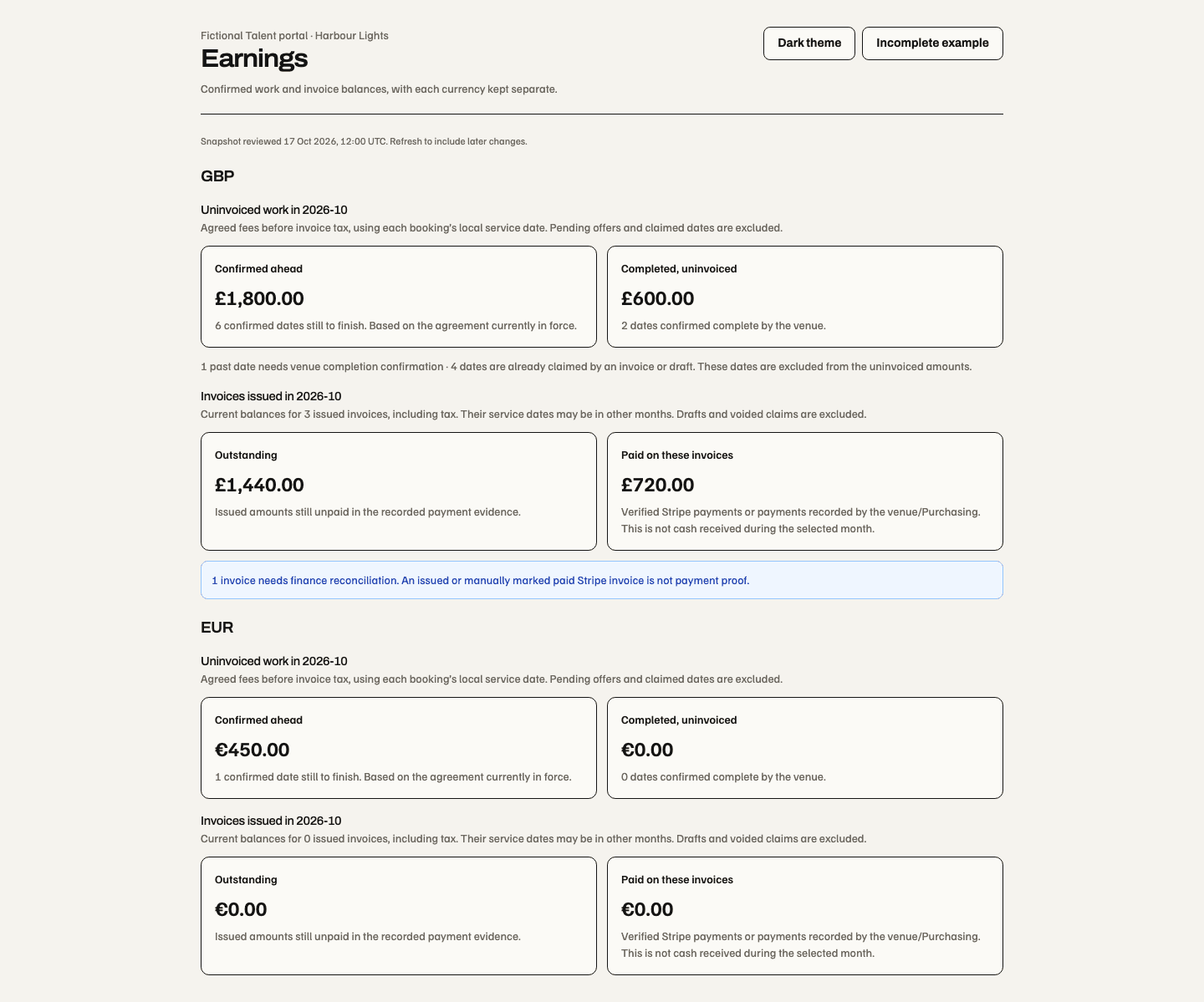
17 October 2026, isolated component harness with fictional records. Service-month fees and issued-invoice balances are separate; this image does not establish authenticated runtime or production acceptance. The narrow incomplete example shows totals withheld when complete evidence cannot be established.
The 18 October signed-in development checks also cover the real portal, month/refresh controls and separate currency balances with fictional prerequisites. They do not establish production or Stripe acceptance.
Invite to manage profile names the recipient on the existing Act. Acceptance checks the signed-in email and the inviter's current authority. A venue-created Act immediately gains private self-management: profile, unavailable blocks, assigned/accepted bookings, offers and monthly invoices. Existing bookings and fees stay on the same identity, and unavailable blocks never cancel them. Network ownership review remains independent: provisional acts stay undiscoverable until verification and explicit opt-in. Verified owners can invite/revoke other representatives. Email delivery, acceptance and ownership are separate states; an emailed link alone grants neither representation nor ownership.
For one-way cover, put a future booking up for cover. Eligible same-kind roster acts review their own rate and claim it; an independent venue manager approves the replacement. For a reciprocal swap, both acts review their new dates/fees and a manager approves both. Until approval the original bookings remain active. Collisions, stale agreements, invoice/completion evidence or changed authority can block the swap. Rejected/expired/withdrawn requests preserve original dates.
Event lineups and retained commitments
An Event's Event → Lineup page can assign eligible venue-created Talent, offer a roster act the occurrence, or attach an existing confirmed booking. Technical crew remain operational bookings unless explicitly added to the bill.
A 1 November correction makes Lineup discovery agree with existing
source access for an exact Event reader who also has Talent view at that Event's
current Site or Space. Space access requires the exact current Space. Read-only
viewing does not add assignment, profile creation, editing or publication rights;
each Event still checks current source access. Source 6311b83a is deployed;
signed-in checks verified the matching Site/exact-Event reader and sibling Event
refusal. Exact-Space and Group-only production acceptance remain pending.
Read-only source captures
retain the separate local presentation evidence.
The same released correction recognises Group Talent view through its current
Group grant and matching Group/child entitlement binding. No equivalent direct
business grant is required. Retired membership, grant, entitlement or binding
still removes the contribution and source access.
The wording identifies read-only Lineup access, uses View bookings, and describes the saved bill instead of instructing readers to edit or publish. It changes no permissions or command guards. Its fictional rendered verification is separate from production delivery.
The web Lineup editor uses a searchable Talent list beside On the bill. Tick confirmed or completed Event bookings to include them, then use the labelled up/down and remove buttons to arrange the advertised order. New bookings start outside the bill until explicitly selected. Search filters this already permitted list locally and retains hidden selections. Removing a bill entry keeps its booking, reservation, fee and historical evidence.
New profile opens the shared private-roster creation form in place for current whole-business Talent managers. Creating a profile does not book or advertise it. Assign, offer or attach another act retains the Event booking review; Manage bookings opens the existing calendar. Billing details keeps the act's permitted role and performance-time evidence available without crowding the bill. The bill's portrait follows its selected promotional photographs.
Save lineup draft saves selection, order, roles and approved profile updates. Failed saves retain the draft; concurrent source changes require reloading it. Publish reviewed lineup remains a separate permission-controlled action. The public Event route forwards the frozen published lineup to its existing renderer, including approved biography, photos, billing role and order. The 28 October correction closes an adapter omission found during production publication acceptance. The panels stack on narrow screens. These changes are web/desktop only; native interfaces remain separate.
Fictional Event Lineup editor with a searchable Talent picker, ordered bill and separate save and publication controls
27 October 2026, actual source components with fictional records and local saves. Checkboxes select the public bill; arrow buttons change its order. Booking and publication actions keep their existing review boundaries. This preview is not production acceptance.
On the web, comedians offer Headliner, MC and Support; bands and music artists offer Headliner and Support. Tour guides offer Guide, DJs offer DJ, and other Talent, quizmasters and explicitly included technical crew offer Performer. No billing role is always available. Roles describe that appearance; the shared act's classification is edited in its Talent profile. The server refuses incompatible new choices even from an older client. An unchanged previously saved role remains labelled as a saved role; clearing it removes that retained choice. Existing published snapshots are not reclassified by profile updates. Order the bill, then save and publish the reviewed promotional snapshot. Featuring an act photo is explicit; global profile edits never silently rewrite published event copy.

21 October 2026, isolated component fixture with fictional acts. The billing selectors are the shared source controls; the classification selector feeds only this fixture. The saved MC is preserved history, not a new band choice. This does not establish authenticated profile saving or production acceptance.
Series → Talent selects one eligible act and actual dated occurrences for
one Assign to selected dates action, without a saved-default prerequisite. It appears only when the registered Talent contribution is
available to the current operator. Assignment and offers require
talent.manage and ticketing.events.manage; an assignment reserves the act's
diary immediately, while an offer awaits acceptance. Event
rescheduling/cancellation creates a Talent review rather than cancelling the
agreement or settling a fee. Confirmed commitments remain accessible through
retained-commitment surfaces after subscription retirement only while the person
still has current authority at the stored scope.
A proposed location, fee or private term needs its own current source authority; reading an accepted booking does not reveal a denied proposed change. Fresh agreement reads hide withdrawn details and clear copied fields after a received refusal or narrower private projection. A stalled renewal or temporary disconnect preserves the open draft; submission and private-file continuations still need fresh authority. Schedule and retained lists are bounded, non-exhaustive windows of admitted records; a known permitted agreement remains accessible directly.
Talent costs and ticket break-even
On the web, Event Lineup and Series Talent include Talent costs & break-even when the operator has Ticketing Reports access and Talent management or finance authority for every included Event and agreement. A refused, incomplete or oversized source shows an unavailable comparison rather than a partial or £0 total.
The card automatically sums the frozen fees of confirmed and completed Talent engagements, including direct venue assignments. Pending offers, cancelled work, roster defaults and proposed fee changes do not replace agreed fees. Invoice and payment totals are not added again. Different currencies have separate comparisons. The Series view includes its current Events and each Event's recorded ticket sales, with costs by Event in a disclosure. Historical Series Reports and ledger statements retain saved purchase/posting attribution after an Event moves; this planning comparison deliberately follows the current Event set on both sides.
Reported ticket sales reuses the admitted Event report's recorded purchase and refund calculation. The card compares these sales with agreed Talent fees, then shows the remaining amount to cover or sales above those fees. This is hypothetical Talent-fee coverage, not full Event profit. Customer VAT is included in reported sales; unrecorded Talent invoice tax, payment/platform fees, other Event costs and capacity constraints are excluded.
Base calculation on selects an existing same-currency ticket type, starting with an on-sale fixed paid ticket when available. Choose another ticket type to compare its saved price; no amount needs to be entered. Series choices name the Event and date. Reading those prices requires separate Event Ticketing view authority; losing it removes price choices without granting or withdrawing Talent money access. A removed selected ticket withholds the estimate until another is chosen. It does not silently switch the operator's selection.
The total target is agreed fees divided by the selected ticket's price, rounded up to whole sale units. Additional units use the remaining gap and cannot be negative. Multi-person packages show package units and resulting admissions. Free tickets provide no revenue target. Donation tickets explicitly use their saved suggested amount; quantity-priced tickets explicitly use their single-unit rate. Those variable rates do not guarantee future revenue. Native currency precision is preserved, including three-decimal prices. The choice is local to this mounted source; it creates no booking, price change, invoice, payment, saved forecast or grant. Native mobile has no new interface in this slice.

Invoices and payments
In the representative portal's Invoices, choose a service month and Review month. Soupy groups dates by buyer, payee and currency using each booking's agreed local date. All remaining dates in that group need venue-confirmed completion. Upcoming, unresolved and already invoiced dates are identified; recorded cancellation is excluded. Issue invoice freezes the dated services, agreed fees, issuer/buyer details and tax, creates one invoice and places it in the venue's Money review queue. Download invoice creates the same itemised PDF for the representative and authorised venue staff. Stripe is optional.
Choose Venue payment, Connected Stripe payment, or Venue payment and Stripe. Stripe requires a verified owner and ready Act-owned account whose legal issuer matches the invoice. Its online payment request is reviewed and explicitly issued/emailed against the same claim. Either route contributes to one outstanding balance. Use venue payment closes an existing online request before venue payment can be recorded, including through Purchasing. A payment race or uncertain provider state requires reconciliation rather than another claim. Refunds and disputes can reopen finance review.
Without Purchasing, authorised staff record the payment reference/date as recorded paid externally. With Purchasing, Send invoice to Finance creates one structured supplier claim with the dated lines; independent approval, payable creation and settlement remain Purchasing-owned. Issuance does not mean approval or payment. Manual invoice attachment and the existing Stripe draft workflow remain available, but no path can claim an already invoiced service.
Profile loads independently of calendar volume. The manual invoice date selector has a bounded window with an explicit truncation notice; monthly review loads its selected month independently.

Source preview: dated agreed fees appear above issuer/buyer details. Payment options selects either route or both; Issue invoice is the explicit submission boundary below the reviewed total.
The month reader fails explicitly above 500 service records or 1,000 historical invoices; it never issues a silently truncated month. Stripe currently supports up to 100 dated lines; larger supported months can use venue payment. Currency precision, stale fee reviews and duplicate operation details are checked before issue. Email acceptance and verified payment remain separate; a manually marked paid provider invoice is not verified card payment.
Creation, programme scope, hero editing and monthly issuance are web/desktop screens. Existing native Talent screens consume the same confirmed bookings and invoice evidence; they do not yet provide these new editors. The guarded Development Environment blocks outbound email, uploads through HTTP actions and Stripe execution; local tests do not establish live provider acceptance.
| Responsibility | Capability |
|---|---|
| Roster/bookings read | talent.view |
| Roster and booking decisions; whole-business roster removal/restoration | talent.manage |
| Invoice/payment evidence | talent.finance |
| Settings | talent.settings.view / talent.settings.manage |
| Free portal | Current explicit act representation, independent of tenant module access |